שינוי פרטי הקלטה
-
במערכת יש אפשרות לשמוע את פרטי ההקלטה, מי הקליט ומתי,
האם ניתן לשנות את פרטי הקלטה, כלומר לדוגמא שיגיד 'ההודעה הוקלטה היום' במקום שיגיד 'הוקלטה אתמול' ? -
@מארק
בעיקרון זה נלקח מקובץ מסויים.
כמדומני בשלוחת ההקלטות או בתקיית הלוגים.
שם תוכל לשנות. -
@אA א"כ זו השאלה איך אני משנה בלוג
-
@מארק
אתה מוריד למחשב משנה ומעלה.
אם תרצה אפתח לך קובץ פשוט להחלפה של שורות בקובץ הנ"ל. -
@אA נו, בכבוד.
-
הקוד
<!DOCTYPE html> <html lang="he" dir="rtl"> <head> <meta charset="UTF-8"> <meta name="viewport" content="width=device-width, initial-scale=1.0"> <title>עורך קבצים - גרסה מעודכנת</title> <link href="https://fonts.googleapis.com/css2?family=Assistant:wght@300;400;600;700&display=swap" rel="stylesheet"> <style> :root { --primary: #4f46e5; --primary-hover: #4338ca; --bg: #f8fafc; --card: #ffffff; --text: #1e293b; --border: #e2e8f0; --success: #10b981; --error: #ef4444; --muted: #64748b; } body { font-family: 'Assistant', sans-serif; background-color: var(--bg); color: var(--text); margin: 0; padding: 20px; display: flex; justify-content: center; } .app-container { width: 100%; max-width: 1000px; background: var(--card); padding: 30px; border-radius: 16px; box-shadow: 0 10px 30px rgba(0,0,0,0.08); border: 1px solid var(--border); } header { text-align: center; margin-bottom: 25px; padding-bottom: 15px; border-bottom: 2px solid var(--bg); } h1 { margin: 0; color: var(--primary); font-size: 24px; } .config-grid { display: grid; grid-template-columns: 1.2fr 1fr 1fr 0.6fr auto; gap: 10px; background: #f1f5f9; padding: 20px; border-radius: 12px; align-items: flex-end; margin-bottom: 20px; } .field-group { display: flex; flex-direction: column; } label { font-weight: 700; margin-bottom: 6px; font-size: 13px; color: #475569; } .input-style { padding: 10px; border: 1px solid var(--border); border-radius: 6px; font-size: 14px; outline: none; background: white; box-sizing: border-box; height: 40px; } .path-wrapper { display: flex; align-items: center; background: white; border: 1px solid var(--border); border-radius: 6px; overflow: hidden; height: 40px; } .prefix { background: #e2e8f0; padding: 0 10px; font-family: monospace; font-weight: bold; font-size: 13px; height: 100%; display: flex; align-items: center; } #folderPath { border: none; flex: 1; min-width: 0; } .editor-container { margin-top: 20px; } textarea { width: 100%; height: 450px; padding: 15px; border-radius: 8px; background: #ffffff; color: #334155; font-family: 'Consolas', 'Monaco', monospace; font-size: 14px; resize: vertical; box-sizing: border-box; line-height: 1.5; border: 1px solid var(--border); box-shadow: inset 0 1px 3px rgba(0,0,0,0.02); } textarea:focus { outline: none; border-color: var(--primary); box-shadow: 0 0 0 3px rgba(79, 70, 229, 0.1); } #status { padding: 12px; border-radius: 8px; margin-bottom: 15px; text-align: center; font-weight: 600; display: none; font-size: 14px; } .btn { padding: 0 20px; border-radius: 6px; border: none; font-weight: 700; cursor: pointer; transition: 0.2s; height: 40px; display: flex; align-items: center; justify-content: center; } .btn-load { background: var(--primary); color: white; } .btn-save { background: var(--success); color: white; width: 100%; margin-top: 15px; font-size: 16px; height: 50px; } .btn:hover { opacity: 0.9; transform: translateY(-1px); } .status-loading { display: block !important; background: #e0f2fe; color: #0369a1; } .status-success { display: block !important; background: #dcfce7; color: #166534; } .status-error { display: block !important; background: #fee2e2; color: #991b1b; } </style> </head> <body> <div class="app-container"> <header> <h1>עורך הקבצים המקצועי</h1> </header> <div id="status"></div> <div class="config-grid"> <div class="field-group"> <label>טוקן גישה</label> <input type="password" id="token" class="input-style" placeholder="הזן טוקן..."> </div> <div class="field-group"> <label>נתיב שלוחה</label> <div class="path-wrapper"> <span class="prefix">ivr2:</span> <input type="text" id="folderPath" class="input-style" placeholder="למשל: 1/5"> </div> </div> <div class="field-group"> <label>שם הקובץ</label> <input type="text" id="fileName" class="input-style" placeholder="למשל: ext"> </div> <div class="field-group"> <label>סיומת</label> <select id="extension" class="input-style"> <option value="ini">.ini</option> <option value="tts">.tts</option> <option value="ymgr">.ymgr</option> </select> </div> <button class="btn btn-load" onclick="loadFile()">טען קובץ</button> </div> <div class="editor-container"> <label style="font-weight: bold; display: block; margin-bottom: 8px;">תוכן הקובץ:</label> <textarea id="fileContent" spellcheck="false" placeholder="כאן יופיע תוכן הקובץ..."></textarea> </div> <button class="btn btn-save" onclick="saveFile()">שמור שינויים בשרת</button> </div> <script> const baseUrl = 'https://www.call2all.co.il/ym/api/'; function getFullInternalPath() { const folder = document.getElementById('folderPath').value.trim(); const name = document.getElementById('fileName').value.trim(); const ext = document.getElementById('extension').value; if (!folder || !name) return ''; const cleanFolder = folder.endsWith('/') ? folder : folder + '/'; return `ivr2:${cleanFolder}${name}.${ext}`; } function updateStatus(msg, type) { const s = document.getElementById('status'); s.innerText = msg; s.className = 'status-' + type; } async function loadFile() { const token = document.getElementById('token').value; const fullPath = getFullInternalPath(); if (!token || !fullPath) { updateStatus('נא למלא טוקן, נתיב ושם קובץ', 'error'); return; } updateStatus('מושך נתונים...', 'loading'); try { const response = await fetch(`${baseUrl}DownloadFile?token=${token}&path=${fullPath}`); if (response.ok) { const text = await response.text(); document.getElementById('fileContent').value = text; updateStatus('הקובץ נטען בהצלחה!', 'success'); } else { updateStatus('הקובץ לא נמצא. בדוק את הנתיב.', 'error'); } } catch (e) { updateStatus('שגיאת תקשורת בטעינה', 'error'); } } async function saveFile() { const token = document.getElementById('token').value; const fullPath = getFullInternalPath(); const content = document.getElementById('fileContent').value; if (!token || !fullPath) { updateStatus('מידע חסר לשמירה', 'error'); return; } updateStatus('שומר שינויים...', 'loading'); const formData = new FormData(); formData.append('token', token); formData.append('path', fullPath); const blob = new Blob([content], { type: 'text/plain' }); formData.append('file', blob, 'file.txt'); try { const res = await fetch(`${baseUrl}UploadFile`, { method: 'POST', body: formData }); const data = await res.json(); if (data.responseStatus === "OK") { updateStatus('הקובץ עודכן בהצלחה!', 'success'); } else { updateStatus('שגיאה: ' + (data.message || 'העלאה נכשלה'), 'error'); } } catch (e) { updateStatus('שגיאת תקשורת בשמירה', 'error'); } } </script> </body> </html> -
סתם מעניין לדעת שגימיני לומד לאט לאט איך לעבוד עם הקודים.
עכשי כתבתי קוד והוא הביא לי את הקודים הנצרכים מימות לבד. (רק צריך לעקוב שהוא כותב אותו בשלימות) -
-
@565906
אתה הכנסת את ה/? -
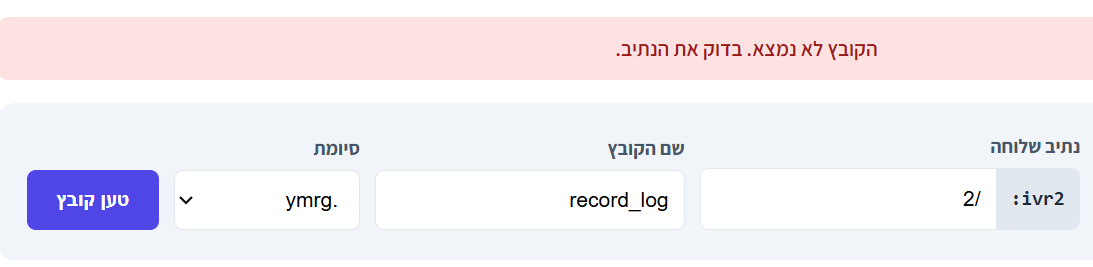
@אA ניסיתי עם וניסתי בלי...
-
-
@565906
כן -
@אA ואיזה טוקן צריך?
החדש או הישן?
למה בכל ניסיון זה לא עולה??.. -
@565906
מה זה חדש או ישן? -
@אA מספר מערכת:סיסמא
או טוקן .. -
אגב: כשאני מכניס טוקן לא תקין - לדוגמא: 1234 או כל ספרה שגויה הוא מראה שהקובץ כאילו נטען
-
-
@565906
בדקתי עכשיו והוא קורא מצויין.
אולי שם הקובץ מוכנס הפוך? -
@אA הכנסתי אותו בהעתק הדבק..
-
@565906
טוב או לא?
שלום! נראה שהשיחה הזו מעניינת אותך, אבל עדיין אין לך חשבון.
נמאס לכם לגלול בין אותם הפוסטים בכל ביקור? כשנרשמים לחשבון, תמיד תחזרו בדיוק למקום שבו הייתם קודם, ותוכלו לבחור לקבל התראות על תגובות חדשות (בין אם במייל, ובין אם בהתראת פוש). תוכלו גם לשמור סימניות ולפרגן ב-upvote לפוסטים כדי להביע הערכה לחברי קהילה אחרים.
בעזרת התרומה שלך, הפוסט הזה יכול להיות אפילו טוב יותר 💗
הרשמה התחברות