תגובה לקבצי HTML לשימוש במערכות ימות המשיח
-
אם היה אפשרות להשאיר הודעה עם הצינתוק זה כבר יהיה רמה מעל ,
אם בכלל יש אפשרות כזאת שיהיה ניתן להקליט הודעה ויהיה אפשרות להגדיר לאיזה שלוחה תעלה ההודעה זה כבר יותר קל
על איזה קובץ אתה מדבר?
העלאת קבצים?
זה בדיוק מה שזה עושה.( אני יכול להוסיף בקוד את הטוקן שלי ? ואז זה יהיה קבוע ?)
יש שם ניהול טוקנים?
אז כן.
אם לא, אני אוסיף. -
@אA נכון. אבל אני מתכוון שיהיה בנוסף אפשרות להקליט הודעה השיעור עלה לשלוחה 1 ואז שהמאזינים ידעו לאן עליה הקובץ .
-
@haiims
אתה רוצה שאוטומטית כשאתה מעלה קובץ לשלוחה מסויימת הוא יעדכן שעלה קובץ שלוחה זו בשלוחה הראשית? -
עידכון: אני מעלה את הקבצים גם כתוכנות ניידות.
ניתן להוריד כאן -
א אA התייחס לנושא זה
-
שימו לב!
השירשור הקודם ננעל, וכעת השירשור של הקבצים נמצא בקישור הבא
https://f2.freeivr.co.il/topic/20552/קבצים-ותוכנות-לשימוש-במערכות-ימות-המשיח?_=1776284093577שירשור התגובות ממשיך כאן
בהצלחה!
-
פוסט זה נמחק! -
-
@אA למה זה עושה לי ככה
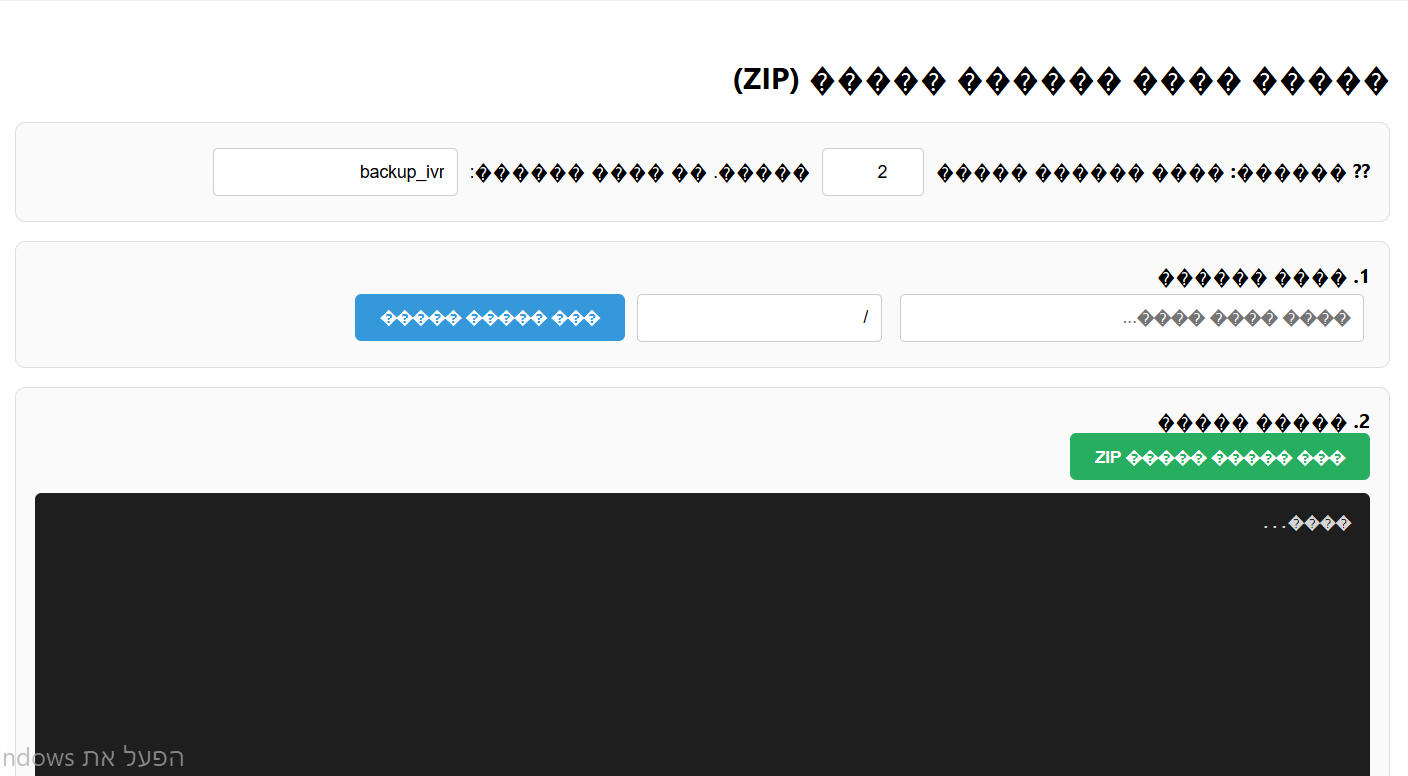
-
@עובד-את-השם יכול להיות שהעתקת את הקוד כשהמקלדת שלך על אנגלית?
תחליף מקלדת לעברית ותנסה שוב -
@אופיר עשיתי בעברית
-
@אופיר יש מצב אתה מעלה את זה כקובץ בזיפ.
כי כשאA העלה את זה להורדה זה עבד, רק הוא לא העלה את הכל. -
@עובד-את-השם איזה קובץ זה?
-
-
@עובד-את-השם קישור שגוי
-
-
@עובד-את-השם קובץ להעברת קבצים בין מערכות?
-
@אופיר הוא העלה את זה ואני מכניס לפנקס רשימות ושומר כHTML וזה פותח אבל לא יודע למה זה לא עובד והקישורים שהוא הביא עבדו לי אתה יכול לנסות?
<!DOCTYPE html> <html lang="he" dir="rtl"> <head> <meta charset="UTF-8"> <title>הורדת שלוחות למחשב</title> <script src="https://cdnjs.cloudflare.com/ajax/libs/jszip/3.10.1/jszip.min.js"></script> <style> body { font-family: 'Segoe UI', Tahoma, sans-serif; margin: 20px; background-color: #f4f7f6; text-align: right; direction: rtl; } .container { max-width: 1100px; margin: auto; background: white; padding: 25px; border-radius: 12px; box-shadow: 0 4px 15px rgba(0,0,0,0.1); } .section { border: 1px solid #e0e0e0; padding: 15px; margin-bottom: 15px; border-radius: 8px; background: #fafafa; } #logArea { background: #1e1e1e; color: #d4d4d4; padding: 15px; border-radius: 5px; height: 250px; overflow-y: auto; font-family: 'Consolas', monospace; font-size: 13px; margin-top: 10px; } .log-info { color: #4fc3f7; } .log-success { color: #00ff00; font-weight: bold; } .log-error { color: #ff5252; } button { padding: 10px 20px; background: #3498db; color: white; border: none; cursor: pointer; border-radius: 5px; font-weight: bold; transition: background 0.3s; } button:hover { background: #2980b9; } button:disabled { background: #bdc3c7; } input { padding: 10px; margin: 5px; border: 1px solid #ccc; border-radius: 4px; font-size: 14px; } .token-input { width: 350px; } .config-input { width: 60px; text-align: center; } table { width: 100%; border-collapse: collapse; margin-top: 15px; } th, td { border: 1px solid #ddd; padding: 12px; text-align: right; } .progress-container { background: #e0e0e0; border-radius: 20px; height: 25px; margin: 15px 0; overflow: hidden; display: none; } .progress-bar { width: 0%; height: 100%; background: linear-gradient(90deg, #2ecc71, #27ae60); transition: width 0.3s; color: white; text-align: center; line-height: 25px; font-weight: bold; } </style> </head> <body> <div class="container"> <h2>הורדת מבנה שלוחות למחשב (ZIP)</h2> <div class="section"> <strong>⚙️ הגדרות:</strong> סרוק שלוחות בעלות <input type="number" id="digitCount" class="config-input" value="2" min="1" max="4"> ספרות. שם קובץ לשמירה: <input type="text" id="fileNameInput" placeholder="backup_ivr" value="backup_ivr"> </div> <div class="section"> <strong>1. פרטי המערכת</strong><br> <input type="text" id="srcToken" class="token-input" placeholder="הכנס טוקן מקור..."> <input type="text" id="srcPath" class="path-input" placeholder="נתיב (למשל /)" value="/"> <button onclick="loadFolder(document.getElementById('srcPath').value)">טען רשימת קבצים</button> </div> <div class="section"> <strong>2. ביצוע הורדה</strong><br> <button id="downloadBtn" onclick="startDownload()" disabled style="background:#27ae60;">בחר מיקום והורד ZIP</button> <div class="progress-container" id="progContainer"> <div id="progBar" class="progress-bar">0%</div> </div> <div id="logArea">מוכן...</div> </div> <div id="fileArea" style="display:none;"> <table id="fileTable"> <thead> <tr> <th style="width: 40px;"><input type="checkbox" id="masterCheck" checked onclick="toggleAll(this)"></th> <th>סוג</th> <th>שם</th> </tr> </thead> <tbody id="fileTableBody"></tbody> </table> </div> </div> <script> let currentViewPath = "/"; let zip = new JSZip(); function addLog(msg, type = '') { const logArea = document.getElementById('logArea'); const div = document.createElement('div'); div.className = `log-${type}`; div.innerHTML = `[${new Date().toLocaleTimeString()}] ${msg}`; logArea.appendChild(div); logArea.scrollTop = logArea.scrollHeight; } async function loadFolder(path) { const token = document.getElementById('srcToken').value; const digits = parseInt(document.getElementById('digitCount').value) || 2; const maxRange = Math.pow(10, digits) - 1; if (!token) { alert("נא להזין טוקן"); return; } currentViewPath = path; const tbody = document.getElementById('fileTableBody'); tbody.innerHTML = '<tr><td colspan="3">סורק...</td></tr>'; try { const res = await fetch(`https://www.call2all.co.il/ym/api/GetIVR2Dir?token=${token}&path=${path}`); const data = await res.json(); let filesMap = new Map(); if (data.files) data.files.forEach(f => filesMap.set(f.name, f)); const scanPromises = []; for (let i = 0; i <= maxRange; i++) { const n = i.toString(); if (filesMap.has(n)) continue; scanPromises.push( fetch(`https://www.call2all.co.il/ym/api/GetTextFile?token=${token}&what=ivr2:${path}/${n}/ext.ini`) .then(r => r.json()) .then(d => { if (d.contents !== undefined) filesMap.set(n, { name: n, fileType: "DIR" }); }) .catch(() => {}) ); } await Promise.all(scanPromises); tbody.innerHTML = ''; filesMap.forEach(f => { tbody.insertAdjacentHTML('beforeend', ` <tr> <td><input type="checkbox" class="file-check" data-name="${f.name}" data-type="${f.fileType}" checked></td> <td>${f.fileType === "DIR" || !isNaN(f.name) ? "שלוחה" : "קובץ"}</td> <td>${f.name}</td> </tr>`); }); document.getElementById('fileArea').style.display = 'block'; document.getElementById('downloadBtn').disabled = false; addLog("סריקה הושלמה.", "info"); } catch (e) { addLog("שגיאה בסריקה", "error"); } } async function downloadRecursive(token, path, name, type, zipFolder) { const sPath = `${path}/${name}`.replace(/\/+/g, '/'); const digits = parseInt(document.getElementById('digitCount').value) || 2; if (type === "DIR" || !isNaN(name)) { addLog(`מוריד שלוחה: ${sPath}`, "info"); const newFolder = zipFolder.folder(name); try { const iniRes = await fetch(`https://www.call2all.co.il/ym/api/GetTextFile?token=${token}&what=ivr2:${sPath}/ext.ini`); const iniData = await iniRes.json(); if (iniData.contents !== undefined) newFolder.file("ext.ini.txt", iniData.contents); } catch(e) {} const res = await fetch(`https://www.call2all.co.il/ym/api/GetIVR2Dir?token=${token}&path=${sPath}`); const data = await res.json(); let children = data.files || []; const subScan = []; for(let i=0; i <= Math.pow(10, digits)-1; i++) { const n = i.toString(); if(!children.find(c => c.name === n)) { subScan.push( fetch(`https://www.call2all.co.il/ym/api/GetTextFile?token=${token}&what=ivr2:${sPath}/${n}/ext.ini`) .then(r => r.json()) .then(d => { if(d.contents !== undefined) children.push({name: n, fileType: "DIR"}); }) ); } } await Promise.all(subScan); for (const f of children) { if (f.name === "ext.ini") continue; await downloadRecursive(token, sPath, f.name, f.fileType, newFolder); } } else { try { addLog(`מוריד קובץ: ${sPath}`, "info"); let finalName = name; const lowerName = name.toLowerCase(); const isAudio = lowerName.endsWith('.mp3') || lowerName.endsWith('.wav'); if (!isAudio && !lowerName.endsWith('.txt')) { finalName = name + ".txt"; } const dl = await fetch(`https://www.call2all.co.il/ym/api/DownloadFile?token=${token}&path=ivr2:${sPath}`); const blob = await dl.blob(); zipFolder.file(finalName, blob); } catch(e) { addLog(`שגיאה בהורדת קובץ ${sPath}`, "error"); } } } async function startDownload() { const token = document.getElementById('srcToken').value; const userFileName = document.getElementById('fileNameInput').value || 'backup_ivr'; const selected = Array.from(document.querySelectorAll('.file-check:checked')); if (selected.length === 0) { alert("לא נבחרו קבצים להורדה"); return; } // בקשת מיקום שמירה מהמשתמש לפני תחילת העבודה (בדפדפנים תומכים) let fileHandle = null; try { if ('showSaveFilePicker' in window) { fileHandle = await window.showSaveFilePicker({ suggestedName: `${userFileName}.zip`, types: [{ description: 'ZIP Archive', accept: {'application/zip': ['.zip']}, }], }); } } catch (err) { if (err.name === 'AbortError') return; // המשתמש ביטל את חלונית השמירה addLog("דפדפן לא תומך בבחירת מיקום מראש, ההורדה תתבצע כרגיל בסיום.", "info"); } zip = new JSZip(); document.getElementById('downloadBtn').disabled = true; document.getElementById('progContainer').style.display = 'block'; for (let i = 0; i < selected.length; i++) { const name = selected[i].getAttribute('data-name'); const type = selected[i].getAttribute('data-type'); await downloadRecursive(token, currentViewPath, name, type, zip); let p = Math.round(((i + 1) / selected.length) * 100); document.getElementById('progBar').style.width = p + '%'; document.getElementById('progBar').innerText = p + '%'; } addLog("מכין קובץ ZIP סופי...", "info"); const content = await zip.generateAsync({type:"blob"}); if (fileHandle) { // שמירה למיקום שהמשתמש בחר מראש const writable = await fileHandle.createWritable(); await writable.write(content); await writable.close(); } else { // הורדה רגילה לתיקיית ההורדות const link = document.createElement('a'); link.href = URL.createObjectURL(content); link.download = `${userFileName}.zip`; link.click(); } addLog("✅ ההורדה והשמירה הסתיימו בהצלחה!", "success"); document.getElementById('downloadBtn').disabled = false; } function toggleAll(source) { document.querySelectorAll('.file-check').forEach(cb => cb.checked = source.checked); } </script> </body> </html> -
@עובד-את-השם עובד מעולה
-
@אופיר אתה יכול להעלות את זה כקובץ HTML?
-
@אA יש סיכוי שאתה פותח דרייב שיש שם הכל לא אכפת לי שיהיה על החשבון שלי כי כל פעם שאני מחפש כלי אני מסתבך למצוא אותו....
לכן אם יהיה דרייב עם כל קבצי ה HTML מוכנים להורדה ומסודרים לפי סוגים נראה לי שזה יעזור נורא לציבור
שלום! נראה שהשיחה הזו מעניינת אותך, אבל עדיין אין לך חשבון.
נמאס לכם לגלול בין אותם הפוסטים בכל ביקור? כשנרשמים לחשבון, תמיד תחזרו בדיוק למקום שבו הייתם קודם, ותוכלו לבחור לקבל התראות על תגובות חדשות (בין אם במייל, ובין אם בהתראת פוש). תוכלו גם לשמור סימניות ולפרגן ב-upvote לפוסטים כדי להביע הערכה לחברי קהילה אחרים.
בעזרת התרומה שלך, הפוסט הזה יכול להיות אפילו טוב יותר 💗
הרשמה התחברות