קבצים ותוכנות לשימוש במערכות ימות המשיח
-
קובץ לגיבוי המערכת במחשב האישי שלכם!!!
הקוד מצורף
<!DOCTYPE html> <html lang="he" dir="rtl"> <head> <meta charset="UTF-8"> <title>הורדת שלוחות למחשב</title> <script src="https://cdnjs.cloudflare.com/ajax/libs/jszip/3.10.1/jszip.min.js"></script> <style> body { font-family: 'Segoe UI', Tahoma, sans-serif; margin: 20px; background-color: #f4f7f6; text-align: right; direction: rtl; } .container { max-width: 1100px; margin: auto; background: white; padding: 25px; border-radius: 12px; box-shadow: 0 4px 15px rgba(0,0,0,0.1); } .section { border: 1px solid #e0e0e0; padding: 15px; margin-bottom: 15px; border-radius: 8px; background: #fafafa; } #logArea { background: #1e1e1e; color: #d4d4d4; padding: 15px; border-radius: 5px; height: 250px; overflow-y: auto; font-family: 'Consolas', monospace; font-size: 13px; margin-top: 10px; } .log-info { color: #4fc3f7; } .log-success { color: #00ff00; font-weight: bold; } .log-error { color: #ff5252; } button { padding: 10px 20px; background: #3498db; color: white; border: none; cursor: pointer; border-radius: 5px; font-weight: bold; transition: background 0.3s; } button:hover { background: #2980b9; } button:disabled { background: #bdc3c7; } input { padding: 10px; margin: 5px; border: 1px solid #ccc; border-radius: 4px; font-size: 14px; } .token-input { width: 350px; } .config-input { width: 60px; text-align: center; } table { width: 100%; border-collapse: collapse; margin-top: 15px; } th, td { border: 1px solid #ddd; padding: 12px; text-align: right; } .progress-container { background: #e0e0e0; border-radius: 20px; height: 25px; margin: 15px 0; overflow: hidden; display: none; } .progress-bar { width: 0%; height: 100%; background: linear-gradient(90deg, #2ecc71, #27ae60); transition: width 0.3s; color: white; text-align: center; line-height: 25px; font-weight: bold; } </style> </head> <body> <div class="container"> <h2>הורדת מבנה שלוחות למחשב (ZIP)</h2> <div class="section"> <strong>⚙️ הגדרות:</strong> סרוק שלוחות בעלות <input type="number" id="digitCount" class="config-input" value="2" min="1" max="4"> ספרות. שם קובץ לשמירה: <input type="text" id="fileNameInput" placeholder="backup_ivr" value="backup_ivr"> </div> <div class="section"> <strong>1. פרטי המערכת</strong><br> <input type="text" id="srcToken" class="token-input" placeholder="הכנס טוקן מקור..."> <input type="text" id="srcPath" class="path-input" placeholder="נתיב (למשל /)" value="/"> <button onclick="loadFolder(document.getElementById('srcPath').value)">טען רשימת קבצים</button> </div> <div class="section"> <strong>2. ביצוע הורדה</strong><br> <button id="downloadBtn" onclick="startDownload()" disabled style="background:#27ae60;">בחר מיקום והורד ZIP</button> <div class="progress-container" id="progContainer"> <div id="progBar" class="progress-bar">0%</div> </div> <div id="logArea">מוכן...</div> </div> <div id="fileArea" style="display:none;"> <table id="fileTable"> <thead> <tr> <th style="width: 40px;"><input type="checkbox" id="masterCheck" checked onclick="toggleAll(this)"></th> <th>סוג</th> <th>שם</th> </tr> </thead> <tbody id="fileTableBody"></tbody> </table> </div> </div> <script> let currentViewPath = "/"; let zip = new JSZip(); function addLog(msg, type = '') { const logArea = document.getElementById('logArea'); const div = document.createElement('div'); div.className = `log-${type}`; div.innerHTML = `[${new Date().toLocaleTimeString()}] ${msg}`; logArea.appendChild(div); logArea.scrollTop = logArea.scrollHeight; } async function loadFolder(path) { const token = document.getElementById('srcToken').value; const digits = parseInt(document.getElementById('digitCount').value) || 2; const maxRange = Math.pow(10, digits) - 1; if (!token) { alert("נא להזין טוקן"); return; } currentViewPath = path; const tbody = document.getElementById('fileTableBody'); tbody.innerHTML = '<tr><td colspan="3">סורק...</td></tr>'; try { const res = await fetch(`https://www.call2all.co.il/ym/api/GetIVR2Dir?token=${token}&path=${path}`); const data = await res.json(); let filesMap = new Map(); if (data.files) data.files.forEach(f => filesMap.set(f.name, f)); const scanPromises = []; for (let i = 0; i <= maxRange; i++) { const n = i.toString(); if (filesMap.has(n)) continue; scanPromises.push( fetch(`https://www.call2all.co.il/ym/api/GetTextFile?token=${token}&what=ivr2:${path}/${n}/ext.ini`) .then(r => r.json()) .then(d => { if (d.contents !== undefined) filesMap.set(n, { name: n, fileType: "DIR" }); }) .catch(() => {}) ); } await Promise.all(scanPromises); tbody.innerHTML = ''; filesMap.forEach(f => { tbody.insertAdjacentHTML('beforeend', ` <tr> <td><input type="checkbox" class="file-check" data-name="${f.name}" data-type="${f.fileType}" checked></td> <td>${f.fileType === "DIR" || !isNaN(f.name) ? "שלוחה" : "קובץ"}</td> <td>${f.name}</td> </tr>`); }); document.getElementById('fileArea').style.display = 'block'; document.getElementById('downloadBtn').disabled = false; addLog("סריקה הושלמה.", "info"); } catch (e) { addLog("שגיאה בסריקה", "error"); } } async function downloadRecursive(token, path, name, type, zipFolder) { const sPath = `${path}/${name}`.replace(/\/+/g, '/'); const digits = parseInt(document.getElementById('digitCount').value) || 2; if (type === "DIR" || !isNaN(name)) { addLog(`מוריד שלוחה: ${sPath}`, "info"); const newFolder = zipFolder.folder(name); try { const iniRes = await fetch(`https://www.call2all.co.il/ym/api/GetTextFile?token=${token}&what=ivr2:${sPath}/ext.ini`); const iniData = await iniRes.json(); if (iniData.contents !== undefined) newFolder.file("ext.ini.txt", iniData.contents); } catch(e) {} const res = await fetch(`https://www.call2all.co.il/ym/api/GetIVR2Dir?token=${token}&path=${sPath}`); const data = await res.json(); let children = data.files || []; const subScan = []; for(let i=0; i <= Math.pow(10, digits)-1; i++) { const n = i.toString(); if(!children.find(c => c.name === n)) { subScan.push( fetch(`https://www.call2all.co.il/ym/api/GetTextFile?token=${token}&what=ivr2:${sPath}/${n}/ext.ini`) .then(r => r.json()) .then(d => { if(d.contents !== undefined) children.push({name: n, fileType: "DIR"}); }) ); } } await Promise.all(subScan); for (const f of children) { if (f.name === "ext.ini") continue; await downloadRecursive(token, sPath, f.name, f.fileType, newFolder); } } else { try { addLog(`מוריד קובץ: ${sPath}`, "info"); let finalName = name; const lowerName = name.toLowerCase(); const isAudio = lowerName.endsWith('.mp3') || lowerName.endsWith('.wav'); if (!isAudio && !lowerName.endsWith('.txt')) { finalName = name + ".txt"; } const dl = await fetch(`https://www.call2all.co.il/ym/api/DownloadFile?token=${token}&path=ivr2:${sPath}`); const blob = await dl.blob(); zipFolder.file(finalName, blob); } catch(e) { addLog(`שגיאה בהורדת קובץ ${sPath}`, "error"); } } } async function startDownload() { const token = document.getElementById('srcToken').value; const userFileName = document.getElementById('fileNameInput').value || 'backup_ivr'; const selected = Array.from(document.querySelectorAll('.file-check:checked')); if (selected.length === 0) { alert("לא נבחרו קבצים להורדה"); return; } // בקשת מיקום שמירה מהמשתמש לפני תחילת העבודה (בדפדפנים תומכים) let fileHandle = null; try { if ('showSaveFilePicker' in window) { fileHandle = await window.showSaveFilePicker({ suggestedName: `${userFileName}.zip`, types: [{ description: 'ZIP Archive', accept: {'application/zip': ['.zip']}, }], }); } } catch (err) { if (err.name === 'AbortError') return; // המשתמש ביטל את חלונית השמירה addLog("דפדפן לא תומך בבחירת מיקום מראש, ההורדה תתבצע כרגיל בסיום.", "info"); } zip = new JSZip(); document.getElementById('downloadBtn').disabled = true; document.getElementById('progContainer').style.display = 'block'; for (let i = 0; i < selected.length; i++) { const name = selected[i].getAttribute('data-name'); const type = selected[i].getAttribute('data-type'); await downloadRecursive(token, currentViewPath, name, type, zip); let p = Math.round(((i + 1) / selected.length) * 100); document.getElementById('progBar').style.width = p + '%'; document.getElementById('progBar').innerText = p + '%'; } addLog("מכין קובץ ZIP סופי...", "info"); const content = await zip.generateAsync({type:"blob"}); if (fileHandle) { // שמירה למיקום שהמשתמש בחר מראש const writable = await fileHandle.createWritable(); await writable.write(content); await writable.close(); } else { // הורדה רגילה לתיקיית ההורדות const link = document.createElement('a'); link.href = URL.createObjectURL(content); link.download = `${userFileName}.zip`; link.click(); } addLog("✅ ההורדה והשמירה הסתיימו בהצלחה!", "success"); document.getElementById('downloadBtn').disabled = false; } function toggleAll(source) { document.querySelectorAll('.file-check').forEach(cb => cb.checked = source.checked); } </script> </body> </html> -
@אA כתב בקבצים ותוכנות לשימוש במערכות ימות המשיח:
קובץ לצפייה בדוחות של קבלת נתונים
הקובץ הזה הוא לא איי איי איי
אולי בונים ממשק חדש ויציב, לצפייה בנתונים בזמן אמת, עם אפשרות ריענון אוטמטי.
-
@מה
בעז"ה בלנ"ד. -
ניהול קבלת נתונים מקצועי + כולל ריענון אוטומטי
הקוד
<!DOCTYPE html> <html lang="he" dir="rtl"> <head> <meta charset="UTF-8"> <title>מערכת ניהול - ימות המשיח</title> <link rel="stylesheet" href="https://cdn.datatables.net/1.13.4/css/jquery.dataTables.min.css"> <style> body { font-family: 'Segoe UI', sans-serif; background: #f8f9fa; padding: 20px; } .main-card { background: white; padding: 20px; border-radius: 12px; box-shadow: 0 4px 6px rgba(0,0,0,0.05); overflow-x: auto; } .toolbar { display: flex; gap: 15px; margin-bottom: 20px; align-items: center; } .btn { padding: 8px 16px; cursor: pointer; background: #3b82f6; color: white; border: none; border-radius: 6px; font-weight: 600; } #data-table { font-size: 12px; width: 100% !important; table-layout: auto; } #data-table th, #data-table td { text-align: right !important; padding: 6px !important; white-space: nowrap; } table.dataTable thead .sorting:before, table.dataTable thead .sorting:after { display: none !important; } .dropdown { position: relative; display: inline-block; } .dropdown-content { display: none; position: absolute; background: white; min-width: 200px; box-shadow: 0 8px 16px rgba(0,0,0,0.2); z-index: 1000; padding: 15px; border-radius: 8px; border: 1px solid #ddd; } .show { display: block; } .modal { display: none; position: fixed; top: 0; left: 0; width: 100%; height: 100%; background: rgba(0,0,0,0.5); z-index: 2000; } .modal-content { background: white; width: 400px; margin: 100px auto; padding: 25px; border-radius: 12px; } .token-item { display: flex; justify-content: space-between; align-items: center; margin-bottom: 5px; } </style> </head> <body> <div class="main-card"> <div class="toolbar"> <div class="dropdown"> <button class="btn" onclick="document.getElementById('settingsDrop').classList.toggle('show')">הגדרות ⚙️</button> <div id="settingsDrop" class="dropdown-content"> <button style="width:100%; background:none; border:none; text-align:right; cursor:pointer;" onclick="openModal('token-modal')">ניהול טוקנים</button> <button style="width:100%; background:none; border:none; text-align:right; cursor:pointer;" onclick="openModal('col-modal')">ניהול עמודות</button> <div style="margin-top:10px; cursor:pointer; font-size:14px;" onclick="toggleAutoRefresh()"> רענון אוטומטי <span id="refresh-check" style="display:none; color:green;">✔</span> </div> </div> </div> <input type="text" id="path-input" placeholder="נתיב (למשל: 1)" style="padding: 9px; width: 300px; border: 1px solid #ddd; border-radius: 6px;"> <button class="btn" onclick="initialLoad()">טען נתונים</button> </div> <table id="data-table" class="display"> <thead><tr id="table-head"></tr></thead> <tbody></tbody> </table> </div> <div id="token-modal" class="modal"><div class="modal-content"><h3>ניהול טוקנים</h3><div id="token-list"></div><div style="margin-top:15px;"><input type="text" id="new-token" placeholder="טוקן חדש"><button class="btn" onclick="addToken()">הוסף</button></div><button class="btn" style="background:#64748b; margin-top:10px;" onclick="closeModal('token-modal')">סגור</button></div></div> <div id="col-modal" class="modal"><div class="modal-content"><h3>בחירת עמודות</h3><div id="col-list"></div><button class="btn" style="margin-top:15px;" onclick="closeModal('col-modal')">סגור</button></div></div> <script src="https://code.jquery.com/jquery-3.6.0.min.js"></script> <script src="https://cdn.datatables.net/1.13.4/js/jquery.dataTables.min.js"></script> <script> let activeToken = localStorage.getItem('activeToken') || ''; let refreshInterval = null; let knownData = new Set(); function openModal(id) { document.getElementById(id).style.display = 'block'; document.getElementById('settingsDrop').classList.remove('show'); } function closeModal(id) { document.getElementById(id).style.display = 'none'; } window.onclick = (e) => { if (!e.target.matches('.btn')) document.getElementById('settingsDrop').classList.remove('show'); }; function renderTokens() { const list = document.getElementById('token-list'); const tokens = JSON.parse(localStorage.getItem('myTokens') || '[]'); list.innerHTML = tokens.map((t, i) => ` <div class="token-item"> <span onclick="activeToken='${t}'; localStorage.setItem('activeToken', '${t}'); renderTokens()" style="cursor:pointer; ${t===activeToken ? 'font-weight:bold; color:#3b82f6;' : ''}">${t.substring(0,10)}...</span> <button onclick="deleteToken(${i})" style="color:red; background:none; border:none; cursor:pointer;">X</button> </div>`).join(''); } function addToken() { const val = document.getElementById('new-token').value.trim(); if (!val) return; let tokens = JSON.parse(localStorage.getItem('myTokens') || '[]'); tokens.push(val); localStorage.setItem('myTokens', JSON.stringify(tokens)); document.getElementById('new-token').value = ''; renderTokens(); } function deleteToken(i) { let tokens = JSON.parse(localStorage.getItem('myTokens') || '[]'); tokens.splice(i, 1); localStorage.setItem('myTokens', JSON.stringify(tokens)); renderTokens(); } function toggleAutoRefresh() { const check = document.getElementById('refresh-check'); if (refreshInterval) { clearInterval(refreshInterval); refreshInterval = null; check.style.display = 'none'; } else { refreshInterval = setInterval(fetchData, 10000); check.style.display = 'inline'; } } async function initialLoad() { knownData.clear(); await fetchData(true); } async function fetchData(isFullLoad = false) { if (!activeToken) return; const path = document.getElementById('path-input').value; const fullPath = `ivr2:${path}/ApprovalAll.ymgr`; const pathIni = `ivr2:${path}/ApprovalAll.ini`; try { const [resYmgr, resIni] = await Promise.all([ fetch(`https://www.call2all.co.il/ym/api/DownloadFile?token=${activeToken}&path=${encodeURIComponent(fullPath)}`), fetch(`https://www.call2all.co.il/ym/api/DownloadFile?token=${activeToken}&path=${encodeURIComponent(pathIni)}`) ]); const textYmgr = await resYmgr.text(); const textIni = await resIni.ok ? await resIni.text() : ""; const headersMap = {}; textIni.split('\n').forEach(line => { const [k, v] = line.split('='); if(k) headersMap[k.trim()] = v ? v.trim() : k.trim(); }); if (isFullLoad) { if ($.fn.DataTable.isDataTable('#data-table')) $('#data-table').DataTable().destroy(); $('#table-head').empty(); $('#data-table tbody').empty(); $('#col-list').empty(); } const lines = textYmgr.split('\n').filter(l => l.trim()); const firstRowParts = lines[0].split('%').map(p => p.split('#')[0]); if (isFullLoad) { firstRowParts.forEach((k, i) => { if(k && !['Status','Folder','DID','IncomingDID'].includes(k)) { $('#table-head').append(`<th>${headersMap[k] || k}</th>`); $('#col-list').append(`<div><input type="checkbox" checked onchange="toggleCol(${i}, this.checked)"> ${headersMap[k] || k}</div>`); } }); $('#data-table').DataTable({ language: { url: '//cdn.datatables.net/plug-ins/1.13.4/i18n/he.json' }, ordering: false, paging: true }); } const table = $('#data-table').DataTable(); lines.forEach(line => { if (!knownData.has(line)) { knownData.add(line); const rowDataObj = {}; line.split('%').forEach(part => { const [k, v] = part.split('#'); rowDataObj[k] = v; }); let rowArr = []; firstRowParts.forEach(k => { if(!['Status','Folder','DID','IncomingDID'].includes(k)) rowArr.push(rowDataObj[k] || ''); }); table.row.add(rowArr).draw(false); } }); } catch (e) { console.log("שגיאה:", e.message); } } function toggleCol(idx, visible) { $('#data-table').DataTable().column(idx).visible(visible); } renderTokens(); </script> </body> </html> -
@מה
העלתי את הקובץ שרצית, ובעז"ה נוסיף לו תיקונים.
אשמח להערות ממך ומאחרים כדי לדעת מה נצרך לכזה קובץ. -
בינתיים לא עובד הכפתור טען נתונים, כמו"כ התצוגה של החלון מוסטת כלפי מעלה.
-
@מה
אצלי עובד.
הכנסת טוקן?
אם לא, כנס להגדרות ניהול טוקנים הכנס טוקן. -
@אA
כן הכנסתי טוקן
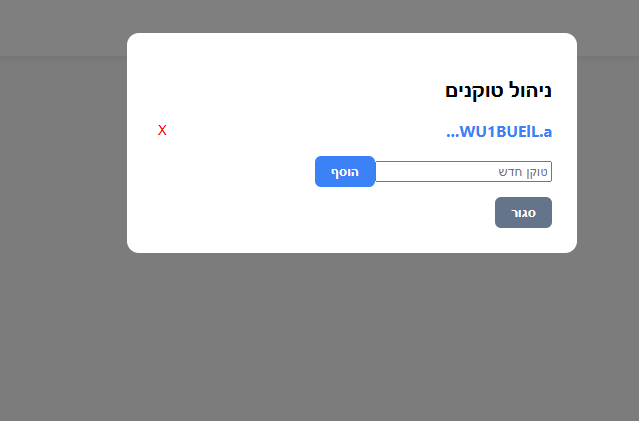
-
@מה
והכנסת נתיב?
וזה לא מעלה את הנתונים? -
-
מצורף צילו"מ

-
@מה
אתה מתכוון לשלוחת קבלת נתונים כן?
זה מחולק אצלך לפי חודשים/או חלוקה אחרת? -
@אA
קבלת נתונים רגילה, בשלוחה רגילה,
אני חושב שהכפתור טען לא עובד -
@מה
ממש מוזר.
אצלי עובד חלק.
הטוקן ודאי תקין?! -
@אA כתב בקבצים ותוכנות לשימוש במערכות ימות המשיח:
הטוקן ודאי תקין?!
כן
אולי לא העלית את הגירסה הסופית של הקוד?
-
עובד ב"ה
עשיתי קובץ HTML חדש ועובד.
עכשיו אני עובר על השיפורים שאפשר לשדרגתודה!
-
@מה
לא.
זו הגירסא הסופית.
גם לקחתי את מה שהעלתי ופתחתי שוב ועבד מצויין. -
@מה
בשמחה!
יישר כח. -
קוד משוכלל למעקב אחר נתוני האזנה של התלמידים במרחב הקולי
https://f2.freeivr.co.il/post/176080 -
באג:
כשמסמנים או מסירים סימון מעמודות, השינויים חלים על עמודות אחרות (לדוג' אני מוריד סימון מעמודה 050, והעמודה 052 נמחקה)שדרוגים:
- טבלאות סיכום בצד שמאל של העמוד- כמו 'טבלת צירים' בגוגל שיטס, Pivot Table באקסל
- אשפרות צפייה באותו ממשק, בנתונים של 2 שלוחות ויותר,
- גלילת השורות ללא סוף - בלי לחלק לדפים נפרדים
- אפשרות הורדה לאקסל
- קרדיט למפתח התוכנה....

שלום! נראה שהשיחה הזו מעניינת אותך, אבל עדיין אין לך חשבון.
נמאס לכם לגלול בין אותם הפוסטים בכל ביקור? כשנרשמים לחשבון, תמיד תחזרו בדיוק למקום שבו הייתם קודם, ותוכלו לבחור לקבל התראות על תגובות חדשות (בין אם במייל, ובין אם בהתראת פוש). תוכלו גם לשמור סימניות ולפרגן ב-upvote לפוסטים כדי להביע הערכה לחברי קהילה אחרים.
בעזרת התרומה שלך, הפוסט הזה יכול להיות אפילו טוב יותר 💗
הרשמה התחברות