פאנל ניהול מותאם אישית
-
@אA את כל הניהול הבסיסי של שלוחה: העלאת קבצים, הורדה, מחיקה, ניהול קבצי EXT, INI, אפשרות לניהול רשימ"ת ספציפית,
זה בגדול אולי יש עוד פרטים שאני לא זוכר -
- העלאה
- הורדה
- מחיקה
- ניהול רשי"ת
- ניהול קבצי ini
ניהול קבצי ext נראה לי קצת פחות, הרי מזה בדיוק אתה מםחד שיטפלו בזה, לא?
-
@אA נכון אבל בשלוחה שלו אם ירצה להוסיף שלוחה פנימית יהיה חייב לערוך
לא אכפת לי שבשלוחה שלו יהיה נזק העיקר שהקו מתפקד
-
@אA
אם כבר מפתחים
להוסיף פיצ'רים לרשימת צינתוקים
וברישמת תפוצה נגיד לוג מי נוסף ומתי ואיך -
פעם פיתכתי משהו בערך
@אa
@ben-zion
יש את זה yemot_basic_manager.html -
@לימוד-בתורת-מרן תעלה את הקוד אי אפשר להעלות ככה או שתדחוס את זה
-
@BEN-ZION
מעלה את הקוד -
פוסט זה נמחק! -
@ben-zion
קוד חדש
כותבים פקודה בapi
ועוד דברים זה ישן<!doctype html> <html lang="he" dir="rtl"> <head> <meta charset="utf-8" /> <meta name="viewport" content="width=device-width,initial-scale=1" /> <title>ניהול בסיסי לשלוחה - ימות המשיח</title> <style> body{ font-family:Arial,sans-serif; background:#f4f6f9; margin:0; padding:20px; color:#222; } .wrap{ max-width:1000px; margin:auto; } h1{ margin:0 0 20px; background:#243447; color:#fff; padding:14px; border-radius:12px; font-size:24px; } .grid{ display:grid; grid-template-columns:repeat(auto-fit,minmax(300px,1fr)); gap:16px; } .card{ background:#fff; border-radius:14px; padding:16px; box-shadow:0 2px 10px rgba(0,0,0,.08); } .card h2{ margin-top:0; font-size:20px; } label{ display:block; margin:10px 0 5px; font-weight:bold; } input, textarea, select, button{ width:100%; box-sizing:border-box; padding:10px; border:1px solid #cfd7df; border-radius:10px; font-size:15px; } textarea{ min-height:130px; resize:vertical; font-family:monospace; } button{ background:#0b57d0; color:#fff; border:none; cursor:pointer; font-weight:bold; margin-top:10px; } button:hover{ opacity:.92; } .btn-danger{ background:#c62828; } .btn-green{ background:#2e7d32; } .btn-gray{ background:#546e7a; } .row{ display:grid; grid-template-columns:1fr 1fr; gap:10px; } .small{ font-size:13px; color:#666; margin-top:6px; } #filesTable{ width:100%; border-collapse:collapse; margin-top:10px; font-size:14px; } #filesTable th,#filesTable td{ border:1px solid #ddd; padding:8px; text-align:right; } #filesTable th{ background:#eef3f8; } pre{ background:#111; color:#7CFC00; padding:14px; border-radius:12px; min-height:180px; overflow:auto; white-space:pre-wrap; word-break:break-word; } .muted{ color:#888; font-size:13px; } </style> </head> <body> <div class="wrap"> <h1>ניהול בסיסי לשלוחה - ימות המשיח</h1> <div class="card" style="margin-bottom:16px;"> <h2>הגדרות כלליות</h2> <label>טוקן</label> <input id="token" placeholder="077XXXXXXX:XXXXXX" /> <label>נתיב שלוחה</label> <input id="path" placeholder="לדוגמה: 1/2/3" /> <div class="small">הנתיב יישלח ל־API כ־ivr2:1/2/3</div> </div> <div class="grid"> <div class="card"> <h2>העלאת קובץ</h2> <label>בחר קובץ</label> <input type="file" id="uploadFileInput" /> <label>שם יעד לקובץ (לא חובה)</label> <input id="targetFileName" placeholder="לדוגמה: 000.wav או ext.ini" /> <label> <input type="checkbox" id="convertAudio" style="width:auto;transform:scale(1.2);margin-left:8px;"> המר אודיו ל־wav </label> <button onclick="uploadFile()">העלה קובץ</button> </div> <div class="card"> <h2>הורדת קובץ</h2> <label>שם קובץ להורדה</label> <input id="downloadFileName" placeholder="לדוגמה: 000.wav או ext.ini" /> <button class="btn-green" onclick="downloadFile()">הורד קובץ</button> </div> <div class="card"> <h2>מחיקה</h2> <label>שם קובץ / שלוחה למחיקה</label> <input id="deleteName" placeholder="לדוגמה: 000.wav או 8" /> <button class="btn-danger" onclick="deleteItem()">מחק</button> </div> <div class="card"> <h2>רשימת קבצים בשלוחה</h2> <button class="btn-gray" onclick="getDir()">רענן רשימת קבצים</button> <div id="filesArea" class="muted" style="margin-top:10px;">עדיין לא נטענה רשימה</div> </div> <div class="card"> <h2>ניהול ext.ini</h2> <div class="row"> <div> <button class="btn-gray" onclick="loadTextFile('ext.ini','extContent')">טען ext.ini</button> </div> <div> <button onclick="saveTextFile('ext.ini','extContent')">שמור ext.ini</button> </div> </div> <label>תוכן ext.ini</label> <textarea id="extContent" placeholder="type=menu title=בדיקה"></textarea> </div> <div class="card"> <h2>ניהול קובץ INI</h2> <label>שם קובץ ini</label> <input id="iniFileName" placeholder="לדוגמה: M1000.ini" /> <div class="row"> <div> <button class="btn-gray" onclick="loadNamedIni()">טען קובץ ini</button> </div> <div> <button onclick="saveNamedIni()">שמור קובץ ini</button> </div> </div> <label>תוכן קובץ ini</label> <textarea id="iniContent"></textarea> </div> <div class="card"> <h2>ניהול קובץ EXT נוסף</h2> <label>שם קובץ ext</label> <input id="extFileName" placeholder="לדוגמה: ext.ini או ext2.ini" /> <div class="row"> <div> <button class="btn-gray" onclick="loadNamedExt()">טען קובץ ext</button> </div> <div> <button onclick="saveNamedExt()">שמור קובץ ext</button> </div> </div> <label>תוכן קובץ ext</label> <textarea id="extCustomContent"></textarea> </div> <div class="card"> <h2>ניהול רשימ"ת / רשימת צינתוקים</h2> <label>שם רשימה</label> <input id="listName" placeholder="לדוגמה: 120" /> <div class="row"> <div><button class="btn-gray" onclick="getLists()">הצג כל הרשימות</button></div> <div><button class="btn-gray" onclick="getListEntries()">הצג מנויים</button></div> </div> <div class="row"> <div><button class="btn-gray" onclick="getListLog()">הצג לוג</button></div> <div><button class="btn-danger" onclick="resetList()">אפס רשימה</button></div> </div> <div class="small"> לפי התיעוד שמצאתי: יש צפייה ברשימות, מנויים, לוג ואיפוס. לא מצאתי כאן פעולה ברורה להוספה/מחיקה ידנית של מספר דרך ה־API הרגיל. </div> </div> </div> <div class="card" style="margin-top:16px;"> <h2>לוג / פלט</h2> <pre id="log"></pre> </div> </div> <script> const API = "https://www.call2all.co.il/ym/api/"; function log(msg, append = true) { const el = document.getElementById("log"); const text = typeof msg === "string" ? msg : JSON.stringify(msg, null, 2); el.textContent = append ? (el.textContent + (el.textContent ? "\n\n" : "") + text) : text; } function clearLog() { document.getElementById("log").textContent = ""; } function getToken() { return document.getElementById("token").value.trim(); } function getPathRaw() { return document.getElementById("path").value.trim().replace(/^\/+|\/+$/g, ""); } function getIvrPath() { const p = getPathRaw(); return p ? `ivr2:${p}` : "ivr2:"; } function buildFullPath(fileName) { const p = getPathRaw(); const cleanName = String(fileName || "").trim().replace(/^\/+/, ""); return p ? `ivr2:${p}/${cleanName}` : `ivr2:${cleanName}`; } function ensureTokenAndPath() { const token = getToken(); const path = getPathRaw(); if (!token) { alert("נא להזין טוקן"); return null; } if (!path) { alert("נא להזין נתיב שלוחה"); return null; } return { token, path }; } async function safeJson(res) { const txt = await res.text(); try { return JSON.parse(txt); } catch { return { raw: txt, httpStatus: res.status, ok: res.ok }; } } async function uploadFile() { clearLog(); const base = ensureTokenAndPath(); if (!base) return; const fileInput = document.getElementById("uploadFileInput"); const file = fileInput.files[0]; if (!file) { alert("נא לבחור קובץ"); return; } const targetFileName = document.getElementById("targetFileName").value.trim() || file.name; const convertAudio = document.getElementById("convertAudio").checked ? "1" : "0"; const form = new FormData(); form.append("token", base.token); form.append("path", buildFullPath(targetFileName)); form.append("convertAudio", convertAudio); form.append("qqfile", file, file.name); try { const res = await fetch(API + "UploadFile", { method: "POST", body: form }); const data = await safeJson(res); log(data, false); await getDir(); } catch (e) { log("שגיאה בהעלאה: " + e.message, false); } } function downloadFile() { clearLog(); const base = ensureTokenAndPath(); if (!base) return; const name = document.getElementById("downloadFileName").value.trim(); if (!name) { alert("נא להזין שם קובץ"); return; } const url = API + "DownloadFile?token=" + encodeURIComponent(base.token) + "&path=" + encodeURIComponent(buildFullPath(name)); log("פותח הורדה:\n" + url, false); window.open(url, "_blank"); } async function deleteItem() { clearLog(); const base = ensureTokenAndPath(); if (!base) return; const name = document.getElementById("deleteName").value.trim(); if (!name) { alert("נא להזין שם קובץ או שלוחה למחיקה"); return; } if (!confirm("למחוק את: " + name + " ?")) return; const url = API + "FileAction?token=" + encodeURIComponent(base.token) + "&action=delete" + "&what=" + encodeURIComponent(buildFullPath(name)); try { const res = await fetch(url); const data = await safeJson(res); log(data, false); await getDir(); } catch (e) { log("שגיאה במחיקה: " + e.message, false); } } async function getDir() { const base = ensureTokenAndPath(); if (!base) return; const url = API + "GetIVR2Dir?token=" + encodeURIComponent(base.token) + "&path=" + encodeURIComponent(base.path); try { const res = await fetch(url); const data = await safeJson(res); log(data, false); renderFiles(data); } catch (e) { log("שגיאה בקבלת רשימת קבצים: " + e.message, false); } } function renderFiles(data) { const area = document.getElementById("filesArea"); const files = data && data.files ? data.files : []; if (!files.length) { area.innerHTML = "לא נמצאו קבצים או שלא התקבלה רשימה."; return; } let html = ` <table id="filesTable"> <thead> <tr> <th>שם</th> <th>סוג</th> <th>גודל</th> </tr> </thead> <tbody> `; for (const f of files) { html += ` <tr> <td>${escapeHtml(f.name ?? "")}</td> <td>${escapeHtml(f.fileType ?? "")}</td> <td>${escapeHtml(String(f.size ?? ""))}</td> </tr> `; } html += `</tbody></table>`; area.innerHTML = html; } async function loadTextFile(fileName, targetTextareaId) { clearLog(); const base = ensureTokenAndPath(); if (!base) return; const url = API + "GetTextFile?token=" + encodeURIComponent(base.token) + "&what=" + encodeURIComponent(buildFullPath(fileName)); try { const res = await fetch(url); const data = await safeJson(res); log(data, false); if (data && typeof data.contents !== "undefined") { document.getElementById(targetTextareaId).value = data.contents; } else { alert("לא התקבל תוכן קובץ"); } } catch (e) { log("שגיאה בקריאת קובץ טקסט: " + e.message, false); } } async function saveTextFile(fileName, sourceTextareaId) { clearLog(); const base = ensureTokenAndPath(); if (!base) return; const content = document.getElementById(sourceTextareaId).value; const body = new URLSearchParams(); body.append("token", base.token); body.append("what", buildFullPath(fileName)); body.append("contents", content); try { const res = await fetch(API + "UploadTextFile", { method: "POST", headers: { "Content-Type": "application/x-www-form-urlencoded;charset=UTF-8" }, body: body.toString() }); const data = await safeJson(res); log(data, false); await getDir(); } catch (e) { log("שגיאה בשמירת קובץ טקסט: " + e.message, false); } } function loadNamedIni() { const name = document.getElementById("iniFileName").value.trim(); if (!name) return alert("נא להזין שם קובץ ini"); loadTextFile(name, "iniContent"); } function saveNamedIni() { const name = document.getElementById("iniFileName").value.trim(); if (!name) return alert("נא להזין שם קובץ ini"); saveTextFile(name, "iniContent"); } function loadNamedExt() { const name = document.getElementById("extFileName").value.trim(); if (!name) return alert("נא להזין שם קובץ ext"); loadTextFile(name, "extCustomContent"); } function saveNamedExt() { const name = document.getElementById("extFileName").value.trim(); if (!name) return alert("נא להזין שם קובץ ext"); saveTextFile(name, "extCustomContent"); } async function getLists() { clearLog(); const token = getToken(); if (!token) return alert("נא להזין טוקן"); try { const url = API + "?token=" + encodeURIComponent(token) + "&action=getLists"; const res = await fetch(url); const data = await safeJson(res); log(data, false); } catch (e) { log("שגיאה בקבלת רשימות: " + e.message, false); } } async function getListEntries() { clearLog(); const token = getToken(); const listName = document.getElementById("listName").value.trim(); if (!token) return alert("נא להזין טוקן"); if (!listName) return alert("נא להזין שם רשימה"); try { const url = API + "?token=" + encodeURIComponent(token) + "&action=getlistEnteres&TzintukimList=" + encodeURIComponent(listName); const res = await fetch(url); const data = await safeJson(res); log(data, false); } catch (e) { log("שגיאה בקבלת מנויי הרשימה: " + e.message, false); } } async function getListLog() { clearLog(); const token = getToken(); const listName = document.getElementById("listName").value.trim(); if (!token) return alert("נא להזין טוקן"); if (!listName) return alert("נא להזין שם רשימה"); try { const url = API + "?token=" + encodeURIComponent(token) + "&action=getLogList&TzintukimList=" + encodeURIComponent(listName); const res = await fetch(url); const data = await safeJson(res); log(data, false); } catch (e) { log("שגיאה בקבלת לוג הרשימה: " + e.message, false); } } async function resetList() { clearLog(); const token = getToken(); const listName = document.getElementById("listName").value.trim(); if (!token) return alert("נא להזין טוקן"); if (!listName) return alert("נא להזין שם רשימה"); if (!confirm("לאפס את הרשימה " + listName + " ?")) return; try { const url = API + "?token=" + encodeURIComponent(token) + "&action=resetList&TzintukimList=" + encodeURIComponent(listName); const res = await fetch(url); const data = await safeJson(res); log(data, false); } catch (e) { log("שגיאה באיפוס רשימה: " + e.message, false); } } function escapeHtml(str) { return String(str) .replaceAll("&", "&") .replaceAll("<", "<") .replaceAll(">", ">") .replaceAll('"', """) .replaceAll("'", "'"); } </script> </body> </html> -
@ben-zion
מה אומר -
יש חדש
@ben-zion -
@לימוד-בתורת-מרן
וואו!!!
זה ממש הכללל!
ודרך אגב יש בתיעוד הסבר איך להוסיף מספרים לרשי"ת. -
@לימוד-בתורת-מרן יפה אבל אני רוצה משהו יותר מסודר
-
@BEN-ZION
כלומר?
מבחינת העיצוב?
או שהכל יהיה בנוי על רשימת הקבצים המוצגת כמו זה<!DOCTYPE html> <html lang="he" dir="rtl"> <head> <meta charset="UTF-8"> <title>ניהול שלוחות ימות המשיח</title> <style> :root { --primary: #2c3e50; --accent: #3498db; --success: #27ae60; --danger: #e74c3c; --violet: #8e44ad; --orange: #f39c12; } body { font-family: 'Segoe UI', sans-serif; background: #f4f7f6; margin: 0; padding: 20px; } /* סרגל עליון */ .top-bar { background: white; padding: 15px; border-radius: 10px; box-shadow: 0 2px 10px rgba(0,0,0,0.05); display: flex; flex-direction: column; gap: 10px; margin-bottom: 20px; } .inputs-row { display: flex; gap: 10px; align-items: center; width: 100%; } input { padding: 8px; border: 1px solid #ddd; border-radius: 5px; flex: 1; } /* עיצוב רכיב הטוקנים */ .token-main { position: relative; flex: 1; display: flex; } /* גודל זהה לשדה הנתיב */ #tokenField { flex: 1; width: 100%; } .token-dropdown { position: absolute; width: 100%; background: white; border: 1px solid #ccc; border-radius: 8px; box-shadow: 0 4px 10px rgba(0,0,0,0.1); z-index: 1000; max-height: 250px; overflow-y: auto; display: none; top: 100%; } .token-item { display: flex; justify-content: space-between; align-items: center; padding: 10px; cursor: pointer; border-bottom: 1px solid #eee; color: #333; } .token-item:hover { background: #f8f9fa; } .delete-item { color: #dc3545; font-weight: bold; padding: 5px 10px; cursor: pointer; border: none; background: none; } .dropdown-footer { padding: 8px; background: #f1f3f5; display: flex; gap: 5px; justify-content: center; border-top: 1px solid #ddd; } .footer-btn { font-size: 11px; padding: 4px 8px; cursor: pointer; border: 1px solid #ccc; background: white; border-radius: 4px; } /* כפתורים וטבלה */ .btn { cursor: pointer; border: none; border-radius: 4px; padding: 4px 8px; font-weight: bold; color: white; transition: 0.2s; font-size: 11px; text-align: center; display: inline-block; width: 100%; max-width: 75px; } .btn:hover { opacity: 0.85; transform: translateY(-1px); } .btn-load { background: var(--primary); padding: 8px 18px; width: auto; max-width: none; font-size: 14px; } .ext-container { background: #fff; padding: 15px; border-radius: 10px; box-shadow: 0 2px 10px rgba(0,0,0,0.05); margin-bottom: 20px; border-top: 4px solid var(--primary); } .ext-container h4 { margin: 0 0 10px 0; color: var(--primary); display: flex; justify-content: space-between; align-items: center; } #extTextArea { width: 100%; height: 120px; font-family: 'Consolas', monospace; font-size: 13px; padding: 10px; box-sizing: border-box; border: 1px solid #ddd; background: #fcfcfc; border-radius: 5px; } table { width: 100%; background: white; border-collapse: collapse; border-radius: 8px; overflow: hidden; } th { background: #f8f9fa; padding: 10px; font-size: 12px; border-bottom: 2px solid #eee; } td { padding: 5px 8px; border-bottom: 1px solid #eee; text-align: center; font-size: 12px; } .dl { background: var(--success); } .ed { background: var(--orange); } .up { background: var(--accent); } .del { background: var(--danger); } .view { background: var(--violet); } .modal { display: none; position: fixed; inset: 0; background: rgba(0,0,0,0.6); justify-content: center; align-items: center; z-index: 1000; } .modal-content { background: white; padding: 25px; border-radius: 12px; width: 600px; max-width: 95%; } .modal-footer { margin-top: 20px; display: flex; justify-content: flex-start; flex-direction: row-reverse; gap: 10px; } .convert-row { display: flex; gap: 10px; justify-content: center; margin-top: 20px; } </style> </head> <body> <div class="top-bar"> <div class="inputs-row"> <div class="token-main"> <input type="text" id="tokenField" placeholder="הזן טוקן או בחר" onclick="toggleDropdown(true)" oninput="filterDropdown(this.value)" onkeypress="handleEnter(event)" autocomplete="off"> <div id="tokenDropdown" class="token-dropdown"></div> </div> <input type="text" id="pathField" value="" placeholder="נתיב שלוחה" onkeypress="handleEnter(event)"> <button class="btn btn-load" onclick="startProcess()">טען רשימת קבצים</button> </div> <div style="display: flex; align-items: center; gap: 15px; padding-top: 5px;"> <div style="display: flex; align-items: center; gap: 5px;"> <input type="checkbox" id="saveTokenToggle" style="width: auto; cursor: pointer;" onchange="document.getElementById('tokenNameField').style.display = this.checked ? 'block' : 'none'"> <label for="saveTokenToggle" style="font-size: 12px; cursor: pointer; color: #666;">שמור טוקן זה במאגר</label> </div> <div id="tokenNameField" style="display:none;"> <input type="text" id="tokenAlias" placeholder="שם למזהה (למשל: המערכת שלי)" style="font-size: 12px; padding: 5px; width: 200px;"> </div> </div> </div> <div class="ext-container" id="extContainer" style="display:none;"> <h4> <span>הגדרות שלוחה (ext.ini)</span> <div style="display:flex; gap:8px;"> <button class="btn" style="background:var(--orange); width:auto; padding:5px 15px;" onclick="renameExtIni()">שנה שם</button> <button class="btn" style="background:var(--success); width:auto; padding:5px 15px;" onclick="saveExtIni()">שמור שינויים</button> </div> </h4> <textarea id="extTextArea"></textarea> </div> <table> <thead> <tr> <th style="text-align: right; width: 25%;">שם קובץ</th> <th>גודל</th> <th>תצוגה</th> <th>הורדה</th> <th>שינוי שם</th> <th>החלפה</th> <th>מחיקה</th> </tr> </thead> <tbody id="tableBody"></tbody> </table> <div id="mainModal" class="modal"> <div class="modal-content"> <h3 id="modalTitle" style="margin:0 0 15px 0; border-bottom:1px solid #eee; padding-bottom:10px;"></h3> <div id="modalBody"></div> <div class="modal-footer" id="modalFooter"> <button id="saveBtn" class="btn btn-load">שמור</button> <button class="btn" onclick="closeModal()" style="background:#95a5a6;">ביטול</button> </div> </div> </div> <script> const API_BASE = 'https://www.call2all.co.il/ym/api/'; const STORAGE_KEY = 'yemot_permanent_storage'; let savedTokens = JSON.parse(localStorage.getItem(STORAGE_KEY) || '{}'); document.addEventListener('click', (e) => { if (!e.target.closest('.token-main')) toggleDropdown(false); }); function toggleDropdown(show) { const dropdown = document.getElementById('tokenDropdown'); if (show) { renderDropdown(); dropdown.style.display = 'block'; } else { dropdown.style.display = 'none'; } } function renderDropdown(filter = "") { const dropdown = document.getElementById('tokenDropdown'); dropdown.innerHTML = ''; const filteredKeys = Object.keys(savedTokens).filter(a => a.toLowerCase().includes(filter.toLowerCase())); filteredKeys.forEach(alias => { const item = document.createElement('div'); item.className = 'token-item'; item.innerHTML = `<span>${alias}</span><button type="button" class="delete-item">✖</button>`; item.onclick = () => { document.getElementById('tokenField').value = savedTokens[alias]; toggleDropdown(false); }; item.querySelector('.delete-item').onclick = (e) => { e.stopPropagation(); if(confirm(`למחוק את ${alias}?`)) { delete savedTokens[alias]; localStorage.setItem(STORAGE_KEY, JSON.stringify(savedTokens)); renderDropdown(filter); } }; dropdown.appendChild(item); }); const footer = document.createElement('div'); footer.className = 'dropdown-footer'; footer.innerHTML = `<button type="button" class="footer-btn" style="color:red" onclick="if(confirm('למחוק הכל?')){savedTokens={};localStorage.setItem(STORAGE_KEY,'{}');renderDropdown();}">מחק הכל</button>`; footer.onclick = (e) => e.stopPropagation(); dropdown.appendChild(footer); } function filterDropdown(val) { renderDropdown(val); document.getElementById('tokenDropdown').style.display = 'block'; } function startProcess() { saveCurrentTokenIfRequested(); loadDirectory(); } function saveCurrentTokenIfRequested() { const token = document.getElementById('tokenField').value.trim(); const alias = document.getElementById('tokenAlias').value.trim(); if (document.getElementById('saveTokenToggle').checked && alias && token) { savedTokens[alias] = token; localStorage.setItem(STORAGE_KEY, JSON.stringify(savedTokens)); } } function handleEnter(event) { if (event.key === "Enter") startProcess(); } function getFullPath(fileName = "") { let rawPath = document.getElementById('pathField').value.trim(); if (rawPath && !rawPath.endsWith('/') && fileName !== "") rawPath += '/'; return `ivr2:${rawPath}${fileName}`; } async function callApi(method, params = {}) { const token = document.getElementById('tokenField').value.trim(); if (!token) return; let url = `${API_BASE}${method}?token=${token}`; for (let key in params) url += `&${key}=${encodeURIComponent(params[key])}`; const res = await fetch(url); return await res.json(); } async function loadDirectory() { const data = await callApi('GetIVR2Dir', { path: getFullPath() }); const body = document.getElementById('tableBody'); body.innerHTML = ''; if (data && data.files) { data.files.forEach(file => { const isText = file.name.endsWith('.ini') || file.name.endsWith('.tts'); body.innerHTML += ` <tr> <td style="text-align: right;"><strong>${file.name}</strong></td> <td style="color:#888;">${file.size} B</td> <td>${isText ? `<button class="btn view" onclick="openTextFile('${file.name}')">הצג</button>` : '-'}</td> <td><button class="btn dl" onclick="handleDownloadClick('${file.name}')">הורדה</button></td> <td><button class="btn ed" onclick="renameFile('${file.name}')">שינוי</button></td> <td><button class="btn up" onclick="uploadUI('${file.name}')">החלפה</button></td> <td><button class="btn del" onclick="deleteFile('${file.name}')">מחיקה</button></td> </tr>`; }); loadExtIni(); } } async function loadExtIni() { const data = await callApi('GetTextFile', { what: getFullPath('ext.ini') }); document.getElementById('extContainer').style.display = 'block'; document.getElementById('extTextArea').value = (data && data.exists !== false) ? data.contents || "" : "קובץ ext.ini לא נמצא."; } async function saveExtIni() { const res = await callApi('UploadTextFile', { what: getFullPath('ext.ini'), contents: document.getElementById('extTextArea').value }); if (res && res.responseStatus === "OK") alert("נשמר!"); } async function renameExtIni() { const newName = prompt("שם חדש ל-ext.ini:", "ext.ini"); if (newName) { const res = await callApi('FileAction', { action: 'move', what: getFullPath('ext.ini'), target: getFullPath(newName) }); if (res && res.responseStatus === "OK") loadDirectory(); } } function handleDownloadClick(name) { if (name.toLowerCase().endsWith('.ymgr')) showConvertModal(name); else window.open(`${API_BASE}DownloadFile?token=${document.getElementById('tokenField').value}&path=${getFullPath(name)}`); } function showConvertModal(name) { const html = ` <p style="text-align:center;">בחר פורמט המרה עבור קובץ הנתונים:</p> <div class="convert-row"> <button class="btn" style="background:var(--primary); max-width:none; flex:1; padding:10px;" onclick="executeRender('${name}', '')">ללא המרה</button> <button class="btn" style="background:var(--success); max-width:none; flex:1; padding:10px;" onclick="executeRender('${name}', 'csv')">אקסל (CSV)</button> <button class="btn" style="background:var(--violet); max-width:none; flex:1; padding:10px;" onclick="executeRender('${name}', 'html')">דף HTML</button> </div>`; showModal("המרה והורדה", html); document.getElementById('modalFooter').style.display = 'none'; } function executeRender(name, type) { const token = document.getElementById('tokenField').value; const url = type === "" ? `${API_BASE}DownloadFile?token=${token}&path=${getFullPath(name)}` : `${API_BASE}RenderYMGRFile?token=${token}&wath=${getFullPath(name)}&convertType=${type}`; window.open(url); closeModal(); } function showModal(title, html) { document.getElementById('modalTitle').innerText = title; document.getElementById('modalBody').innerHTML = html; document.getElementById('mainModal').style.display = 'flex'; document.getElementById('modalFooter').style.display = 'flex'; } function closeModal() { document.getElementById('mainModal').style.display = 'none'; } async function deleteFile(name) { if (confirm(`למחוק את ${name}?`)) { const res = await callApi('FileAction', { action: 'delete', what: getFullPath(name) }); if (res.responseStatus === "OK") loadDirectory(); } } function renameFile(name) { const newName = prompt("שם חדש:", name); if (newName) callApi('FileAction', { action: 'move', what: getFullPath(name), target: getFullPath(newName) }).then(loadDirectory); } async function openTextFile(name) { const data = await callApi('GetTextFile', { what: getFullPath(name) }); showModal(`עריכת ${name}`, `<textarea id="modalTextArea" style="width:100%; height:300px; font-family:monospace;">${data.contents || ''}</textarea>`); document.getElementById('saveBtn').onclick = async () => { await callApi('UploadTextFile', { what: getFullPath(name), contents: document.getElementById('modalTextArea').value }); closeModal(); loadDirectory(); }; } function uploadUI(name) { showModal(`החלפת ${name}`, `<input type="file" id="fInp" style="margin-top:10px;">`); document.getElementById('saveBtn').onclick = async () => { const token = document.getElementById('tokenField').value; const file = document.getElementById('fInp').files[0]; if (!file) return; const fd = new FormData(); fd.append('file', file); await fetch(`${API_BASE}UploadFile?token=${token}&path=${getFullPath()}`, { method: 'POST', body: fd }); closeModal(); loadDirectory(); }; } </script> </body> </html> -
@BEN-ZION
זה ישן לא בדקתי לא סידרתי -
@אA
יש לך קובץ html
של משהו על api. תוכל לעלות את הקוד
כי כותב שגיאה כי זה בתור html -
-
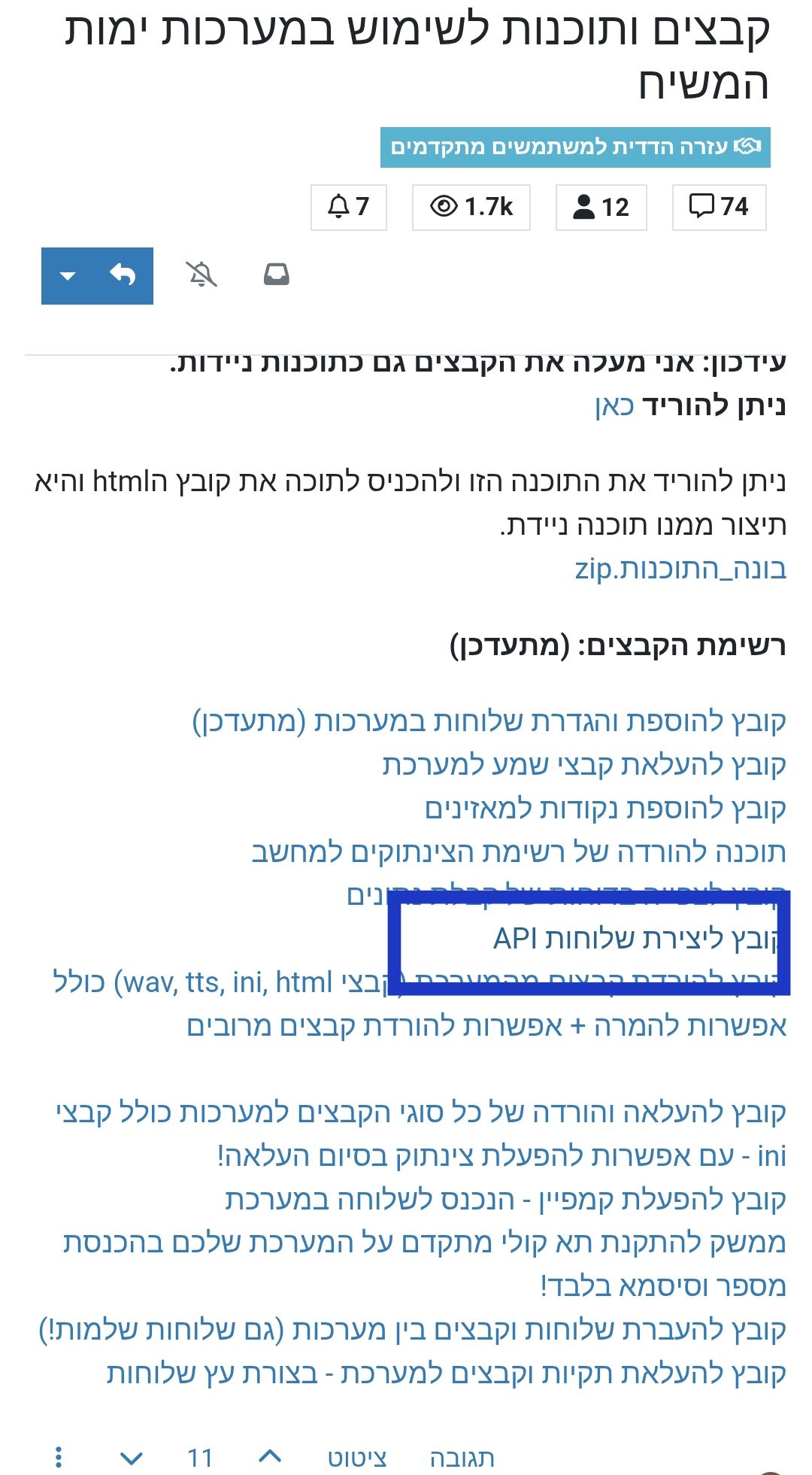
@אA @לימוד-בתורת-מרן כזה סגנון אני רוצה
-
-
@אa
יש מבין?
שלום! נראה שהשיחה הזו מעניינת אותך, אבל עדיין אין לך חשבון.
נמאס לכם לגלול בין אותם הפוסטים בכל ביקור? כשנרשמים לחשבון, תמיד תחזרו בדיוק למקום שבו הייתם קודם, ותוכלו לבחור לקבל התראות על תגובות חדשות (בין אם במייל, ובין אם בהתראת פוש). תוכלו גם לשמור סימניות ולפרגן ב-upvote לפוסטים כדי להביע הערכה לחברי קהילה אחרים.
בעזרת התרומה שלך, הפוסט הזה יכול להיות אפילו טוב יותר 💗
הרשמה התחברות