איחולי בוקר טוב לא עובד לי - למה?
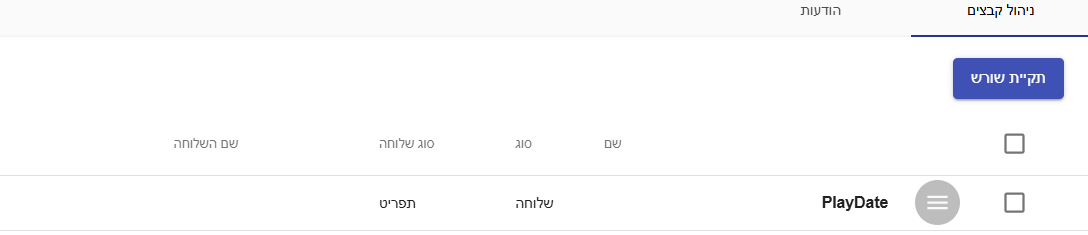
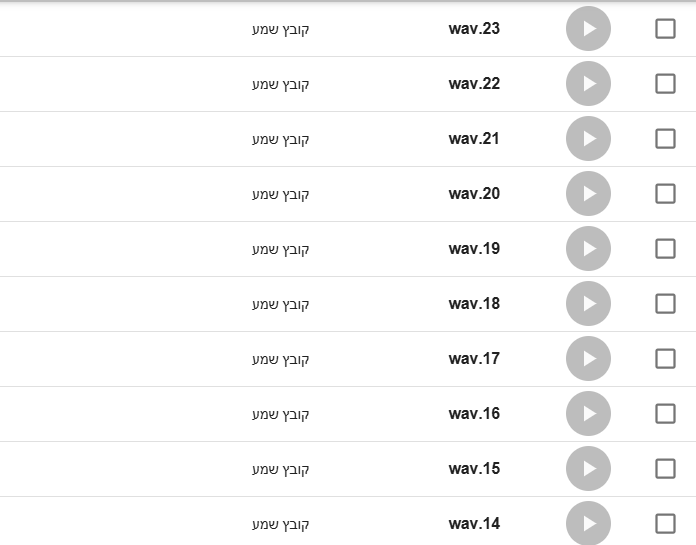
-
@שואל-שאלה התיקיה הזאת נמצאת בתוך שלוחה התפריט ?
-
@BEN-ZION
כן -
@BEN-ZION
השלוחה הראשית היא מוגדרת כתפריט -
@שואל-שאלה מעולה ככה זה אמור לעבוד לך
-
@BEN-ZION
עדין לא עובד לי -
@BEN-ZION
אלו ההגדרות בשלוחה הראשיתtype=menu title=שלוחה ראשית play_file_date=yes file_to_play_date=h play_file_date_one_time=yes ;הגדרות פילטר go_to_from_tzintuk=yes check_list_tzintuk=admins,members go_to_from_tzintuk_found=in_extension go_to_from_tzintuk_blocked=in_extension go_to_from_tzintuk_invited=in_extension go_to_from_tzintuk_not_found=in_extension go_to_from_tzintuk_say_message_according_to_situation=yes go_to_from_tzintuk_password_error_go_to=/ add_admin_to_list=yes ;הגדרות זיהוי אישי record_name=no say_name=no enter_id=yes enter_id_password=yes ;מעקב אחרי חדר ועידה פעיל menu_say_conf_bridge=yes menu_say_conf_bridge_1=conference ;מעקב אחרי הודעות בשלוחות menu_check_playfile_message=yes menu_check_playfile_message_1=personalMessages-id menu_check_playfile_message_2=PendingApproval menu_check_playfile_message_3=voiceMail -
@שואל-שאלה מלמעלה נראה שהכל מוגדר טוב אני יבדוק אצלי יותר מאוחר אני יעדכן אם עבד לי
-
@BEN-ZION
אוקי - תודה! -
@שואל-שאלה בדקתי אצלי זה עובד בניתי לך קובץ להעלות קבצים והוא מכניס את ההגדרות לשלוחה אתה צריך לבחור נתיב של השלוחת תפריט שבא אתה רוצה שישמעו איחולים
איחולי בוקר טוב (2).zip
זה מעלה את ההגדרות לשלוחה תעדכן כשעובד לך -
@BEN-ZION
קודם כול - תודה
דבר שני - לא כ"כ הבנתי מה אני עושה עם הקובץ? -
@שואל-שאלה תעלה דרכו את הקבצים שאתה צריך להגיד לפי שעות הוא יוצר את התיקיה ומוסיף את ההגדרות בשלוחה תבחר שלוחת תפריט שבה אתה רוצה שישמעו את ההודעות תכתוב בנתיב אם זה שלוחה ראשית תשאיר ריק
אתה יכול לבחור קובץ לכל שעה ואתה יכול לעלות קובץ למעלה לסמן כמה שעות וללחוץ על עלה לכל המסומנים -
@BEN-ZION
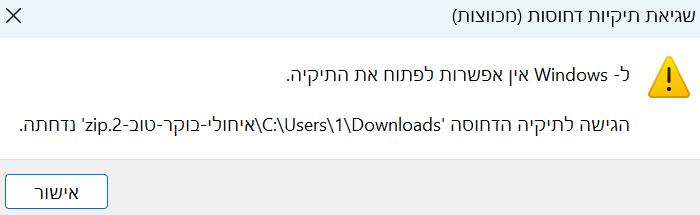
אבל אני בכלל לא מצליח לפתוח את הקובץ במחשב
-
@שואל-שאלה זה בעיה שלך אני יעלה לך קוד HTML
<!DOCTYPE html>
<html lang="he" dir="rtl">
<head>
    <meta charset="UTF-8">
    <title>ניהול הודעות לפי שעה - ללא התראות</title>
    <style>
        body { font-family: sans-serif; padding: 20px; background: #f4f7f6; text-align: right; }
        .box { max-width: 900px; background: white; padding: 20px; border-radius: 10px; box-shadow: 0 2px 5px rgba(0,0,0,0.1); margin: auto; }
        .input-group { margin-bottom: 15px; background: #eef2f3; padding: 15px; border-radius: 8px; }
        label { font-weight: bold; display: block; margin-bottom: 5px; }
        input[type="text"] { width: 100%; padding: 8px; box-sizing: border-box; border: 1px solid #ccc; border-radius: 4px; }

        .files-grid { display: grid; grid-template-columns: repeat(2, 1fr); gap: 10px; margin-top: 20px; }
        .file-row {
            background: #f9f9f9; padding: 10px; border: 1px solid #ddd; border-radius: 5px;
            display: flex; align-items: center; gap: 10px;
        }
        .file-row span { font-weight: bold; min-width: 50px; }
        .file-row input[type="file"] { flex-grow: 1; font-size: 11px; }

        .multi-select-tool { background: #fff3cd; padding: 15px; border-radius: 8px; margin-bottom: 20px; border: 1px solid #ffeeba; }

        button {
            background: #28a745; color: white; border: none; padding: 15px;
            width: 100%; cursor: pointer; border-radius: 5px; font-size: 18px; margin-top: 20px;
        }
        button:disabled { background: #ccc; }
        #status { margin-top: 15px; font-weight: bold; color: #007bff; text-align: center; min-height: 20px; }
        #log { margin-top: 10px; font-size: 12px; max-height: 250px; overflow-y: auto; background: #333; color: #fff; padding: 10px; border-radius: 5px; direction: ltr; text-align: left; }
        .info-text { font-size: 12px; color: #666; margin-top: 5px; }
    </style>
</head>
<body>

<div class="box">
    <h3>ניהול הודעות לפי שעה ועדכון הגדרות</h3>

    <div class="input-group">
        <label>טוקן (Token):</label>
        <input type="text" id="token" placeholder="הכנס טוקן">
    </div>

    <div class="input-group">
        <label>נתיב השלוחה (תיקיית האב של PlayDate):</label>
        <div style="display: flex; align-items: center; direction: ltr;">
            <span>ivr2:/</span>
            <input type="text" id="middlePath" style="width: 200px; margin: 0 5px;" placeholder="ריק לשלוחה ראשית">
        </div>
    </div>

    <div class="multi-select-tool">
        <strong>שכפול קובץ אחד לשעות נבחרות:</strong><br>
        <input type="file" id="masterFile" style="margin: 10px 0;"><br>
        <button onclick="applyMasterFile()" style="background: #ffc107; color: #000; padding: 5px; font-size: 14px; width: auto;">החל קובץ ודלג לבחירה הבאה</button>
        <div class="info-text">בלחיצה: הקובץ יוזרק לשעות המסומנות וה-V יוסר מהן אוטומטית.</div>
    </div>

    <div class="files-grid" id="filesContainer">
        <!-- השורות ייוצרו באמצעות JS -->
    </div>

    <button id="uploadBtn" onclick="startProcess()">התחל העלאה ועדכון הגדרות</button>

    <div id="status"></div>
    <div id="log"></div>
</div>

<script>
    // יצירת שורות השעות
    const container = document.getElementById('filesContainer');
    for (let i = 0; i <= 23; i++) {
        const hour = i.toString().padStart(2, '0');
        const div = document.createElement('div');
        div.className = 'file-row';
        div.innerHTML = `
            <input type="checkbox" class="hour-check" id="check-${hour}">
            <span>${hour}:00</span>
            <input type="file" id="file-${hour}" class="individual-file">
        `;
        container.appendChild(div);
    }

    // פונקציית השכפול ללא Alert
    function applyMasterFile() {
        const status = document.getElementById('status');
        const masterFile = document.getElementById('masterFile').files[0];

        if (!masterFile) {
            status.innerText = "שגיאה: יש לבחור קובץ לשכפול";
            status.style.color = "red";
            return;
        }

        const checkboxes = document.querySelectorAll('.hour-check');
        let count = 0;

        checkboxes.forEach(cb => {
            if (cb.checked) {
                const hour = cb.id.split('-')[1];
                const targetInput = document.getElementById(`file-${hour}`);

                const dataTransfer = new DataTransfer();
                dataTransfer.items.add(masterFile);
                targetInput.files = dataTransfer.files;

                cb.checked = false;
                count++;
            }
        });

        if (count > 0) {
            status.innerText = `הקובץ הוחל על ${count} שעות בהצלחה.`;
            status.style.color = "#28a745";
        } else {
            status.innerText = "לא סומנו שעות ב-V";
            status.style.color = "orange";
        }
    }

    async function startProcess() {
        const token = document.getElementById('token').value;
        const middlePath = document.getElementById('middlePath').value.trim();
        const log = document.getElementById('log');
        const status = document.getElementById('status');
        const btn = document.getElementById('uploadBtn');

        if (!token) {
            status.innerText = "חובה להזין טוקן!";
            status.style.color = "red";
            return;
        }

        log.innerText = "";
        btn.disabled = true;
        status.style.color = "#007bff";
        let successCount = 0;

        const uploadFolder = middlePath === "" ? "PlayDate" : `${middlePath}/PlayDate`;
        const basePath = `ivr2:/${uploadFolder}`;

        for (let i = 0; i <= 23; i++) {
            const hour = i.toString().padStart(2, '0');
            const fileInput = document.getElementById(`file-${hour}`);
            const file = fileInput.files[0];

            if (!file) continue;

            status.innerText = `מעלה שעה ${hour}:00...`;
            const fullPath = `${basePath}/${hour}.wav`;

            try {
                const url = `https://private.call2all.co.il/ym/api/UploadFile?token=${token}&path=${fullPath}&convertAudio=1`;
                const formData = new FormData();
                formData.append('qqfile', file);

                const response = await fetch(url, { method: 'POST', body: formData });
                const result = await response.json();
                if (result.responseStatus === "OK") {
                    log.innerText += `[FILE OK] ${hour}:00 הועלה\n`;
                    successCount++;
                    fileInput.value = "";
                }
            } catch (e) { log.innerText += `[FILE ERR] ${hour}:00 נכשל\n`; }
        }

        status.innerText = "מעדכן הגדרות שלוחה...";
        const extPath = middlePath === "" ? "ivr2:/" : `ivr2:/${middlePath}`;

        try {
            const configUrl = `https://private.call2all.co.il/ym/api/UpdateExtension?token=${token}&path=${extPath}&play_file_date_one_time=yes
&play_file_date=yes&file_to_play_date=h`;
            await fetch(configUrl);
            log.innerText += `\n✅ הגדרות עודכנו בנתיב: ${extPath}\n`;
        } catch (e) { log.innerText += `\n❌ שגיאה בעדכון הגדרות\n`; }

        status.innerText = `סיום: הועלו ${successCount} קבצים.`;
        status.style.color = "#28a745";
        btn.disabled = false;
    }
</script>

</body>
</html>
אתה יודע ליצור קבצי HTML
-
-
@BEN-ZION
אולי תנסה להגדיר שלוחת תפריט עם ההגדרות הללו ולבדוק האם זה יעבודtype=menu title=שלוחה ראשית play_file_date=yes file_to_play_date=h play_file_date_one_time=yes ;הגדרות פילטר go_to_from_tzintuk=yes check_list_tzintuk=admins,members go_to_from_tzintuk_found=in_extension go_to_from_tzintuk_blocked=in_extension go_to_from_tzintuk_invited=in_extension go_to_from_tzintuk_not_found=in_extension go_to_from_tzintuk_say_message_according_to_situation=yes go_to_from_tzintuk_password_error_go_to=/ add_admin_to_list=yes ;הגדרות זיהוי אישי record_name=no say_name=no enter_id=yes enter_id_password=yes ;מעקב אחרי חדר ועידה פעיל menu_say_conf_bridge=yes menu_say_conf_bridge_1=conference ;מעקב אחרי הודעות בשלוחות menu_check_playfile_message=yes menu_check_playfile_message_1=personalMessages-id menu_check_playfile_message_2=PendingApproval menu_check_playfile_message_3=voiceMail -
@שואל-שאלה תעתיק את הטקסט למעלה לפנקס רשימות תשמור בשם
העלאת קבצי איחולים.html -
@BEN-ZION
אוקי עשיתי את זה
מה הלאה? -
@שואל-שאלה תפתח את הקובץ זה יפתח לך בדפדפן תבחר את הקבצים שאתה רוצה לכל שעה ואחרי שבחרת קובץ לכל שעה תעלה את זה למערכת ותעדכן אם עובד זה מוסיף לבד את ההגדרות לשלוחה
שלום! נראה שהשיחה הזו מעניינת אותך, אבל עדיין אין לך חשבון.
נמאס לכם לגלול בין אותם הפוסטים בכל ביקור? כשנרשמים לחשבון, תמיד תחזרו בדיוק למקום שבו הייתם קודם, ותוכלו לבחור לקבל התראות על תגובות חדשות (בין אם במייל, ובין אם בהתראת פוש). תוכלו גם לשמור סימניות ולפרגן ב-upvote לפוסטים כדי להביע הערכה לחברי קהילה אחרים.
בעזרת התרומה שלך, הפוסט הזה יכול להיות אפילו טוב יותר 💗
הרשמה התחברות