העברת קבצים ממערכת למערכת
-
קודם כל: תודה על זה ועל כל השרשור של הקודים. - זה מאוד שימושי בשבילי
לענינינו:
בינתיים אין לחצן הפעלה
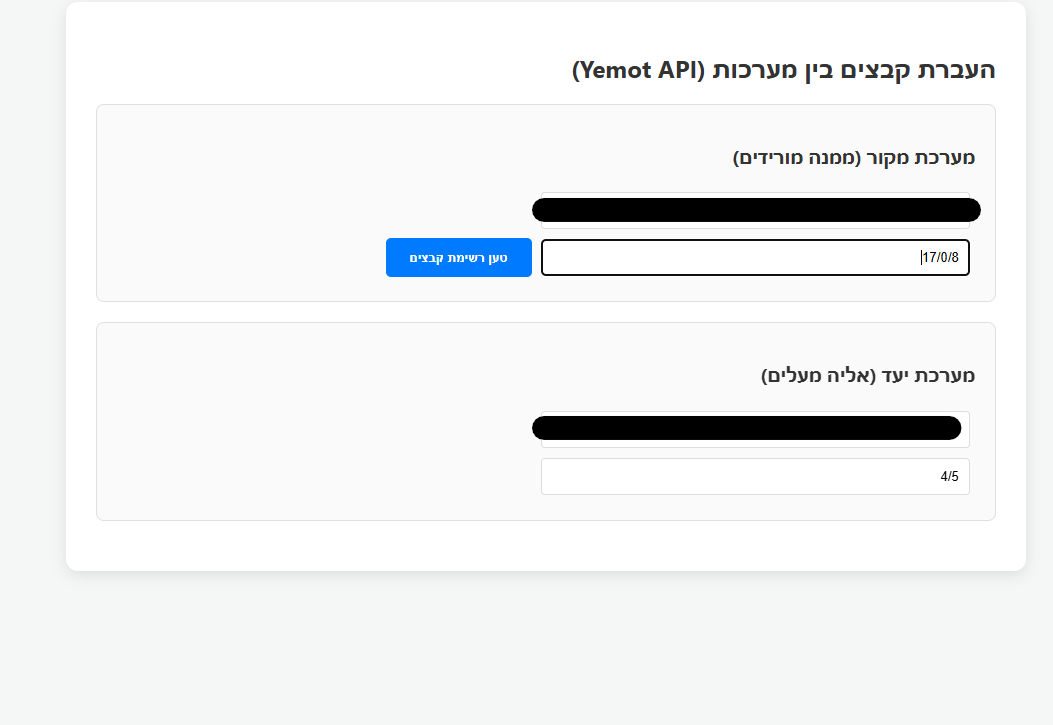
-
@מה אפשר באתר של LIY
https://ym.liy.ovh/manager/ -
כבר ניסיתי המון פעמים ולא הצליח.
(ניסיתי באתר החדש שלו https://ysm.liy.ovh/) -
-
@מה בכוונה הבאתי לך את האתר הישן שלו...
שם זה עובד מצויין... -
@זאביק כתב בהעברת קבצים ממערכת למערכת:
@מה בכוונה הבאתי לך את האתר הישן שלו...
שם זה עובד מצויין..אכן עובד מצוין ומהיר.
אבל אין אצלו אפשרות להעתיק תת שלוחות,
אפשר להעתיק רק את הקבצים מהשלוחה ללא השלוחות שתחתיו. -
@אA כתב בהעברת קבצים ממערכת למערכת:
עריכה: כרגע יתכן לא עובד, אני אשב ע"ז בהמשך לסדר את זה
מחכים בכליון עיניים.
אגב זה יעביר גם שלוחות בתוך שלוחות או רק קבצים ?
-
@מה
מה אתה רוצה שזה יעשה בדיוק? -
@מה
בדקתי והקוד הזה עובד.
בהצלחה!
אם תרצה תוספות תעדכן.
<!DOCTYPE html>
<html lang="he" dir="rtl">
<head>
<meta charset="UTF-8">
<title>מעביר קבצים - ימות המשיח</title>
<style>
body { font-family: 'Segoe UI', Tahoma, Geneva, Verdana, sans-serif; margin: 20px; background-color: #f4f7f6; color: #333; text-align: right; }
.container { max-width: 900px; margin: auto; background: white; padding: 20px; border-radius: 10px; box-shadow: 0 2px 10px rgba(0,0,0,0.1); }
.section { border: 1px solid #e0e0e0; padding: 15px; margin-bottom: 15px; border-radius: 8px; background: #fafafa; }
h2 { color: #2c3e50; border-bottom: 2px solid #3498db; padding-bottom: 10px; margin-top: 0; }
.input-group { margin-bottom: 10px; display: flex; gap: 10px; align-items: center; flex-wrap: wrap; }
input[type="text"] { padding: 8px; border: 1px solid #ddd; border-radius: 4px; flex: 1; min-width: 200px; }
button { padding: 10px 20px; background-color: #3498db; color: white; border: none; border-radius: 4px; cursor: pointer; font-weight: bold; }
button:hover { background-color: #2980b9; }
button:disabled { background-color: #bdc3c7; cursor: not-allowed; }table { width: 100%; border-collapse: collapse; margin-top: 15px; } th, td { border: 1px solid #ddd; padding: 10px; text-align: center; } th { background-color: #ecf0f1; } .progress-container { width: 100%; background-color: #eee; border-radius: 13px; margin: 15px 0; display: none; overflow: hidden; height: 25px; } .progress-bar { width: 0%; height: 100%; background-color: #2ecc71; text-align: center; line-height: 25px; color: white; transition: width 0.3s; } .status-text { font-weight: bold; color: #e67e22; text-align: center; margin-top: 5px; } .file-list-section { margin-top: 20px; border-top: 2px solid #eee; padding-top: 20px; } </style></head>
<body><div class="container">
<h2>מערכת העברת קבצים אוטומטית</h2><div class="section"> <strong>מערכת מקור</strong> <div class="input-group"> <input type="text" id="srcToken" placeholder="טוקן מקור"> <input type="text" id="srcPath" placeholder="שלוחה מקור (למשל 1)"> <button id="loadBtn" onclick="loadFiles()">טען קבצים</button> </div> </div> <div class="section"> <strong>מערכת יעד</strong> <div class="input-group"> <input type="text" id="destToken" placeholder="טוקן יעד"> <input type="text" id="destPath" placeholder="שלוחת יעד (למשל 2)"> <button id="transferBtn" onclick="startTransfer()" disabled>התחל העברה</button> </div> <div class="progress-container" id="progCont"> <div class="progress-bar" id="progBar">0%</div> </div> <div id="transferStatus" class="status-text"></div> </div> <div id="fileArea" class="file-list-section" style="display:none;"> <h3>קבצים בשלוחת המקור</h3> <table> <thead> <tr> <th><input type="checkbox" id="selectAll" onclick="toggleSelectAll(this)"></th> <th>שם הקובץ</th> <th>גודל</th> </tr> </thead> <tbody id="fileTableBody"></tbody> </table> </div></div>
<script>
function toggleSelectAll(source) {
const checkboxes = document.querySelectorAll('.file-check');
checkboxes.forEach(cb => cb.checked = source.checked);
}async function loadFiles() { const token = document.getElementById('srcToken').value; const path = document.getElementById('srcPath').value; const loadBtn = document.getElementById('loadBtn'); const tbody = document.getElementById('fileTableBody'); if(!token || !path) return alert("נא למלא טוקן ונתיב מקור"); loadBtn.innerText = "טוען..."; loadBtn.disabled = true; try { const response = await fetch(`https://www.call2all.co.il/ym/api/GetIVR2Dir?token=${token}&path=${path}`); const data = await response.json(); if (data.responseStatus !== "OK") throw new Error(data.message); tbody.innerHTML = ''; if (data.files && data.files.length > 0) { data.files.forEach(file => { tbody.innerHTML += `<tr> <td><input type="checkbox" class="file-check" data-name="${file.name}"></td> <td>${file.name}</td> <td>${(file.size / 1024).toFixed(1)} KB</td> </tr>`; }); document.getElementById('fileArea').style.display = 'block'; document.getElementById('transferBtn').disabled = false; } else { alert("לא נמצאו קבצים בשלוחה זו."); } } catch (e) { alert("שגיאה: " + e.message); } finally { loadBtn.innerText = "טען קבצים"; loadBtn.disabled = false; } } async function startTransfer() { const srcToken = document.getElementById('srcToken').value; const srcPath = document.getElementById('srcPath').value; const destToken = document.getElementById('destToken').value; const destPath = document.getElementById('destPath').value; const selected = Array.from(document.querySelectorAll('.file-check:checked')); if (selected.length === 0) return alert('נא לבחור קבצים להעברה'); const status = document.getElementById('transferStatus'); const progBar = document.getElementById('progBar'); document.getElementById('progCont').style.display = 'block'; document.getElementById('transferBtn').disabled = true; for (let i = 0; i < selected.length; i++) { const fileName = selected[i].getAttribute('data-name'); status.innerText = `מעביר: ${fileName} (${i + 1}/${selected.length})`; try { // הורדה const downloadUrl = `https://www.call2all.co.il/ym/api/DownloadFile?token=${srcToken}&path=ivr2:${srcPath}/${fileName}`; const downloadRes = await fetch(downloadUrl); if (!downloadRes.ok) throw new Error('הורדה נכשלה'); const fileBlob = await downloadRes.blob(); // העלאה const formData = new FormData(); formData.append('token', destToken); formData.append('path', `ivr2:${destPath}/${fileName}`); formData.append('qqfile', fileBlob, fileName); const uploadRes = await fetch(`https://www.call2all.co.il/ym/api/UploadFile`, { method: 'POST', body: formData }); await uploadRes.json(); } catch (err) { console.error("תקלה:", err); status.innerText = `שגיאה בקובץ ${fileName}, ממשיך...`; } const percent = Math.round(((i + 1) / selected.length) * 100); progBar.style.width = percent + '%'; progBar.innerText = percent + '%'; } status.innerText = 'ההעברה הושלמה בהצלחה!'; document.getElementById('transferBtn').disabled = false; }</script>
</body>
</html>
-
@אA כתב בהעברת קבצים ממערכת למערכת:
Spoiler
תגובה
תודה!
רק אני רוצה שיעביר גם את השלוחות הנמצאות בתוך השלוחה.
לדוגמה שכשמעבירים שלוחה 1 יעביר את כל הקבצים והשלוחות הנמצאים תחת שלוחה 1בדוגמה רואים שטוען רק את הקבצים הנמצאים בשלוחה, ולא את השלוחות שנמצאים בשלוחה
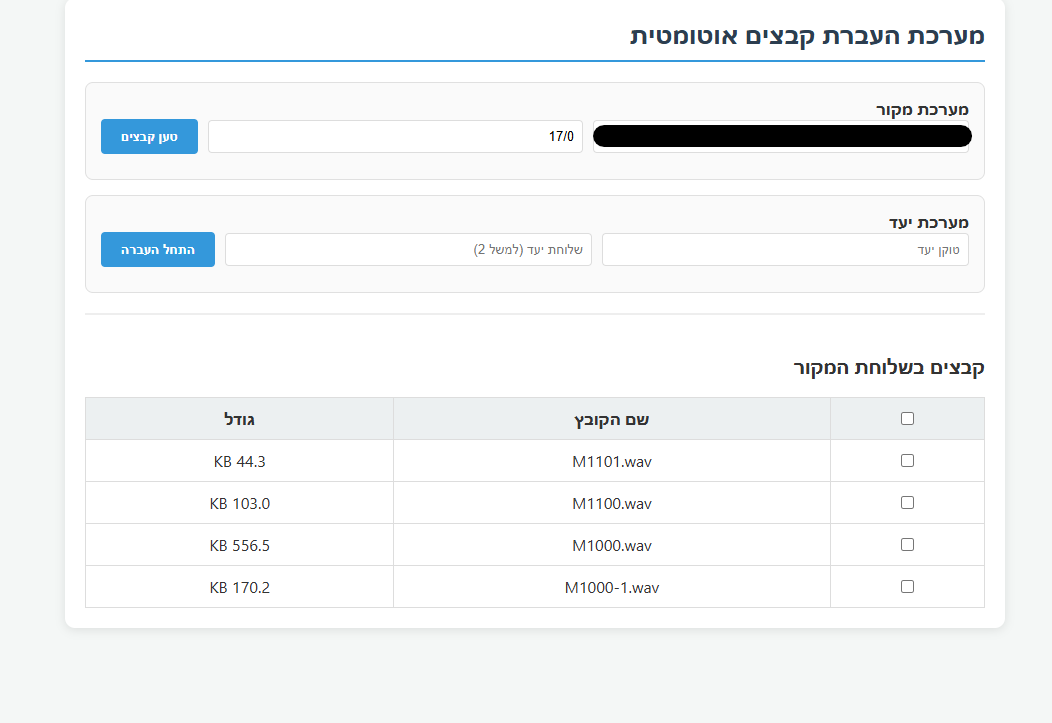
ושוב תודה תודה...
-
@מה
לא היה פשוט, אבל ב"ה.הקוד המשודרג מצורף
<!DOCTYPE html> <html lang="he" dir="rtl"> <head> <meta charset="UTF-8"> <title>העברת שלוחות ממערכת למערכת</title> <style> body { font-family: 'Segoe UI', Tahoma, sans-serif; margin: 20px; background-color: #f4f7f6; text-align: right; direction: rtl; } .container { max-width: 1100px; margin: auto; background: white; padding: 25px; border-radius: 12px; box-shadow: 0 4px 15px rgba(0,0,0,0.1); } .section { border: 1px solid #e0e0e0; padding: 15px; margin-bottom: 15px; border-radius: 8px; background: #fafafa; } #logArea { background: #1e1e1e; color: #d4d4d4; padding: 15px; border-radius: 5px; height: 250px; overflow-y: auto; font-family: 'Consolas', monospace; font-size: 13px; margin-top: 10px; } .log-info { color: #4fc3f7; } .log-success { color: #00ff00; font-weight: bold; } button { padding: 10px 20px; background: #3498db; color: white; border: none; cursor: pointer; border-radius: 5px; font-weight: bold; transition: background 0.3s; } button:hover { background: #2980b9; } button:disabled { background: #bdc3c7; } .nav-btn { background: #9b59b6; margin-bottom: 15px; } /* עיצוב שדות קלט - טוקנים רחבים */ input { padding: 10px; margin: 5px; border: 1px solid #ccc; border-radius: 4px; font-size: 14px; } .token-input { width: 350px; background: #fdfdfd; } .path-input { width: 150px; } .config-input { width: 60px; background: #fffde7; font-weight: bold; border: 1px solid #fbc02d; text-align: center; } table { width: 100%; border-collapse: collapse; margin-top: 15px; direction: rtl; } th, td { border: 1px solid #ddd; padding: 12px; text-align: right; } th { background: #f8f9fa; } .folder-link { color: #3498db; cursor: pointer; font-weight: bold; text-decoration: underline; } .breadcrumb { margin-bottom: 10px; font-weight: bold; color: #2c3e50; background: #e8f4fd; padding: 10px; border-radius: 5px; border-right: 5px solid #3498db; } .progress-container { background: #e0e0e0; border-radius: 20px; height: 25px; margin: 15px 0; overflow: hidden; display: none; } .progress-bar { width: 0%; height: 100%; background: linear-gradient(90deg, #2ecc71, #27ae60); transition: width 0.3s; color: white; text-align: center; line-height: 25px; font-weight: bold; } </style> </head> <body> <div class="container"> <h2>העברת שלוחות ממערכת למערכת</h2> <div class="section"> <strong>⚙️ הגדרות סריקה:</strong> סרוק שלוחות בעלות <input type="number" id="digitCount" class="config-input" value="2" min="1" max="4"> ספרות. </div> <div class="section"> <strong>1. מערכת המקור</strong><br> <input type="text" id="srcToken" class="token-input" placeholder="הכנס טוקן מקור כאן..."> <input type="text" id="srcPath" class="path-input" placeholder="נתיב מקור" value=> <button onclick="loadFolder(document.getElementById('srcPath').value)">טען קבצים ושלוחות</button> </div> <div class="section"> <strong>2. מערכת היעד</strong><br> <input type="text" id="destToken" class="token-input" placeholder="הכנס טוקן יעד כאן..."> <input type="text" id="destPath" class="path-input" placeholder="נתיב יעד"> <button id="transferBtn" onclick="startTransfer()" disabled style="background:#27ae60;">התחל העברה</button> <div class="progress-container" id="progContainer"> <div id="progBar" class="progress-bar">0%</div> </div> <div id="logArea">מוכן לפעולה...</div> </div> <div id="fileArea" style="display:none;"> <div class="breadcrumb" id="currentDisplayPath">מיקום נוכחי: /</div> <button class="nav-btn" id="backBtn" onclick="goBack()" style="display:none;">⬆️ חזור למעלה</button> <table> <thead> <tr> <th style="width: 40px;"><input type="checkbox" id="masterCheck" checked onclick="toggleAll(this)"></th> <th style="width: 100px;">סוג</th> <th>שם</th> <th style="width: 120px;">גודל</th> </tr> </thead> <tbody id="fileTableBody"></tbody> </table> </div> </div> <script> let currentViewPath = "/"; function addLog(msg, type = '') { const logArea = document.getElementById('logArea'); const div = document.createElement('div'); div.className = `log-${type}`; div.innerHTML = `[${new Date().toLocaleTimeString()}] ${msg}`; logArea.appendChild(div); logArea.scrollTop = logArea.scrollHeight; } function formatSize(bytes) { if (!bytes || bytes == 0) return "-"; const k = 1024; const sizes = ['Bytes', 'KB', 'MB', 'GB']; const i = Math.floor(Math.log(bytes) / Math.log(k)); return parseFloat((bytes / Math.pow(k, i)).toFixed(2)) + ' ' + sizes[i]; } function getFileType(name, type) { if (type === "DIR" || !isNaN(name)) return "שלוחה"; return name.includes('.') ? name.split('.').pop().toLowerCase() : "קובץ"; } function cleanPath(path) { let p = path.replace(/\/+/g, '/'); if (!p.startsWith('/')) p = '/' + p; if (p.endsWith('/') && p.length > 1) p = p.slice(0, -1); return p; } async function loadFolder(path) { const token = document.getElementById('srcToken').value; const digits = parseInt(document.getElementById('digitCount').value) || 2; const maxRange = Math.pow(10, digits) - 1; if (!token) return; currentViewPath = cleanPath(path); document.getElementById('currentDisplayPath').innerText = `מיקום נוכחי: ${currentViewPath}`; document.getElementById('backBtn').style.display = currentViewPath === "/" ? "none" : "inline-block"; const tbody = document.getElementById('fileTableBody'); tbody.innerHTML = '<tr><td colspan="4">סורק...</td></tr>'; try { const res = await fetch(`https://www.call2all.co.il/ym/api/GetIVR2Dir?token=${token}&path=${currentViewPath}`); const data = await res.json(); let filesMap = new Map(); if (data.files) data.files.forEach(f => filesMap.set(f.name, f)); const iniCheck = await fetch(`https://www.call2all.co.il/ym/api/GetTextFile?token=${token}&what=ivr2:${currentViewPath}/ext.ini`); if ((await iniCheck.json()).contents !== undefined) { filesMap.set("ext.ini", { name: "ext.ini", fileType: "FILE", isIni: true, size: 0 }); } const scanPromises = []; for (let i = 0; i <= maxRange; i++) { const n = i.toString(); if (filesMap.has(n)) continue; scanPromises.push( fetch(`https://www.call2all.co.il/ym/api/GetTextFile?token=${token}&what=ivr2:${currentViewPath}/${n}/ext.ini`) .then(r => r.json()) .then(d => { if (d.contents !== undefined) filesMap.set(n, { name: n, fileType: "DIR", size: 0 }); }).catch(() => {}) ); } await Promise.all(scanPromises); let files = Array.from(filesMap.values()); files.sort((a, b) => { const aIsDir = a.fileType === "DIR" || !isNaN(a.name); const bIsDir = b.fileType === "DIR" || !isNaN(b.name); const aIsIni = a.name === "ext.ini"; const bIsIni = b.name === "ext.ini"; if (aIsDir && !bIsDir) return -1; if (!aIsDir && bIsDir) return 1; if (!aIsDir && !bIsDir) { if (aIsIni && !bIsIni) return -1; if (!aIsIni && bIsIni) return 1; } return a.name.localeCompare(b.name, undefined, {numeric: true}); }); tbody.innerHTML = ''; files.forEach(f => { const isDir = f.fileType === "DIR" || !isNaN(f.name); tbody.insertAdjacentHTML('beforeend', ` <tr> <td><input type="checkbox" class="file-check" data-name="${f.name}" data-type="${f.fileType}" checked></td> <td><strong>${getFileType(f.name, f.fileType)}</strong></td> <td class="${isDir ? 'folder-link' : ''}" onclick="${isDir ? `loadFolder('${currentViewPath}/${f.name}')` : ''}">${f.name}</td> <td>${formatSize(f.size)}</td> </tr>`); }); document.getElementById('fileArea').style.display = 'block'; document.getElementById('transferBtn').disabled = false; addLog(`סריקה הושלמה: נמצאו ${files.length} פריטים.`, "info"); } catch (e) { addLog("שגיאה בטעינה", "error"); } } function goBack() { let parts = currentViewPath.split('/'); parts.pop(); loadFolder(parts.join('/') || "/"); } async function uploadIniAsFile(token, path, fileName, contents) { const blob = new Blob([contents], { type: 'text/plain' }); const fd = new FormData(); fd.append('token', token); fd.append('path', `ivr2:${cleanPath(path)}/${fileName}`); fd.append('qqfile', blob, fileName); await fetch(`https://www.call2all.co.il/ym/api/UploadFile`, { method: 'POST', body: fd }); } async function transferRecursive(srcT, srcP, destT, destP, name, type) { const sPath = cleanPath(`${srcP}/${name}`); const dPath = cleanPath(`${destP}/${name}`); const digits = parseInt(document.getElementById('digitCount').value) || 2; const maxRange = Math.pow(10, digits) - 1; if (type === "DIR" || !isNaN(name)) { addLog(`מעביר שלוחה ${name}...`, "info"); await fetch(`https://www.call2all.co.il/ym/api/Ym_MakeDir?token=${destT}&path=ivr2:${dPath}`); const ini = await fetch(`https://www.call2all.co.il/ym/api/GetTextFile?token=${srcT}&what=ivr2:${sPath}/ext.ini`); const iniD = await ini.json(); if (iniD.contents !== undefined) await uploadIniAsFile(destT, dPath, "ext.ini", iniD.contents); const res = await fetch(`https://www.call2all.co.il/ym/api/GetIVR2Dir?token=${srcT}&path=${sPath}`); const data = await res.json(); let children = data.files || []; const subScanPromises = []; for(let i=0; i<=maxRange; i++) { const n = i.toString(); if(!children.find(c => c.name === n)) { subScanPromises.push( fetch(`https://www.call2all.co.il/ym/api/GetTextFile?token=${srcT}&what=ivr2:${sPath}/${n}/ext.ini`) .then(r => r.json()) .then(d => { if(d.contents !== undefined) children.push({name: n, fileType: "DIR"}); }).catch(() => {}) ); } } await Promise.all(subScanPromises); for (const f of children) { if (f.name === "ext.ini") continue; await transferRecursive(srcT, sPath, destT, dPath, f.name, f.fileType); } addLog(`השלוחה ${name} הועברה`, "success"); } else { const dl = await fetch(`https://www.call2all.co.il/ym/api/DownloadFile?token=${srcT}&path=ivr2:${sPath}`); const blob = await dl.blob(); const fd = new FormData(); fd.append('token', destT); fd.append('path', `ivr2:${cleanPath(destP)}/${name}`); fd.append('qqfile', blob, name); await fetch(`https://www.call2all.co.il/ym/api/UploadFile`, { method: 'POST', body: fd }); } } async function startTransfer() { const srcT = document.getElementById('srcToken').value; const destT = document.getElementById('destToken').value; const destP = cleanPath(document.getElementById('destPath').value || "/"); const selected = Array.from(document.querySelectorAll('.file-check:checked')); document.getElementById('transferBtn').disabled = true; document.getElementById('progContainer').style.display = 'block'; const rootIni = await fetch(`https://www.call2all.co.il/ym/api/GetTextFile?token=${srcT}&what=ivr2:${currentViewPath}/ext.ini`); const rootData = await rootIni.json(); if (rootData.contents !== undefined) await uploadIniAsFile(destT, destP, "ext.ini", rootData.contents); for (let i = 0; i < selected.length; i++) { const name = selected[i].getAttribute('data-name'); const type = selected[i].getAttribute('data-type'); if (name === "ext.ini") continue; await transferRecursive(srcT, currentViewPath, destT, destP, name, type); let p = Math.round(((i + 1) / selected.length) * 100); document.getElementById('progBar').style.width = p + '%'; document.getElementById('progBar').innerText = p + '%'; } addLog("✅ סיום העברה!", "success"); document.getElementById('transferBtn').disabled = false; } function toggleAll(source) { document.querySelectorAll('.file-check').forEach(cb => cb.checked = source.checked); } </script> </body> </html> -
@אA וואלה עובד טיל!!
-
פשוט לא יאומן כי יסופר!
הבאת בס"ד פתרון לאחד מהדברים הכי מבוקשים כאן בפורום.
ואם כבר...
אז אולי אפשר להוסיף שיוריד את כל המערכת למחשב... מסודר לפי שלוחות,
וכמובן גם העלה מהמחשב למערכת....
(במילה אחד: FTP) -
-
-
שלום! נראה שהשיחה הזו מעניינת אותך, אבל עדיין אין לך חשבון.
נמאס לכם לגלול בין אותם הפוסטים בכל ביקור? כשנרשמים לחשבון, תמיד תחזרו בדיוק למקום שבו הייתם קודם, ותוכלו לבחור לקבל התראות על תגובות חדשות (בין אם במייל, ובין אם בהתראת פוש). תוכלו גם לשמור סימניות ולפרגן ב-upvote לפוסטים כדי להביע הערכה לחברי קהילה אחרים.
בעזרת התרומה שלך, הפוסט הזה יכול להיות אפילו טוב יותר 💗
הרשמה התחברות