במודולי המבחנים - האם יש אופציה לשמוע איזה מבחנים חסרים?
-
@TARR איך מתחלף המבחנים כל יום? והאם לכל מבחן יש דוח נפרד? או שיש דוח כללי מה מבנה הדוח ?
תשלח לי רק את הכותרות -
@BEN-ZION אני משתמש באופציה הזאת https://f2.freeivr.co.il/post/57 של ההעברה לשלוחה אחרת - לפי תאריך עברי / לועזי וכל מבחן הוא שלוחה בפני עצמה ואין קשר ביניהם ולכל מבחן יש דו"ח נפרד
איזה כותרות אתה צריך? -
@TARR אני צריך לדעת את מבנה הדוח כדי לדעת מה לכתוב לקוד לחפש תעשה צילום מסך של השורה אם הכותרות ושורה אחת אם נתונים תצנזר רק את הפרטים האישיים
וכן אני צריך את מבנה השלוחות כמה שלוחות יש? ומה הנתיב שלהם כדי לדעת מאיפה ייקח את הנתונים -
-
אם הבנתי נכון, אז זה המודול הזה: https://f2.freeivr.co.il/post/112
יש בתוך כל שלוחה לוג שתמיד עם אותו שם קובץ: ExaminationAmericanLogOK.ymgr
כל אחד יכול לעשות רק פעם אחת את המבחן. כל יום זה מבחן חדש, ואין קשר בין יום אחד לשני.אם כן צריך לעשות API שיפתח את כל קבצי הלוג ותבדוק כל משתמש היכן מופיע שורה שלו והיכן לא, אבל זה יצטרך הרצה של הרבה פקודות ובדיקות של כל קובץ בנפרד [אולי יש לעשות רק את 7 ימים אחרונים], ניתן לעשות API שאחת ליום יחבר את הלוגים ללוג אחד ויצטרכו לבדוק רק שם [או מקסימום בנוסף גם את הקובץ היומי] או בכלל לשמור עותק של כל לוג בשרת ולבדוק משם, או שתמצא פיתרון יותר טוב.
-
@963 תכלס מה אני יכול לעשות [אני לא מפתח]
-
@TARR תתן לי דוח או לוג אחד שאני יבין מה זה ואני יכתוב לך קוד
-
-
@TARR יש לך רשימה מראש של מי אמור להבחן? אם איזה אמצעי זיהוי נכנסים?
-
@BEN-ZION יש לי.
הזיהוי באמצעות מס' טלפון.
תודה רבה! -
@TARR בניתי לך קוד בסיסי HTML תעדכן אם זה טוב לך אפשר לעשות את זה גם אוטומטי בגוגל סקריפט
זה בודק את כל הדוחות ברשימת השלוחות שתכניס הוספתי גם חלונית לבחירת שם למבחן ואז זה אומר לו חסר לך מבחן X בשלוחה Y
נתיב להעלאה צריך שלוחה כזו זה מעלה אוטמטי קובץ בשם שישמיע לכל אחד הזיהוי הוא הטלפון<!DOCTYPE html> <html lang="he" dir="rtl"> <head> <meta charset="UTF-8"> <title>מערכת בדיקת מבחנים - עם שמירה ואקסל</title> <script src="https://cdnjs.cloudflare.com/ajax/libs/xlsx/0.18.5/xlsx.full.min.js"></script> <style> body { font-family: 'Segoe UI', Arial, sans-serif; background-color: #eef2f3; margin: 0; padding: 20px; direction: rtl; } .container { max-width: 1100px; margin: auto; background: white; padding: 25px; border-radius: 15px; box-shadow: 0 8px 30px rgba(0,0,0,0.1); } h2 { color: #1a73e8; text-align: center; margin-top: 0; } .setup-grid { display: grid; grid-template-columns: 1fr 1fr; gap: 20px; margin-bottom: 20px; background: #f8f9fa; padding: 15px; border-radius: 8px; } .input-group { display: flex; flex-direction: column; gap: 5px; } .main-grid { display: grid; grid-template-columns: 1fr 2fr; gap: 20px; } .column-box { display: flex; flex-direction: column; gap: 10px; } .pair-inputs { display: grid; grid-template-columns: 1fr 1fr; gap: 10px; } label { font-weight: bold; color: #555; font-size: 14px; } input, textarea { padding: 10px; border: 1px solid #ccc; border-radius: 6px; font-size: 14px; transition: all 0.2s; } input:focus, textarea:focus { border-color: #1a73e8; outline: none; box-shadow: 0 0 5px rgba(26,115,232,0.2); } .controls { margin-top: 20px; display: grid; grid-template-columns: 1fr 1fr; gap: 15px; } button { padding: 12px; border: none; border-radius: 8px; cursor: pointer; font-size: 16px; font-weight: bold; transition: opacity 0.2s; } .btn-run { background-color: #27ae60; color: white; } .btn-excel { background-color: #f39c12; color: white; } button:hover { opacity: 0.9; } #log { margin-top: 20px; padding: 15px; background: #1e1e1e; color: #dcdcdc; border-radius: 8px; font-family: 'Courier New', monospace; font-size: 13px; max-height: 200px; overflow-y: auto; line-height: 1.4; } .success { color: #51cf66; } .error { color: #ff6b6b; } .file-input-wrapper { margin-bottom: 10px; } </style> </head> <body> <div class="container"> <h2>ניהול מבחנים חסרים (V3)</h2> <div class="setup-grid"> <div class="input-group"> <label>טוקן API:</label> <input type="text" id="apiToken" oninput="saveData()" placeholder="הכנס טוקן..."> </div> <div class="input-group"> <label>נתיב העלאה (למשל ivr2:1/):</label> <input type="text" id="uploadPath" oninput="saveData()" placeholder="ivr2:5/"> </div> </div> <div class="main-grid"> <div class="column-box"> <label>מספרי טלפון (עמודה A):</label> <div class="file-input-wrapper"> <input type="file" id="excelFile" accept=".xlsx, .xls, .csv" style="font-size: 12px;"> </div> <textarea id="phones" rows="12" oninput="saveData()" placeholder="הדבק מספרים או טען אקסל..."></textarea> </div> <div class="column-box"> <label>מבחנים (שלוחה מול שם המבחן):</label> <div class="pair-inputs"> <textarea id="extensions" rows="15" oninput="saveData()" placeholder="שלוחות (עמודה B)"></textarea> <textarea id="testNames" rows="15" oninput="saveData()" placeholder="שמות מבחנים (עמודה C)"></textarea> </div> </div> </div> <div class="controls"> <button class="btn-excel" onclick="document.getElementById('excelFile').click()">טען קובץ אקסל</button> <button class="btn-run" onclick="startProcess()">הרץ בדיקה וייצור TTS</button> </div> <div id="log">מוכן לפעולה. כל הנתונים נשמרים אוטומטית בדפדפן.</div> </div> <script> const API_BASE = "https://private.call2all.co.il/ym/api/"; // --- שמירה וטעינה מהזיכרון --- window.onload = () => { const saved = JSON.parse(localStorage.getItem('gemini_netfree_data') || '{}'); if (saved) { document.getElementById('apiToken').value = saved.token || ''; document.getElementById('uploadPath').value = saved.path || ''; document.getElementById('phones').value = saved.phones || ''; document.getElementById('extensions').value = saved.extensions || ''; document.getElementById('testNames').value = saved.testNames || ''; } }; function saveData() { const data = { token: document.getElementById('apiToken').value, path: document.getElementById('uploadPath').value, phones: document.getElementById('phones').value, extensions: document.getElementById('extensions').value, testNames: document.getElementById('testNames').value }; localStorage.setItem('gemini_netfree_data', JSON.stringify(data)); } // --- טיפול בקובץ אקסל --- document.getElementById('excelFile').addEventListener('change', function(e) { const file = e.target.files[0]; if (!file) return; const reader = new FileReader(); reader.onload = function(e) { const data = new Uint8Array(e.target.result); const workbook = XLSX.read(data, {type: 'array'}); const firstSheet = workbook.Sheets[workbook.SheetNames[0]]; const json = XLSX.utils.sheet_to_json(firstSheet, {header: 1}); // לוקח את עמודה A (אינדקס 0) מכל שורה const phoneList = json.map(row => row[0]).filter(cell => cell && cell.toString().trim().length > 5); document.getElementById('phones').value = phoneList.join('\n'); saveData(); addLog(`נטענו ${phoneList.length} מספרי טלפון מהקובץ`, 'success'); }; reader.readAsArrayBuffer(file); }); function addLog(msg, type = '') { const logDiv = document.getElementById('log'); const color = type === 'error' ? 'error' : (type === 'success' ? 'success' : ''); logDiv.innerHTML += `<div class="${color}">[${new Date().toLocaleTimeString()}] ${msg}</div>`; logDiv.scrollTop = logDiv.scrollHeight; } // --- הפעולה המרכזית --- async function startProcess() { const token = document.getElementById('apiToken').value.trim(); const uploadPath = document.getElementById('uploadPath').value.trim(); const phones = document.getElementById('phones').value.split('\n').map(s => s.trim()).filter(s => s); const extensions = document.getElementById('extensions').value.split('\n').map(s => s.trim()).filter(s => s); const testNames = document.getElementById('testNames').value.split('\n').map(s => s.trim()).filter(s => s); if (!token || !uploadPath || phones.length === 0) { alert("חסרים נתונים להרצה"); return; } addLog("מתחיל סריקה..."); let missingData = {}; phones.forEach(p => missingData[p] = []); for (let i = 0; i < extensions.length; i++) { const ext = extensions[i]; const name = testNames[i] || `מבחן ${ext}`; addLog(`בודק שלוחה ${ext}...`); try { const res = await fetch(`${API_BASE}RenderYMGRFile?token=${token}&wath=ivr2:${ext}/ExaminationAmericanLogOK.ymgr&convertType=json¬LoadLang=1`); const json = await res.json(); if (json.responseStatus === "OK") { const logs = json.data || []; phones.forEach(phone => { const found = logs.some(row => String(row.EnterId).trim() === phone); if (!found) missingData[phone].push(`${name} בשלוחה ${ext}`); }); } } catch (e) { addLog(`שגיאה בשלוחה ${ext}`, 'error'); } } addLog("מעלה קבצים..."); for (const phone of phones) { let text = missingData[phone].length > 0 ? "חסרים לך מבחנים: " + missingData[phone].join(", ") : "ביצעת את כל המבחנים."; await uploadTTS(token, uploadPath, phone, text); } addLog("הסתיים!", 'success'); } async function uploadTTS(token, basePath, phone, text) { const formData = new FormData(); formData.append('token', token); formData.append('path', (basePath.endsWith('/') ? basePath : basePath + '/') + phone + '.tts'); formData.append('tts', '1'); formData.append('qqfile', new Blob([text], { type: 'text/plain' }), phone + '.tts'); try { const res = await fetch(`${API_BASE}UploadFile`, { method: 'POST', body: formData }); const j = await res.json(); if(j.responseStatus === "OK") addLog(`הועלה: ${phone}`, 'success'); } catch (e) {} } </script> </body> </html> -
@BEN-ZION כתב בבמודולי המבחנים - האם יש אופציה לשמוע איזה מבחנים חסרים?:
רשימת השלוחות שתכניס
איפה להכניס רשימת שלוחות?
תודה רבה על העזרה -
-
@tarr עובד לך??
-
@BEN-ZION גילוי נאות - אין לי מושג איך משתמשים עם הקוד, איפה להכניס אותו ומה לעשות איתו
-
@TARR אתה צריך את הפתרון?
מצרף תמונה להמחשה איך זה יראה אתה מוריד את הקובץ שהעלית למעלה מחלץ אותו פותח אותו הוא יפתח לך בדפדפן ומכניס פרטים כמו בתמונה
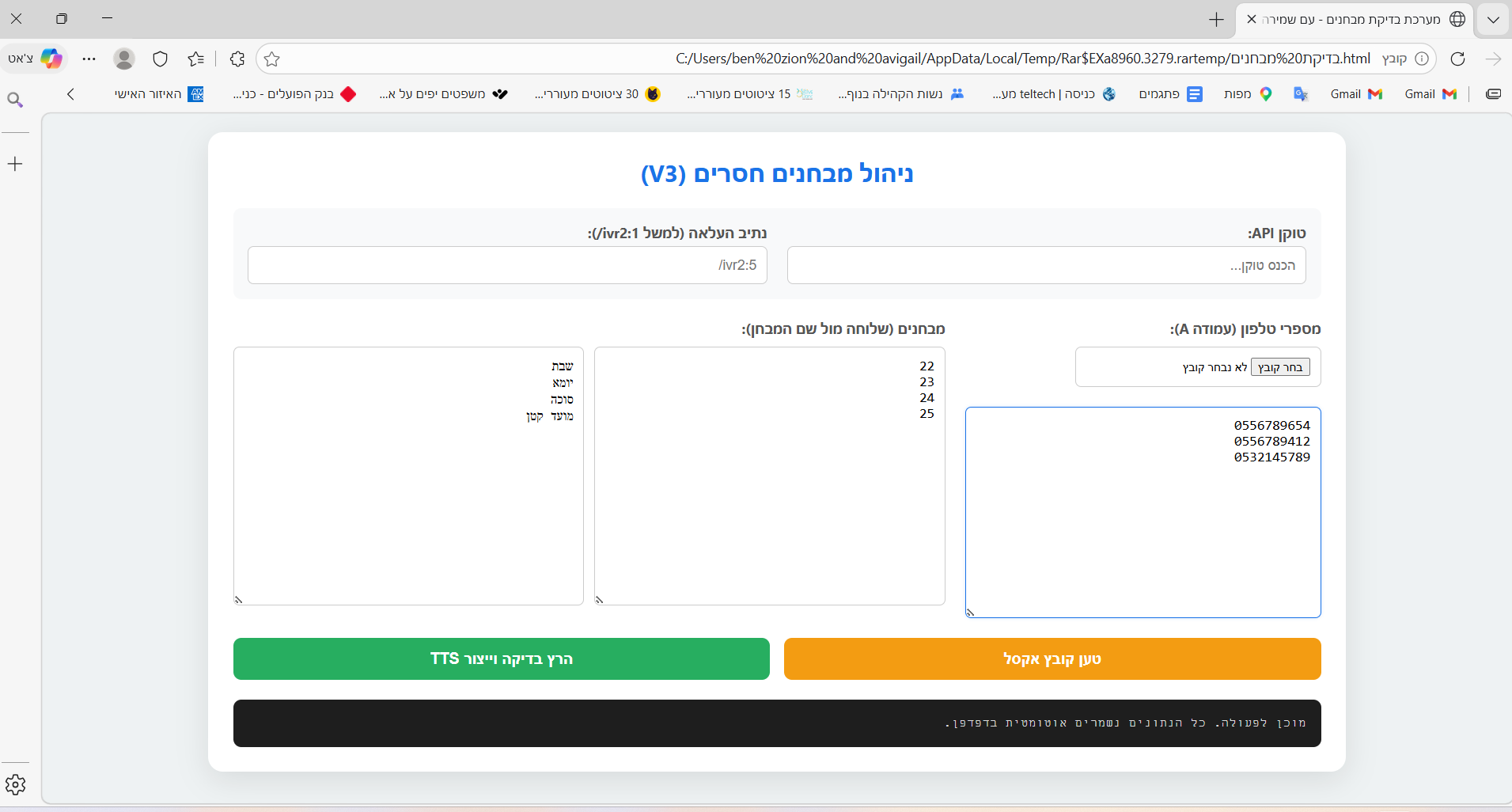
אם אתה רוצה אתה יכול לחייג אלי
-
@BEN-ZION מה זה 'שם המבחן'?
-
@TARR כדי שמי ששומע ידע איזה מבחן חסר לו אתה לא חייב לשים פשוט בניתי את זה בצורה שאומר לו חסר לך "שם המבחן" בשלוחה "מס' שלוחה"
כמובן שאתה יכול לכתוב כל דבר שנראה לך נגיד יום שלישי ואז הוא יגיד "חסר לך מבחן של יום שלישי שלוחה 20" -
@BEN-ZION ומה אני כותב ב'הכנס טוקן', וב'נתיב העלאה'?
ומה אני עושה עם כל זה אחר כך?
מקווה שאני לא מזעזע יותר מדי עם הבורות היוצאת מן הכלל... -
@TARR
מזעזע ממש...
כאלו פרטים בסיסיים...
בכל מקרה טוקן אתה מוציא באתר הישן לשונית אבטחה>מפתחות גישה> נכנס לעמוד ואז צור טוקן>אישור >מעתיק את הטוקן ומדביק בשדה.
נתיב הכוונה לשלוחה בה נמצא הקובץ.
שלום! נראה שהשיחה הזו מעניינת אותך, אבל עדיין אין לך חשבון.
נמאס לכם לגלול בין אותם הפוסטים בכל ביקור? כשנרשמים לחשבון, תמיד תחזרו בדיוק למקום שבו הייתם קודם, ותוכלו לבחור לקבל התראות על תגובות חדשות (בין אם במייל, ובין אם בהתראת פוש). תוכלו גם לשמור סימניות ולפרגן ב-upvote לפוסטים כדי להביע הערכה לחברי קהילה אחרים.
בעזרת התרומה שלך, הפוסט הזה יכול להיות אפילו טוב יותר 💗
הרשמה התחברות