• הרשמה
    • התחברות
    • חיפוש
    • דף הבית
    • אינדקס קישורים
    • פוסטים אחרונים
    • קבלת התראות מהדפדפן
    • משתמשים
    • חיפוש בהגדרות המתקדמות
    • חיפוש גוגל בפורום
    • ניהול המערכת
    • ניהול המערכת - שרת private

    נפתר שמות למספרי טלפון

    שאלות ועזרה הדדית
    2
    26
    63
    טוען פוסטים נוספים
    • מהישן לחדש
    • מהחדש לישן
    • הכי הרבה הצבעות
    תגובה
    • הגיבו כנושא
    התחברו בכדי לפרסם תגובה
    נושא זה נמחק. רק משתמשים עם הרשאות מתאימות יוכלו לצפות בו.
    • א
      אA @BEN ZION נערך לאחרונה על ידי

      @BEN-ZION
      אם אתה מסתבך אני אנסה.

      B תגובה 1 תגובה אחרונה תגובה ציטוט 0
      • B
        BEN ZION @אA נערך לאחרונה על ידי

        @אA עשיתי איזה קובץ אם בינה
        לרשימות צינתוקים זה הכניס שמות ללשונית שיחה נכנסות זה לא הוסיף
        זה הקוד

        <!DOCTYPE html>
        <html lang="he" dir="rtl">
        <head>
        <meta charset="UTF-8">
        <title>יצירת שני קבצים והעלאה לימות</title>
        
        <script src="https://cdn.jsdelivr.net/npm/xlsx/dist/xlsx.full.min.js"></script>
        
        <style>
        body { font-family: Arial; padding: 20px; max-width: 900px }
        label { display:block; margin-top:10px; font-weight:bold }
        input, textarea, button { width:100%; margin-top:5px }
        textarea { height:200px }
        button { margin-top:15px; padding:8px }
        </style>
        </head>
        
        <body>
        
        <h2>אקסל → שני קבצי ini → העלאה לשני נתיבים</h2>
        
        <label>בחירת קובץ אקסל / CSV</label>
        <input type="file" id="fileInput" accept=".xls,.xlsx,.csv">
        
        <button onclick="generateIni()">צור קבצים</button>
        
        <label>תצוגת התוכן (טלפון=שם)</label>
        <textarea id="output"></textarea>
        
        <button onclick="download('PhonesName.ini')">הורד PhonesName.ini</button>
        <button onclick="download('EnterIDValName.ini')">הורד EnterIDValName.ini</button>
        
        <hr>
        
        <h3>הגדרות העלאה</h3>
        
        <label>Token</label>
        <input type="text" id="token" placeholder="077000000:API_KEY">
        
        <label>Path לקובץ PhonesName.ini</label>
        <input type="text" id="path1" placeholder="ivr2:/1/PhonesName.ini">
        
        <label>Path לקובץ EnterIDValName.ini</label>
        <input type="text" id="path2" placeholder="ivr2:/EnterID/EnterIDValName.ini">
        
        <button onclick="uploadBoth()">העלה שני קבצים</button>
        
        <script>
        let iniText = '';
        
        function generateIni() {
            const file = document.getElementById('fileInput').files[0];
            if (!file) return alert('בחר קובץ');
        
            const reader = new FileReader();
            reader.onload = e => {
                const wb = XLSX.read(new Uint8Array(e.target.result), { type: 'array' });
                const sheet = wb.Sheets[wb.SheetNames[0]];
                const rows = XLSX.utils.sheet_to_json(sheet, { header: 1 });
        
                iniText = '';
                rows.forEach(r => {
                    if (r[0] && r[1]) {
                        const phone = String(r[0]).replace(/\D/g,'');
                        iniText += phone + '=' + r[1] + '\n';
                    }
                });
        
                document.getElementById('output').value = iniText;
            };
            reader.readAsArrayBuffer(file);
        }
        
        function download(name){
            if(!iniText) return alert('אין תוכן');
            const blob = new Blob([iniText], {type:'text/plain;charset=utf-8'});
            const a = document.createElement('a');
            a.href = URL.createObjectURL(blob);
            a.download = name;
            a.click();
        }
        
        async function uploadBoth(){
            if(!iniText) return alert('אין קובץ מוכן');
        
            const token = document.getElementById('token').value.trim();
            const path1 = document.getElementById('path1').value.trim();
            const path2 = document.getElementById('path2').value.trim();
        
            if(!token || !path1 || !path2)
                return alert('יש למלא token ושני נתיבים');
        
            try {
                await uploadFile(token, path1, 'PhonesName.ini');
                await uploadFile(token, path2, 'EnterIDValName.ini');
                alert('שני הקבצים הועלו בהצלחה');
            } catch(e){
                alert('שגיאה בהעלאה');
                console.error(e);
            }
        }
        
        function uploadFile(token, path, filename){
            const fd = new FormData();
            fd.append('token', token);
            fd.append('path', path);
            fd.append('file', new Blob([iniText], {type:'text/plain'}), filename);
        
            return fetch('https://www.call2all.co.il/ym/api/UploadFile', {
                method:'POST',
                body:fd
            }).then(r => r.json()).then(j => {
                if(j.responseStatus && j.responseStatus !== 'OK'){
                    throw j;
                }
                return j;
            });
        }
        </script>
        
        </body>
        </html>
        
        
        א תגובה 1 תגובה אחרונה תגובה ציטוט 0
        • א
          אA @BEN ZION נערך לאחרונה על ידי

          @BEN-ZION
          זה לא הכניס לקובץ?
          הוא לא יצר אותו?

          B תגובה 1 תגובה אחרונה תגובה ציטוט 0
          • B
            BEN ZION @אA נערך לאחרונה על ידי

            @אA זה יצר את הקובץ והעלה אותו בפועל השמות לא מופיעים

            א תגובה 1 תגובה אחרונה תגובה ציטוט 0
            • א
              אA @BEN ZION נערך לאחרונה על ידי

              @BEN-ZION
              עכשיו עדיין לא?

              B תגובה 1 תגובה אחרונה תגובה ציטוט 0
              • B
                BEN ZION @אA נערך לאחרונה על ידי

                @אA לא
                אבל אין לי דוח שיחות זה רק דרך הלשונית ואני לא יודע אם בכלל זה יכול להציג שם

                א 2 תגובות תגובה אחרונה תגובה ציטוט 0
                • א
                  אA @BEN ZION נערך לאחרונה על ידי

                  @BEN-ZION
                  בלשונית של הקובץ שלך?

                  B תגובה 1 תגובה אחרונה תגובה ציטוט 0
                  • א
                    אA @BEN ZION נערך לאחרונה על ידי

                    @BEN-ZION
                    אני רואה שהוא מעלה לקובץ שנמצא בתוך תקיה.
                    זה בכוונה?

                    B תגובה 1 תגובה אחרונה תגובה ציטוט 0
                    • B
                      BEN ZION @אA נערך לאחרונה על ידי

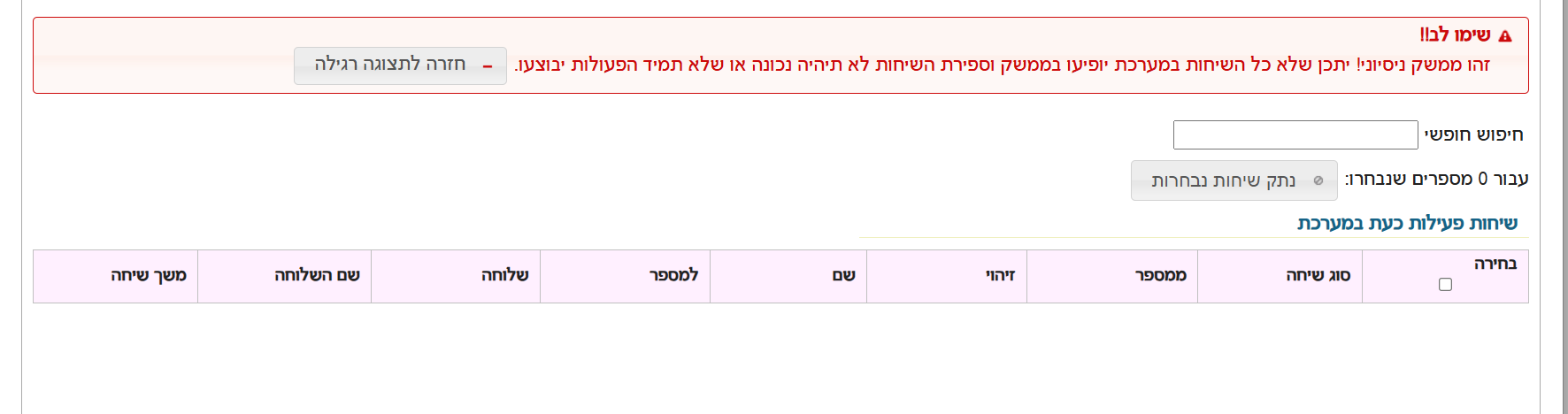
                      @אA בלשונית באתר של שיחות נכנסות תצוגה חדשה

                      א תגובה 1 תגובה אחרונה תגובה ציטוט 0
                      • B
                        BEN ZION @אA נערך לאחרונה על ידי

                        @אA כתב בשמות למספרי טלפון:

                        @BEN-ZION
                        אני רואה שהוא מעלה לקובץ שנמצא בתוך תקיה.
                        זה בכוונה?

                        איזה קובץ של הרשימת צינתוקים זה טעות
                        הקובץ השני ככה קראתי שזה המקום שלו

                        א תגובה 1 תגובה אחרונה תגובה ציטוט 0
                        • א
                          אA @BEN ZION נערך לאחרונה על ידי

                          @BEN-ZION
                          בטח שיכול.
                          ברגע שיש שמות בקובץ הנ"ל , ומוגדר בשלוחה הראשית זיהוי (תעשה לפי טלפון) זה מוצג בלשונית הנ"ל.
                          תוכל ליצור לך קובץ כמו הלשונית הנ"ל, רק שכדי שהוא ירוץ כל הזמן צריך שרת או סקריפט שירוץ כל הזמן.

                          תגובה 1 תגובה אחרונה תגובה ציטוט 0
                          • א
                            אA @BEN ZION נערך לאחרונה על ידי

                            @BEN-ZION
                            אתה צודק.
                            אבל אם זה בשביל שיהיה רשום בלשונית אז בשלוחה הראשית תוסיף את נתיב הקובץ כדי שידע לקחת ממנו.

                            B תגובה 1 תגובה אחרונה תגובה ציטוט 0
                            • B
                              BEN ZION @אA נערך לאחרונה על ידי

                              @אA מה להגדיר בשלוחה ראשית

                              א 2 תגובות תגובה אחרונה תגובה ציטוט 0
                              • א
                                אA @BEN ZION נערך לאחרונה על ידי

                                @BEN-ZION

                                enter_id=yes
                                enter_id_type=phone
                                login_add_val_name=yes
                                login_add_val_name_folder=/EnterID
                                

                                הרחבה כאן
                                https://f2.freeivr.co.il/topic/752/טעינת-שמות-זיהוי-מספר-עם-השם-במערכת?_=1594036098976

                                תגובה 1 תגובה אחרונה תגובה ציטוט 1
                                • הנושא סומן כנפתר  B BEN ZION 
                                • א
                                  אA @BEN ZION נערך לאחרונה על ידי

                                  @BEN-ZION
                                  תרצה לבדוק?

                                  <!DOCTYPE html>
                                  <html lang="he" dir="rtl">
                                  <head>
                                      <meta charset="UTF-8">
                                      <meta name="viewport" content="width=device-width, initial-scale=1.0">
                                      <title>ניהול קבצים - ימות המשיח</title>
                                      <style>
                                          :root {
                                              --primary-color: #4a90e2;
                                              --secondary-color: #2ecc71;
                                              --danger-color: #e74c3c;
                                              --bg-color: #f4f7f6;
                                              --text-color: #333;
                                              --card-bg: #ffffff;
                                              --border-radius: 12px;
                                          }
                                  
                                          body {
                                              font-family: 'Segoe UI', Tahoma, Geneva, Verdana, sans-serif;
                                              background-color: var(--bg-color);
                                              color: var(--text-color);
                                              margin: 0;
                                              padding: 20px;
                                              display: flex;
                                              justify-content: center;
                                          }
                                  
                                          .container {
                                              background-color: var(--card-bg);
                                              padding: 30px;
                                              border-radius: var(--border-radius);
                                              box-shadow: 0 10px 25px rgba(0,0,0,0.1);
                                              max-width: 650px;
                                              width: 100%;
                                          }
                                  
                                          h2 {
                                              text-align: center;
                                              color: var(--primary-color);
                                              margin-bottom: 30px;
                                              font-weight: 600;
                                          }
                                  
                                          .input-group {
                                              margin-bottom: 20px;
                                          }
                                  
                                          label {
                                              display: block;
                                              margin-bottom: 8px;
                                              font-weight: bold;
                                              font-size: 0.9em;
                                          }
                                  
                                          input[type="text"], textarea {
                                              width: 100%;
                                              padding: 12px;
                                              border: 2px solid #eee;
                                              border-radius: 8px;
                                              box-sizing: border-box;
                                              transition: border-color 0.3s;
                                              font-size: 16px;
                                          }
                                  
                                          input[type="text"]:focus, textarea:focus {
                                              border-color: var(--primary-color);
                                              outline: none;
                                          }
                                  
                                          .flex-row {
                                              display: flex;
                                              gap: 10px;
                                              align-items: center;
                                          }
                                  
                                          button {
                                              padding: 12px 20px;
                                              border: none;
                                              border-radius: 8px;
                                              cursor: pointer;
                                              font-weight: bold;
                                              transition: all 0.3s;
                                              display: inline-flex;
                                              align-items: center;
                                              justify-content: center;
                                              white-space: nowrap;
                                          }
                                  
                                          .btn-load {
                                              background-color: var(--primary-color);
                                              color: white;
                                              min-width: 120px;
                                          }
                                  
                                          .btn-load:hover { background-color: #357abd; transform: translateY(-1px); }
                                  
                                          .btn-add {
                                              background-color: var(--secondary-color);
                                              color: white;
                                              font-size: 0.9em;
                                              gap: 8px;
                                          }
                                  
                                          .btn-add:hover { background-color: #27ae60; }
                                  
                                          .btn-delete {
                                              background-color: var(--danger-color);
                                              color: white;
                                              padding: 10px;
                                              min-width: 40px;
                                          }
                                  
                                          .btn-delete:hover { background-color: #c0392b; }
                                  
                                          .file-input-wrapper {
                                              display: flex;
                                              gap: 8px;
                                              margin-bottom: 10px;
                                              animation: fadeIn 0.3s ease;
                                          }
                                  
                                          @keyframes fadeIn {
                                              from { opacity: 0; transform: translateY(10px); }
                                              to { opacity: 1; transform: translateY(0); }
                                          }
                                  
                                          textarea {
                                              height: 180px;
                                              resize: vertical;
                                              background-color: #fafafa;
                                              font-family: monospace;
                                              margin-top: 10px;
                                          }
                                  
                                          .btn-upload {
                                              background-color: #e67e22;
                                              color: white;
                                              width: 100%;
                                              font-size: 1.1em;
                                              margin-top: 20px;
                                              box-shadow: 0 4px 15px rgba(230, 126, 34, 0.3);
                                          }
                                  
                                          .btn-upload:hover { background-color: #d35400; }
                                      </style>
                                  </head>
                                  <body>
                                  
                                  <div class="container">
                                      <h2>ניהול קבצי מערכת</h2>
                                  
                                      <div class="input-group">
                                          <label>טוקן אישי</label>
                                          <input type="text" id="token" placeholder="הכנס את ה-Token שלך">
                                      </div>
                                  
                                      <div class="input-group">
                                          <label>מספר שלוחה</label>
                                          <div class="flex-row">
                                              <input type="text" id="ext" placeholder="למשל: 1">
                                              <button class="btn-load" onclick="loadFirstFile()">טען תוכן קובץ</button>
                                          </div>
                                      </div>
                                  
                                      <div class="input-group">
                                          <label>שמות קבצים ליעד</label>
                                          <div id="file-fields">
                                              <div class="file-input-wrapper">
                                                  <input type="text" class="filename-input" placeholder="שם קובץ (למשל ext.ini)">
                                                  <button class="btn-add" onclick="addNewFileField()">קובץ נוסף +</button>
                                              </div>
                                          </div>
                                      </div>
                                  
                                      <div class="input-group">
                                          <label>תוכן הקובץ</label>
                                          <textarea id="fileContents" placeholder="כאן יופיע תוכן הקובץ לאחר הטעינה..."></textarea>
                                      </div>
                                  
                                      <button class="btn-upload" onclick="uploadAll()">העלה טקסט</button>
                                  </div>
                                  
                                  <script>
                                      const baseUrl = 'https://www.call2all.co.il/ym/api/';
                                  
                                      function addNewFileField() {
                                          const container = document.getElementById('file-fields');
                                          const newDiv = document.createElement('div');
                                          newDiv.className = 'file-input-wrapper';
                                          
                                          // יצירת שדה קלט וכפתור מחיקה
                                          newDiv.innerHTML = `
                                              <input type="text" class="filename-input" placeholder="שם קובץ נוסף">
                                              <button class="btn-delete" onclick="removeField(this)" title="מחק שדה">🗑️</button>
                                          `;
                                          container.appendChild(newDiv);
                                      }
                                  
                                      function removeField(btn) {
                                          // מחיקת האלמנט שעוטף את הכפתור (ה-div של השורה)
                                          btn.parentElement.remove();
                                      }
                                  
                                      async function loadFirstFile() {
                                          const token = document.getElementById('token').value;
                                          const ext = document.getElementById('ext').value;
                                          const firstInput = document.querySelector('.filename-input');
                                          const fileName = firstInput ? firstInput.value : '';
                                  
                                          if (!token || !fileName) {
                                              alert("נא למלא טוקן ושם קובץ");
                                              return;
                                          }
                                  
                                          const path = `ivr2:${ext}/${fileName}`;
                                          try {
                                              const response = await fetch(`${baseUrl}GetTextFile?token=${token}&what=${path}`);
                                              const data = await response.json();
                                              if (data.responseStatus === "OK") {
                                                  document.getElementById('fileContents').value = data.contents || "הקובץ ריק";
                                              } else {
                                                  alert("שגיאה: " + (data.message || "לא ניתן לטעון קובץ"));
                                              }
                                          } catch (error) { alert("שגיאת תקשורת"); }
                                      }
                                  
                                      async function uploadAll() {
                                          const token = document.getElementById('token').value;
                                          const ext = document.getElementById('ext').value;
                                          const content = document.getElementById('fileContents').value;
                                          const fileInputs = document.querySelectorAll('.filename-input');
                                  
                                          if (!token) { alert("אנא הזן טוקן"); return; }
                                  
                                          let successCount = 0;
                                          let fileCount = 0;
                                  
                                          for (let input of fileInputs) {
                                              const fileName = input.value;
                                              if (!fileName) continue;
                                              
                                              fileCount++;
                                              const path = `ivr2:${ext}/${fileName}`;
                                              const url = `${baseUrl}UploadTextFile?token=${token}&what=${path}&contents=${encodeURIComponent(content)}`;
                                              
                                              try {
                                                  const res = await fetch(url);
                                                  const data = await res.json();
                                                  if (data.responseStatus === "OK") successCount++;
                                              } catch (e) { console.error(e); }
                                          }
                                  
                                          if (fileCount === 0) {
                                              alert("לא הוזנו שמות קבצים");
                                          } else {
                                              alert(`הסתיים! ${successCount} מתוך ${fileCount} קבצים עודכנו בהצלחה.`);
                                          }
                                      }
                                  </script>
                                  
                                  </body>
                                  </html>
                                  
                                  B תגובה 1 תגובה אחרונה תגובה ציטוט 0
                                  • B
                                    BEN ZION @אA נערך לאחרונה על ידי

                                    @אA לא הבנתי מה לבדוק (קשור לנושא למעלה? אני רציתי להעלות טבלה מקובץ אקסל)
                                    בכל אופן זה עובד זה מציג את תוכן הקובץ ומעדכן נתונים

                                    א תגובה 1 תגובה אחרונה תגובה ציטוט 0
                                    • א
                                      אA @BEN ZION נערך לאחרונה על ידי

                                      @BEN-ZION
                                      גם לקובץ השני?
                                      להוסיף אפשרות להעלות טבלה

                                      B תגובה 1 תגובה אחרונה תגובה ציטוט 0
                                      • B
                                        BEN ZION @אA נערך לאחרונה על ידי

                                        @אA אי אפשר את שתי הקבצים כי הם בניתוב שונה

                                        א 2 תגובות תגובה אחרונה תגובה ציטוט 0
                                        • א
                                          אA @BEN ZION נערך לאחרונה על ידי

                                          @BEN-ZION
                                          הוספתי פונקציה שתעלה לשני הקבצים שבשדות

                                          תגובה 1 תגובה אחרונה תגובה ציטוט 0
                                          • א
                                            אA @BEN ZION נערך לאחרונה על ידי

                                            @BEN-ZION
                                            הנה הקוד כולל אפשרות להעלות קובץ אקסל או טקסט

                                            <!DOCTYPE html>
                                            <html lang="he" dir="rtl">
                                            <head>
                                            <meta charset="UTF-8">
                                            <meta name="viewport" content="width=device-width, initial-scale=1.0">
                                            <title>ניהול קבצים - ימות המשיח</title>
                                            <style>
                                            :root {
                                            --primary-color: #4a90e2;
                                            --secondary-color: #2ecc71;
                                            --danger-color: #e74c3c;
                                            --bg-color: #f4f7f6;
                                            --text-color: #333;
                                            --card-bg: #ffffff;
                                            --border-radius: 12px;
                                            }
                                                body {
                                                    font-family: 'Segoe UI', Tahoma, Geneva, Verdana, sans-serif;
                                                    background-color: var(--bg-color);
                                                    color: var(--text-color);
                                                    margin: 0;
                                                    padding: 20px;
                                                    display: flex;
                                                    justify-content: center;
                                                }
                                             
                                                .container {
                                                    background-color: var(--card-bg);
                                                    padding: 30px;
                                                    border-radius: var(--border-radius);
                                                    box-shadow: 0 10px 25px rgba(0,0,0,0.1);
                                                    max-width: 650px;
                                                    width: 100%;
                                                }
                                             
                                                h2 {
                                                    text-align: center;
                                                    color: var(--primary-color);
                                                    margin-bottom: 30px;
                                                    font-weight: 600;
                                                }
                                             
                                                .input-group {
                                                    margin-bottom: 20px;
                                                }
                                             
                                                label {
                                                    display: block;
                                                    margin-bottom: 8px;
                                                    font-weight: bold;
                                                    font-size: 0.9em;
                                                }
                                             
                                                input[type="text"], textarea {
                                                    width: 100%;
                                                    padding: 12px;
                                                    border: 2px solid #eee;
                                                    border-radius: 8px;
                                                    box-sizing: border-box;
                                                    transition: border-color 0.3s;
                                                    font-size: 16px;
                                                }
                                             
                                                input[type="text"]:focus, textarea:focus {
                                                    border-color: var(--primary-color);
                                                    outline: none;
                                                }
                                             
                                                .flex-row {
                                                    display: flex;
                                                    gap: 10px;
                                                    align-items: center;
                                                }
                                             
                                                button {
                                                    padding: 12px 20px;
                                                    border: none;
                                                    border-radius: 8px;
                                                    cursor: pointer;
                                                    font-weight: bold;
                                                    transition: all 0.3s;
                                                    display: inline-flex;
                                                    align-items: center;
                                                    justify-content: center;
                                                    white-space: nowrap;
                                                }
                                             
                                                .btn-load {
                                                    background-color: var(--primary-color);
                                                    color: white;
                                                    min-width: 120px;
                                                }
                                             
                                                .btn-load:hover { background-color: #357abd; transform: translateY(-1px); }
                                             
                                                .btn-add {
                                                    background-color: var(--secondary-color);
                                                    color: white;
                                                    font-size: 0.9em;
                                                    gap: 8px;
                                                }
                                             
                                                .btn-add:hover { background-color: #27ae60; }
                                             
                                                .btn-delete {
                                                    background-color: var(--danger-color);
                                                    color: white;
                                                    padding: 10px;
                                                    min-width: 40px;
                                                }
                                             
                                                .btn-delete:hover { background-color: #c0392b; }
                                             
                                                .file-input-wrapper {
                                                    display: flex;
                                                    gap: 8px;
                                                    margin-bottom: 10px;
                                                    animation: fadeIn 0.3s ease;
                                                }
                                             
                                                @keyframes fadeIn {
                                                    from { opacity: 0; transform: translateY(10px); }
                                                    to { opacity: 1; transform: translateY(0); }
                                                }
                                             
                                                textarea {
                                                    height: 180px;
                                                    resize: vertical;
                                                    background-color: #fafafa;
                                                    font-family: monospace;
                                                    margin-top: 10px;
                                                }
                                             
                                                /* עיצוב חדש לאזור העלאת קובץ מקומי */
                                                .file-upload-zone {
                                                    margin: 15px 0;
                                                    padding: 15px;
                                                    border: 2px dashed #ccc;
                                                    border-radius: 8px;
                                                    text-align: center;
                                                    background-color: #f9f9f9;
                                                }
                                             
                                                .custom-file-upload {
                                                    display: inline-block;
                                                    padding: 8px 16px;
                                                    cursor: pointer;
                                                    background-color: #fff;
                                                    border: 1px solid var(--primary-color);
                                                    color: var(--primary-color);
                                                    border-radius: 4px;
                                                    font-weight: bold;
                                                    transition: 0.3s;
                                                }
                                             
                                                .custom-file-upload:hover {
                                                    background-color: var(--primary-color);
                                                    color: white;
                                                }
                                             
                                                #localFileInput {
                                                    display: none;
                                                }
                                             
                                                .btn-upload {
                                                    background-color: #e67e22;
                                                    color: white;
                                                    width: 100%;
                                                    font-size: 1.1em;
                                                    margin-top: 10px;
                                                    box-shadow: 0 4px 15px rgba(230, 126, 34, 0.3);
                                                }
                                             
                                                .btn-upload:hover { background-color: #d35400; }
                                            </style>
                                            </head>
                                            <body>
                                            
                                            <div class="container">
                                            <h2>ניהול קבצי מערכת</h2>
                                            
                                            <div class="input-group">
                                                <label>טוקן אישי</label>
                                                <input type="text" id="token" placeholder="הכנס את ה-Token שלך">
                                            </div>
                                             
                                            <div class="input-group">
                                                <label>מספר שלוחה</label>
                                                <div class="flex-row">
                                                    <input type="text" id="ext" placeholder="למשל: 1">
                                                    <button class="btn-load" onclick="loadFirstFile()">טען תוכן מהשרת</button>
                                                </div>
                                            </div>
                                             
                                            <div class="input-group">
                                                <label>שמות קבצים ליעד</label>
                                                <div id="file-fields">
                                                    <div class="file-input-wrapper">
                                                        <input type="text" class="filename-input" placeholder="שם קובץ (למשל ext.ini)">
                                                        <button class="btn-add" onclick="addNewFileField()">קובץ נוסף +</button>
                                                    </div>
                                                </div>
                                            </div>
                                             
                                            <div class="input-group">
                                                <label>תוכן הקובץ</label>
                                                <textarea id="fileContents" placeholder="כאן יופיע תוכן הקובץ..."></textarea>
                                                
                                                <div class="file-upload-zone">
                                                    <label for="localFileInput" class="custom-file-upload">
                                                        📂 טען טקסט מקובץ במחשב
                                                    </label>
                                                    <input type="file" id="localFileInput" accept=".txt,.ini,.csv,.text" onchange="readLocalFile(this)">
                                                    <div id="fileNameDisplay" style="margin-top: 8px; font-size: 0.8em; color: #666;"></div>
                                                </div>
                                            </div>
                                             
                                            <button class="btn-upload" onclick="uploadAll()">העלה קבצים למערכת</button>
                                            </div>
                                            
                                            <script>
                                            const baseUrl = 'https://www.call2all.co.il/ym/api/';
                                            
                                            // פונקציה לקריאת קובץ מקומי מהמחשב
                                            function readLocalFile(input) {
                                                const file = input.files[0];
                                                if (!file) return;
                                             
                                                const reader = new FileReader();
                                                document.getElementById('fileNameDisplay').innerText = "קובץ שנבחר: " + file.name;
                                             
                                                reader.onload = function(e) {
                                                    document.getElementById('fileContents').value = e.target.result;
                                                };
                                             
                                                reader.readAsText(file);
                                            }
                                             
                                            function addNewFileField() {
                                                const container = document.getElementById('file-fields');
                                                const newDiv = document.createElement('div');
                                                newDiv.className = 'file-input-wrapper';
                                                newDiv.innerHTML = `
                                                    <input type="text" class="filename-input" placeholder="שם קובץ נוסף">
                                                    <button class="btn-delete" onclick="removeField(this)" title="מחק שדה">🗑️</button>
                                                `;
                                                container.appendChild(newDiv);
                                            }
                                             
                                            function removeField(btn) {
                                                btn.parentElement.remove();
                                            }
                                             
                                            async function loadFirstFile() {
                                                const token = document.getElementById('token').value;
                                                const ext = document.getElementById('ext').value;
                                                const firstInput = document.querySelector('.filename-input');
                                                const fileName = firstInput ? firstInput.value : '';
                                             
                                                if (!token || !fileName) {
                                                    alert("נא למלא טוקן ושם קובץ בתיבה הראשונה");
                                                    return;
                                                }
                                             
                                                const path = `ivr2:${ext}/${fileName}`;
                                                try {
                                                    const response = await fetch(`${baseUrl}GetTextFile?token=${token}&what=${path}`);
                                                    const data = await response.json();
                                                    if (data.responseStatus === "OK") {
                                                        document.getElementById('fileContents').value = data.contents || "הקובץ ריק";
                                                    } else {
                                                        alert("שגיאה: " + (data.message || "לא ניתן לטעון קובץ"));
                                                    }
                                                } catch (error) { alert("שגיאת תקשורת"); }
                                            }
                                             
                                            async function uploadAll() {
                                                const token = document.getElementById('token').value;
                                                const ext = document.getElementById('ext').value;
                                                const content = document.getElementById('fileContents').value;
                                                const fileInputs = document.querySelectorAll('.filename-input');
                                             
                                                if (!token) { alert("אנא הזן טוקן"); return; }
                                             
                                                let successCount = 0;
                                                let fileCount = 0;
                                             
                                                for (let input of fileInputs) {
                                                    const fileName = input.value;
                                                    if (!fileName) continue;
                                                    
                                                    fileCount++;
                                                    const path = `ivr2:${ext}/${fileName}`;
                                                    const url = `${baseUrl}UploadTextFile?token=${token}&what=${path}&contents=${encodeURIComponent(content)}`;
                                                    
                                                    try {
                                                        const res = await fetch(url);
                                                        const data = await res.json();
                                                        if (data.responseStatus === "OK") successCount++;
                                                    } catch (e) { console.error(e); }
                                                }
                                             
                                                if (fileCount === 0) {
                                                    alert("לא הוזנו שמות קבצים ליעד");
                                                } else {
                                                    alert(`הסתיים! ${successCount} מתוך ${fileCount} קבצים עודכנו בהצלחה.`);
                                                }
                                            }
                                            </script>
                                            
                                            </body>
                                            </html>
                                            
                                            תגובה 1 תגובה אחרונה תגובה ציטוט 1
                                            • פוסט ראשון
                                              פוסט אחרון