שמות למספרי טלפון
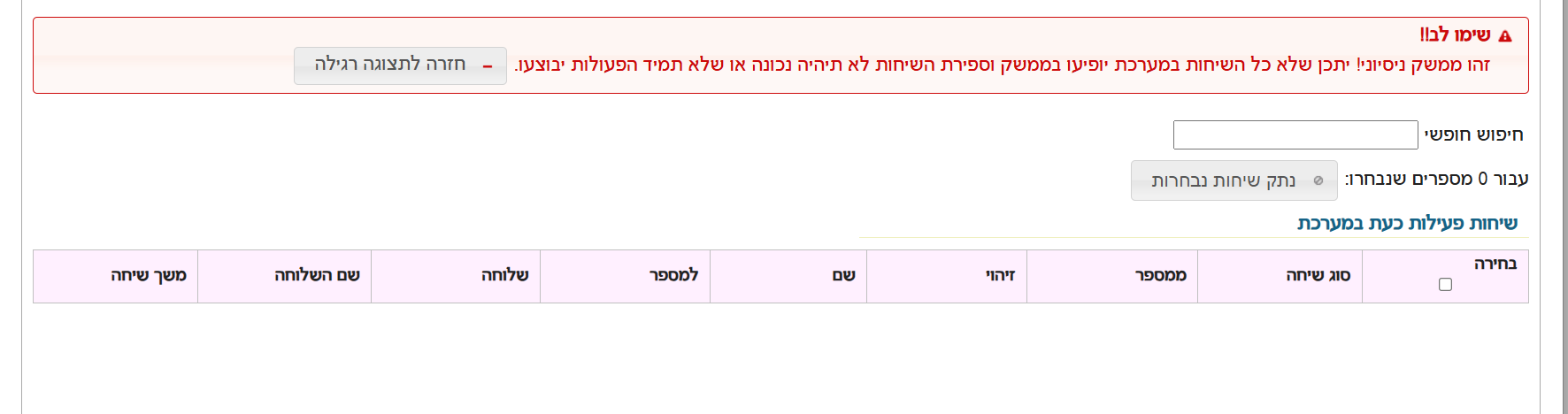
-
@אA זה יצר את הקובץ והעלה אותו בפועל השמות לא מופיעים
-
@BEN-ZION
עכשיו עדיין לא? -
@אA לא
אבל אין לי דוח שיחות זה רק דרך הלשונית ואני לא יודע אם בכלל זה יכול להציג שם -
@BEN-ZION
בלשונית של הקובץ שלך? -
@BEN-ZION
אני רואה שהוא מעלה לקובץ שנמצא בתוך תקיה.
זה בכוונה? -
@אA בלשונית באתר של שיחות נכנסות תצוגה חדשה
-
@אA כתב בשמות למספרי טלפון:
@BEN-ZION
אני רואה שהוא מעלה לקובץ שנמצא בתוך תקיה.
זה בכוונה?איזה קובץ של הרשימת צינתוקים זה טעות
הקובץ השני ככה קראתי שזה המקום שלו -
@BEN-ZION
בטח שיכול.
ברגע שיש שמות בקובץ הנ"ל , ומוגדר בשלוחה הראשית זיהוי (תעשה לפי טלפון) זה מוצג בלשונית הנ"ל.
תוכל ליצור לך קובץ כמו הלשונית הנ"ל, רק שכדי שהוא ירוץ כל הזמן צריך שרת או סקריפט שירוץ כל הזמן. -
@BEN-ZION
אתה צודק.
אבל אם זה בשביל שיהיה רשום בלשונית אז בשלוחה הראשית תוסיף את נתיב הקובץ כדי שידע לקחת ממנו. -
@אA מה להגדיר בשלוחה ראשית
-
enter_id=yes
enter_id_type=phone
login_add_val_name=yes
login_add_val_name_folder=/EnterID
הרחבה כאן
https://f2.freeivr.co.il/topic/752/טעינת-שמות-זיהוי-מספר-עם-השם-במערכת?_=1594036098976 -
B BEN ZION סימן נושא זה כנפתר
-
@BEN-ZION
תרצה לבדוק?<!DOCTYPE html> <html lang="he" dir="rtl"> <head> <meta charset="UTF-8"> <meta name="viewport" content="width=device-width, initial-scale=1.0"> <title>ניהול קבצים - ימות המשיח</title> <style> :root { --primary-color: #4a90e2; --secondary-color: #2ecc71; --danger-color: #e74c3c; --bg-color: #f4f7f6; --text-color: #333; --card-bg: #ffffff; --border-radius: 12px; } body { font-family: 'Segoe UI', Tahoma, Geneva, Verdana, sans-serif; background-color: var(--bg-color); color: var(--text-color); margin: 0; padding: 20px; display: flex; justify-content: center; } .container { background-color: var(--card-bg); padding: 30px; border-radius: var(--border-radius); box-shadow: 0 10px 25px rgba(0,0,0,0.1); max-width: 650px; width: 100%; } h2 { text-align: center; color: var(--primary-color); margin-bottom: 30px; font-weight: 600; } .input-group { margin-bottom: 20px; } label { display: block; margin-bottom: 8px; font-weight: bold; font-size: 0.9em; } input[type="text"], textarea { width: 100%; padding: 12px; border: 2px solid #eee; border-radius: 8px; box-sizing: border-box; transition: border-color 0.3s; font-size: 16px; } input[type="text"]:focus, textarea:focus { border-color: var(--primary-color); outline: none; } .flex-row { display: flex; gap: 10px; align-items: center; } button { padding: 12px 20px; border: none; border-radius: 8px; cursor: pointer; font-weight: bold; transition: all 0.3s; display: inline-flex; align-items: center; justify-content: center; white-space: nowrap; } .btn-load { background-color: var(--primary-color); color: white; min-width: 120px; } .btn-load:hover { background-color: #357abd; transform: translateY(-1px); } .btn-add { background-color: var(--secondary-color); color: white; font-size: 0.9em; gap: 8px; } .btn-add:hover { background-color: #27ae60; } .btn-delete { background-color: var(--danger-color); color: white; padding: 10px; min-width: 40px; } .btn-delete:hover { background-color: #c0392b; } .file-input-wrapper { display: flex; gap: 8px; margin-bottom: 10px; animation: fadeIn 0.3s ease; } @keyframes fadeIn { from { opacity: 0; transform: translateY(10px); } to { opacity: 1; transform: translateY(0); } } textarea { height: 180px; resize: vertical; background-color: #fafafa; font-family: monospace; margin-top: 10px; } .btn-upload { background-color: #e67e22; color: white; width: 100%; font-size: 1.1em; margin-top: 20px; box-shadow: 0 4px 15px rgba(230, 126, 34, 0.3); } .btn-upload:hover { background-color: #d35400; } </style> </head> <body> <div class="container"> <h2>ניהול קבצי מערכת</h2> <div class="input-group"> <label>טוקן אישי</label> <input type="text" id="token" placeholder="הכנס את ה-Token שלך"> </div> <div class="input-group"> <label>מספר שלוחה</label> <div class="flex-row"> <input type="text" id="ext" placeholder="למשל: 1"> <button class="btn-load" onclick="loadFirstFile()">טען תוכן קובץ</button> </div> </div> <div class="input-group"> <label>שמות קבצים ליעד</label> <div id="file-fields"> <div class="file-input-wrapper"> <input type="text" class="filename-input" placeholder="שם קובץ (למשל ext.ini)"> <button class="btn-add" onclick="addNewFileField()">קובץ נוסף +</button> </div> </div> </div> <div class="input-group"> <label>תוכן הקובץ</label> <textarea id="fileContents" placeholder="כאן יופיע תוכן הקובץ לאחר הטעינה..."></textarea> </div> <button class="btn-upload" onclick="uploadAll()">העלה טקסט</button> </div> <script> const baseUrl = 'https://www.call2all.co.il/ym/api/'; function addNewFileField() { const container = document.getElementById('file-fields'); const newDiv = document.createElement('div'); newDiv.className = 'file-input-wrapper'; // יצירת שדה קלט וכפתור מחיקה newDiv.innerHTML = ` <input type="text" class="filename-input" placeholder="שם קובץ נוסף"> <button class="btn-delete" onclick="removeField(this)" title="מחק שדה">🗑️</button> `; container.appendChild(newDiv); } function removeField(btn) { // מחיקת האלמנט שעוטף את הכפתור (ה-div של השורה) btn.parentElement.remove(); } async function loadFirstFile() { const token = document.getElementById('token').value; const ext = document.getElementById('ext').value; const firstInput = document.querySelector('.filename-input'); const fileName = firstInput ? firstInput.value : ''; if (!token || !fileName) { alert("נא למלא טוקן ושם קובץ"); return; } const path = `ivr2:${ext}/${fileName}`; try { const response = await fetch(`${baseUrl}GetTextFile?token=${token}&what=${path}`); const data = await response.json(); if (data.responseStatus === "OK") { document.getElementById('fileContents').value = data.contents || "הקובץ ריק"; } else { alert("שגיאה: " + (data.message || "לא ניתן לטעון קובץ")); } } catch (error) { alert("שגיאת תקשורת"); } } async function uploadAll() { const token = document.getElementById('token').value; const ext = document.getElementById('ext').value; const content = document.getElementById('fileContents').value; const fileInputs = document.querySelectorAll('.filename-input'); if (!token) { alert("אנא הזן טוקן"); return; } let successCount = 0; let fileCount = 0; for (let input of fileInputs) { const fileName = input.value; if (!fileName) continue; fileCount++; const path = `ivr2:${ext}/${fileName}`; const url = `${baseUrl}UploadTextFile?token=${token}&what=${path}&contents=${encodeURIComponent(content)}`; try { const res = await fetch(url); const data = await res.json(); if (data.responseStatus === "OK") successCount++; } catch (e) { console.error(e); } } if (fileCount === 0) { alert("לא הוזנו שמות קבצים"); } else { alert(`הסתיים! ${successCount} מתוך ${fileCount} קבצים עודכנו בהצלחה.`); } } </script> </body> </html> -
@אA לא הבנתי מה לבדוק (קשור לנושא למעלה? אני רציתי להעלות טבלה מקובץ אקסל)
בכל אופן זה עובד זה מציג את תוכן הקובץ ומעדכן נתונים -
@BEN-ZION
גם לקובץ השני?
להוסיף אפשרות להעלות טבלה -
@אA אי אפשר את שתי הקבצים כי הם בניתוב שונה
-
@BEN-ZION
הוספתי פונקציה שתעלה לשני הקבצים שבשדות -
@BEN-ZION
הנה הקוד כולל אפשרות להעלות קובץ אקסל או טקסט<!DOCTYPE html> <html lang="he" dir="rtl"> <head> <meta charset="UTF-8"> <meta name="viewport" content="width=device-width, initial-scale=1.0"> <title>ניהול קבצים - ימות המשיח</title> <style> :root { --primary-color: #4a90e2; --secondary-color: #2ecc71; --danger-color: #e74c3c; --bg-color: #f4f7f6; --text-color: #333; --card-bg: #ffffff; --border-radius: 12px; } body { font-family: 'Segoe UI', Tahoma, Geneva, Verdana, sans-serif; background-color: var(--bg-color); color: var(--text-color); margin: 0; padding: 20px; display: flex; justify-content: center; } .container { background-color: var(--card-bg); padding: 30px; border-radius: var(--border-radius); box-shadow: 0 10px 25px rgba(0,0,0,0.1); max-width: 650px; width: 100%; } h2 { text-align: center; color: var(--primary-color); margin-bottom: 30px; font-weight: 600; } .input-group { margin-bottom: 20px; } label { display: block; margin-bottom: 8px; font-weight: bold; font-size: 0.9em; } input[type="text"], textarea { width: 100%; padding: 12px; border: 2px solid #eee; border-radius: 8px; box-sizing: border-box; transition: border-color 0.3s; font-size: 16px; } input[type="text"]:focus, textarea:focus { border-color: var(--primary-color); outline: none; } .flex-row { display: flex; gap: 10px; align-items: center; } button { padding: 12px 20px; border: none; border-radius: 8px; cursor: pointer; font-weight: bold; transition: all 0.3s; display: inline-flex; align-items: center; justify-content: center; white-space: nowrap; } .btn-load { background-color: var(--primary-color); color: white; min-width: 120px; } .btn-load:hover { background-color: #357abd; transform: translateY(-1px); } .btn-add { background-color: var(--secondary-color); color: white; font-size: 0.9em; gap: 8px; } .btn-add:hover { background-color: #27ae60; } .btn-delete { background-color: var(--danger-color); color: white; padding: 10px; min-width: 40px; } .btn-delete:hover { background-color: #c0392b; } .file-input-wrapper { display: flex; gap: 8px; margin-bottom: 10px; animation: fadeIn 0.3s ease; } @keyframes fadeIn { from { opacity: 0; transform: translateY(10px); } to { opacity: 1; transform: translateY(0); } } textarea { height: 180px; resize: vertical; background-color: #fafafa; font-family: monospace; margin-top: 10px; } /* עיצוב חדש לאזור העלאת קובץ מקומי */ .file-upload-zone { margin: 15px 0; padding: 15px; border: 2px dashed #ccc; border-radius: 8px; text-align: center; background-color: #f9f9f9; } .custom-file-upload { display: inline-block; padding: 8px 16px; cursor: pointer; background-color: #fff; border: 1px solid var(--primary-color); color: var(--primary-color); border-radius: 4px; font-weight: bold; transition: 0.3s; } .custom-file-upload:hover { background-color: var(--primary-color); color: white; } #localFileInput { display: none; } .btn-upload { background-color: #e67e22; color: white; width: 100%; font-size: 1.1em; margin-top: 10px; box-shadow: 0 4px 15px rgba(230, 126, 34, 0.3); } .btn-upload:hover { background-color: #d35400; } </style> </head> <body> <div class="container"> <h2>ניהול קבצי מערכת</h2> <div class="input-group"> <label>טוקן אישי</label> <input type="text" id="token" placeholder="הכנס את ה-Token שלך"> </div> <div class="input-group"> <label>מספר שלוחה</label> <div class="flex-row"> <input type="text" id="ext" placeholder="למשל: 1"> <button class="btn-load" onclick="loadFirstFile()">טען תוכן מהשרת</button> </div> </div> <div class="input-group"> <label>שמות קבצים ליעד</label> <div id="file-fields"> <div class="file-input-wrapper"> <input type="text" class="filename-input" placeholder="שם קובץ (למשל ext.ini)"> <button class="btn-add" onclick="addNewFileField()">קובץ נוסף +</button> </div> </div> </div> <div class="input-group"> <label>תוכן הקובץ</label> <textarea id="fileContents" placeholder="כאן יופיע תוכן הקובץ..."></textarea> <div class="file-upload-zone"> <label for="localFileInput" class="custom-file-upload"> 📂 טען טקסט מקובץ במחשב </label> <input type="file" id="localFileInput" accept=".txt,.ini,.csv,.text" onchange="readLocalFile(this)"> <div id="fileNameDisplay" style="margin-top: 8px; font-size: 0.8em; color: #666;"></div> </div> </div> <button class="btn-upload" onclick="uploadAll()">העלה קבצים למערכת</button> </div> <script> const baseUrl = 'https://www.call2all.co.il/ym/api/'; // פונקציה לקריאת קובץ מקומי מהמחשב function readLocalFile(input) { const file = input.files[0]; if (!file) return; const reader = new FileReader(); document.getElementById('fileNameDisplay').innerText = "קובץ שנבחר: " + file.name; reader.onload = function(e) { document.getElementById('fileContents').value = e.target.result; }; reader.readAsText(file); } function addNewFileField() { const container = document.getElementById('file-fields'); const newDiv = document.createElement('div'); newDiv.className = 'file-input-wrapper'; newDiv.innerHTML = ` <input type="text" class="filename-input" placeholder="שם קובץ נוסף"> <button class="btn-delete" onclick="removeField(this)" title="מחק שדה">🗑️</button> `; container.appendChild(newDiv); } function removeField(btn) { btn.parentElement.remove(); } async function loadFirstFile() { const token = document.getElementById('token').value; const ext = document.getElementById('ext').value; const firstInput = document.querySelector('.filename-input'); const fileName = firstInput ? firstInput.value : ''; if (!token || !fileName) { alert("נא למלא טוקן ושם קובץ בתיבה הראשונה"); return; } const path = `ivr2:${ext}/${fileName}`; try { const response = await fetch(`${baseUrl}GetTextFile?token=${token}&what=${path}`); const data = await response.json(); if (data.responseStatus === "OK") { document.getElementById('fileContents').value = data.contents || "הקובץ ריק"; } else { alert("שגיאה: " + (data.message || "לא ניתן לטעון קובץ")); } } catch (error) { alert("שגיאת תקשורת"); } } async function uploadAll() { const token = document.getElementById('token').value; const ext = document.getElementById('ext').value; const content = document.getElementById('fileContents').value; const fileInputs = document.querySelectorAll('.filename-input'); if (!token) { alert("אנא הזן טוקן"); return; } let successCount = 0; let fileCount = 0; for (let input of fileInputs) { const fileName = input.value; if (!fileName) continue; fileCount++; const path = `ivr2:${ext}/${fileName}`; const url = `${baseUrl}UploadTextFile?token=${token}&what=${path}&contents=${encodeURIComponent(content)}`; try { const res = await fetch(url); const data = await res.json(); if (data.responseStatus === "OK") successCount++; } catch (e) { console.error(e); } } if (fileCount === 0) { alert("לא הוזנו שמות קבצים ליעד"); } else { alert(`הסתיים! ${successCount} מתוך ${fileCount} קבצים עודכנו בהצלחה.`); } } </script> </body> </html>
שלום! נראה שהשיחה הזו מעניינת אותך, אבל עדיין אין לך חשבון.
נמאס לכם לגלול בין אותם הפוסטים בכל ביקור? כשנרשמים לחשבון, תמיד תחזרו בדיוק למקום שבו הייתם קודם, ותוכלו לבחור לקבל התראות על תגובות חדשות (בין אם במייל, ובין אם בהתראת פוש). תוכלו גם לשמור סימניות ולפרגן ב-upvote לפוסטים כדי להביע הערכה לחברי קהילה אחרים.
בעזרת התרומה שלך, הפוסט הזה יכול להיות אפילו טוב יותר 💗
הרשמה התחברות