צפייה ברשימות צינתוקים בהקלדת list_tzintuk=
-
קוד שאתה מכניס מפתח של בחירת רשימת צינתוקים מציג לך את רשימות הצינתוקים במערכת שלך הקוד עובד על תוסף tampermonkey
// ==UserScript==
// @name         Yemot Tzintuk List Helper - Multi-Key Support
// @namespace    http://tampermonkey.net/
// @version      1.3
// @description  הוספת תמיכה במפתח check_list_tzintuk ובבחירה מרובה עם פסיק
// @author       Gemini Netfree
// @match        https://*.call2all.co.il/*
// @grant        GM_xmlhttpRequest
// @connect      self
// @connect      *.call2all.co.il
// ==/UserScript==

(function () {
    'use strict';

    let tzintukLists = [];
    // הגדרת המפתחות שמפעילים את התפריט
    const triggerKeys = ["list_tzintuk=", "check_list_tzintuk="];

    const box = document.createElement("div");
    box.style.cssText = "position: absolute; background: white; border: 1px solid #aaa; box-shadow: 2px 2px 10px rgba(0,0,0,0.2); padding: 5px; display: none; z-index: 10000; max-height: 250px; overflow-y: auto; min-width: 200px; font-family: Arial, sans-serif; direction: rtl; text-align: right; border-radius: 4px;";
    document.body.appendChild(box);

    function getToken() {
        const urlParams = new URLSearchParams(window.location.search);
        let token = urlParams.get('token');
        if (!token) {
            const cookieToken = document.cookie.split('; ').find(row => row.startsWith('token='));
            if (cookieToken) token = cookieToken.split('=')[1];
        }
        if (!token) token = localStorage.getItem('token') || sessionStorage.getItem('token');
        return token;
    }

    function fetchTzintukLists(callback) {
        const token = getToken();
        let apiUrl = `${window.location.origin}/ym/ws.php?ws=TzintukimListManagement&action=getlists`;
        if (token) apiUrl += `&token=${token}`;

        GM_xmlhttpRequest({
            method: "GET",
            url: apiUrl,
            headers: { 'Accept': 'application/json' },
            onload: function(response) {
                try {
                    const jsonData = JSON.parse(response.responseText);
                    if (jsonData.responseStatus === "OK" && jsonData.lists) {
                        tzintukLists = jsonData.lists;
                        if (callback) callback(true);
                    } else {
                        if (callback) callback(false);
                    }
                } catch (e) {
                    if (callback) callback(false);
                }
            }
        });
    }

    function renderList(textarea) {
        box.innerHTML = "<div style='font-weight:bold; border-bottom:1px solid #ccc; margin-bottom:5px; padding-bottom:3px; font-size:12px;'>בחר רשימת צינתוק:</div>";

        if (tzintukLists.length === 0) {
            box.innerHTML += "<div id='tz-loading-msg' style='padding:5px; color:blue; font-size:11px;'>טוען נתונים...</div>";
            fetchTzintukLists((success) => {
                if (success && tzintukLists.length > 0) {
                    renderList(textarea);
                } else {
                    const msg = document.getElementById('tz-loading-msg');
                    if (msg) {
                        msg.textContent = "לא נמצאו רשימות או שיש שגיאת התחברות.";
                        msg.style.color = "red";
                    }
                }
            });
        } else {
            tzintukLists.forEach((list) => {
                const item = document.createElement("div");
                item.textContent = `${list.listName} (${list.subscribers} רשומים)`;
                item.style.cssText = "cursor: pointer; padding: 6px; border-bottom: 1px solid #eee; font-size: 13px;";
                item.onmouseover = () => item.style.backgroundColor = "#f0f0f0";
                item.onmouseout = () => item.style.backgroundColor = "transparent";
                item.onmousedown = (e) => {
                    e.preventDefault();
                    insert(textarea, list.listName);
                    box.style.display = "none";
                };
                box.appendChild(item);
            });
        }
    }

    function showBox(textarea) {
        const rect = textarea.getBoundingClientRect();
        // מיקום התיבה מתחת לטקסטורה
        box.style.top = (rect.top + window.scrollY + 30) + "px";
        box.style.left = (rect.left + window.scrollX) + "px";
        box.style.display = "block";
        renderList(textarea);
    }

    function insert(textarea, value) {
        const start = textarea.selectionStart;
        const end = textarea.selectionEnd;
        const before = textarea.value.substring(0, start);
        const after = textarea.value.substring(end);

        textarea.value = before + value + after;

        const newPos = start + value.length;
        textarea.setSelectionRange(newPos, newPos);
        textarea.dispatchEvent(new Event('input', { bubbles: true }));
        textarea.focus();
    }

    document.addEventListener("input", (e) => {
        if (e.target.tagName === "TEXTAREA") {
            const cursor = e.target.selectionStart;
            const textBefore = e.target.value.substring(0, cursor);

            // בדיקה האם הטקסט לפני הסמן מסתיים באחד המפתחות או בפסיק אחרי מפתח
            const isTriggerKey = triggerKeys.some(key => textBefore.endsWith(key));

            // לוגיקה לבדיקת פסיק: האם הפסיק הגיע אחרי אחד המפתחות שלנו?
            let isCommaAfterKey = false;
            if (textBefore.endsWith(",")) {
                isCommaAfterKey = triggerKeys.some(key => {
                    const lastKeyIndex = textBefore.lastIndexOf(key);
                    return lastKeyIndex !== -1 && !textBefore.substring(lastKeyIndex).includes(" "); // מוודא שזה באותו רצף ללא רווחים
                });
            }

            if (isTriggerKey || isCommaAfterKey) {
                showBox(e.target);
            } else {
                box.style.display = "none";
            }
        }
    });

    document.addEventListener("mousedown", (e) => {
        if (!box.contains(e.target) && e.target.tagName !== "TEXTAREA") {
            box.style.display = "none";
        }
    });

    // טעינה ראשונית של הרשימות
    fetchTzintukLists();
})();
אם יש מישהו שיכול לעשות שזה יהיה אוטמטי רק להתקין תוסף כמו זה זה יביא תועלת להרבה משתמשים אולי קרדיט על הקוד של המוזמנים לרשימה השתמשתי בו כבסיס @cubase אם תוכל להוסיף את זה לתוסף שלך
-
הקוד עודכן עכשיו גם בפילטר לפי רשימת צינתוקים נפתח הרשימה ואם רוצים פילטר לכמה רשימות אחרי ה , שוב יופיע הרשימות לבחירה
-
@BEN-ZION עדיין רלוונטי התוסף?
כי אני יכול להכין... -
כתב בצפייה ברשימות צינתוקים בהקלדת list_tzintuk=:
@BEN-ZION עדיין רלוונטי התוסף?
כי אני יכול להכין...בניתי תוסף
למי שלא יודע איך מתקינים שישאל...
תוסף רשימת צינטוקים.zip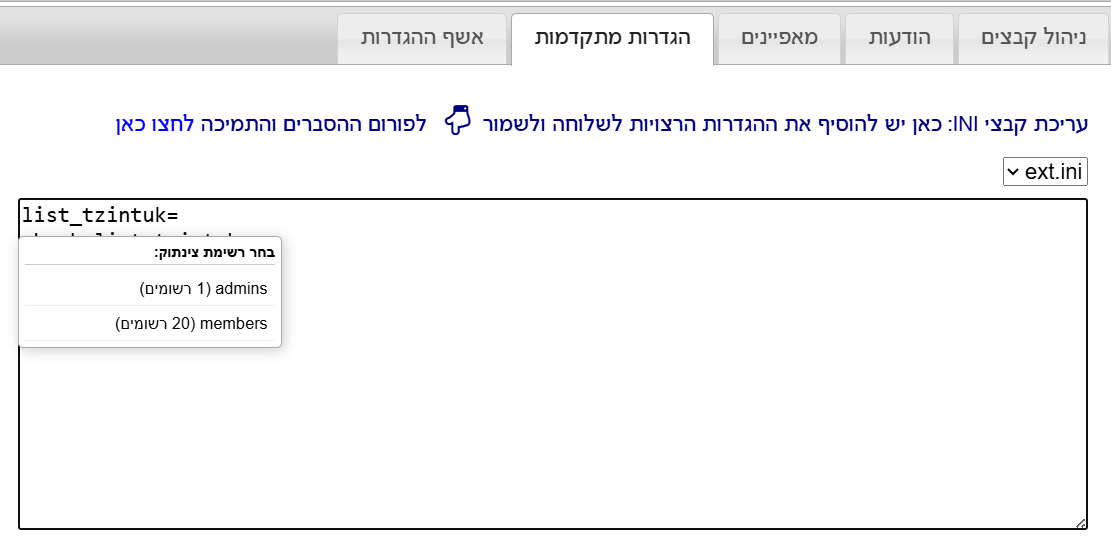
-
@uytrn אני חושב ששימושי לפעמים אתה טועה תוך כדי הקלדה במקום זה מופיע לך רשימה חזק וברוך על התוסף מה עושים אם הקובץ שהעלת?
-
@BEN-ZION תוספים -

ואז מצב פיתוח
טעינת פריט
ואז תבחר את התיקייה שחילצת...
ותרענן את העמוד
שלום! נראה שהשיחה הזו מעניינת אותך, אבל עדיין אין לך חשבון.
נמאס לכם לגלול בין אותם הפוסטים בכל ביקור? כשנרשמים לחשבון, תמיד תחזרו בדיוק למקום שבו הייתם קודם, ותוכלו לבחור לקבל התראות על תגובות חדשות (בין אם במייל, ובין אם בהתראת פוש). תוכלו גם לשמור סימניות ולפרגן ב-upvote לפוסטים כדי להביע הערכה לחברי קהילה אחרים.
בעזרת התרומה שלך, הפוסט הזה יכול להיות אפילו טוב יותר 💗
הרשמה התחברות