סקריפט ל-Tampermonkey להורדת טבלת רשומים לצינתוקים, דוחות, ועוד כמה...
-
בעזרת GPT יצרתי סקריפט ל-Tampermonkey שמוסיף כפתור להורדת טבלת רשומים לצינתוקים כ-csv או כאקסל, ניתן לראות כאן כיצד מתקינים את Tampermonkey
// ==UserScript== // @name Download Table as CSV and Excel for Call2All // @namespace http://tampermonkey.net/ // @version 1.1 // @description Add buttons to download the table as CSV and Excel // @author Jonny // @include https://*.call2all.co.il/ym/index.php?view=Tzintukim* // @grant none // @require https://cdnjs.cloudflare.com/ajax/libs/xlsx/0.17.1/xlsx.full.min.js // ==/UserScript== (function() { 'use strict'; // Wait until the table is loaded function waitForTable() { const table = document.getElementById("table_data"); if (table) { createDownloadButtons(table); } else { setTimeout(waitForTable, 100); } } // Function to create the download buttons function createDownloadButtons(table) { // Create the CSV download button const downloadCSVButton = document.createElement("button"); downloadCSVButton.innerHTML = "הורד כ-CSV"; downloadCSVButton.style.padding = "10px 20px"; downloadCSVButton.style.fontSize = "16px"; downloadCSVButton.style.cursor = "pointer"; downloadCSVButton.style.marginBottom = "20px"; // Adds space between the button and table downloadCSVButton.style.marginRight = "10px"; // Adds space between buttons downloadCSVButton.style.display = "inline-block"; // Keeps buttons side by side // Create the Excel download button const downloadExcelButton = document.createElement("button"); downloadExcelButton.innerHTML = "הורד כ-Excel"; downloadExcelButton.style.padding = "10px 20px"; downloadExcelButton.style.fontSize = "16px"; downloadExcelButton.style.cursor = "pointer"; downloadExcelButton.style.marginBottom = "20px"; // Adds space between the button and table downloadExcelButton.style.display = "inline-block"; // Keeps buttons side by side // Insert the buttons above the table table.parentNode.insertBefore(downloadCSVButton, table); table.parentNode.insertBefore(downloadExcelButton, table); // Event listeners for button clicks downloadCSVButton.addEventListener("click", downloadCSV); downloadExcelButton.addEventListener("click", downloadExcel); } // Function to download the table as CSV with UTF-8 encoding function downloadCSV() { const table = document.getElementById("table_data"); let csv = []; const rows = table.querySelectorAll("tr"); rows.forEach(row => { const cols = row.querySelectorAll("td, th"); const rowData = []; cols.forEach(col => { rowData.push(col.innerText.trim()); }); csv.push(rowData.join(",")); }); // Create a CSV file with UTF-8 encoding and trigger download const csvFile = new Blob([decodeURIComponent(encodeURIComponent(csv.join("\n")))], { type: "text/csv;charset=utf-8;" }); const downloadLink = document.createElement("a"); downloadLink.href = URL.createObjectURL(csvFile); downloadLink.download = "table_data.csv"; downloadLink.click(); } // Function to download the table as Excel with RTL and Text columns function downloadExcel() { const table = document.getElementById("table_data"); // Convert the table to a workbook object const wb = XLSX.utils.table_to_book(table, { sheet: "Sheet 1" }); // Set the sheet properties to right-to-left (RTL) const sheet = wb.Sheets["Sheet 1"]; sheet["!cols"] = []; const rows = sheet["!rows"] || []; // Loop through the columns and set all of them to "text" format const maxColumns = sheet["!ref"].split(":")[1].charCodeAt(0) - 64; // Get the number of columns for (let i = 0; i < maxColumns; i++) { sheet["!cols"].push({ wch: 20, type: "s" }); // Set each column width and type to "string" } // Set the direction of the sheet to RTL (Mimicking Right-To-Left text direction) sheet["!margins"] = { left: 0.7, right: 0.7, top: 0.75, bottom: 0.75 }; sheet["!sheetPr"] = { "tabColor": { "rgb": "FFFF00" }, "defaultRowHeight": 15 }; sheet["!rows"] = sheet["!rows"].map(row => { row.forEach(cell => { cell.s = { alignment: { horizontal: "right", vertical: "center" }, font: { bold: false, italic: false } }; }); return row; }); // Write the workbook and trigger the download const wbout = XLSX.write(wb, { bookType: "xlsx", type: "array" }); // Create a Blob from the Excel file and trigger download const blob = new Blob([wbout], { type: "application/octet-stream" }); const downloadLink = document.createElement("a"); downloadLink.href = URL.createObjectURL(blob); downloadLink.download = "table_data.xlsx"; downloadLink.click(); } // Start the script by waiting for the table to load waitForTable(); })(); -
קודם כל תודה רבה!
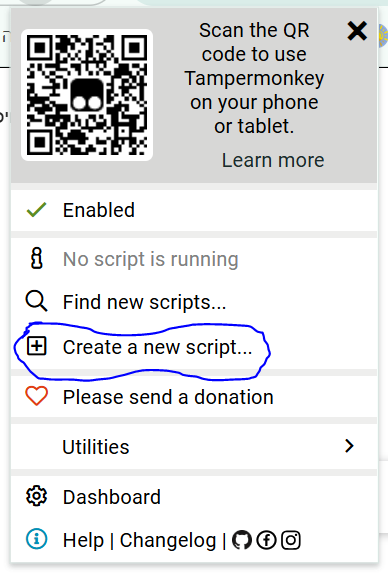
התקנתי את התוסף, אך לא נפתח לי שום חלונית כמו בתצלום שהבאת
איך מגיעים לחלונית הזו?
-
@א-ב תצמיד את התוסף לסרגל הכלים, ותלחץ על הסמל של התוסף
-
@א-ב ליד תיבת החיפוש יש סמל של פאזל, תלחץ עליו ואז תלחץ שם על הסמל של התוסף
-
@CUBASE מאז התקנת הסקריפט בכל פעם שאני נכנס ללשונית של הצינתוקים קופצת לי ההודעה הבאה
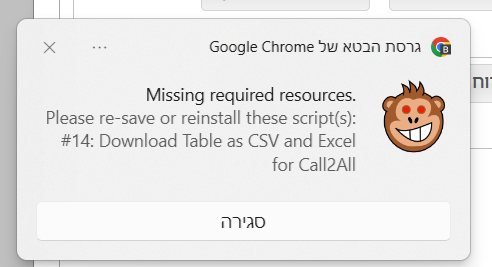
תרגום: חסר משאבים נדרשים.
אנא יש לצנם מחדש או להתקין מחדש את התסריט / ים:
#14: טבלת הורדה כ- CSV ו- Excel
עבור Ca112all -
@פישל תשאל את מי שעשה את הסקריפט
-
@א-ב התיוג תוקן...
-
@פישל באמת שאין לי מושג מה זה, תנסה לחפש באינטרנט על השגיאה הזו..
ניסית לשמור מחדש את הסקריפט?
-
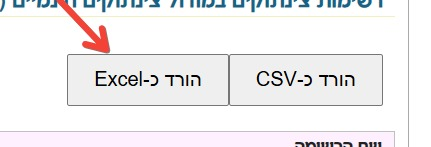
@CUBASE הכפתור הפסיק לעבוד...
-
@פישל התקנת מחדש?
לי עובד מצויין...
-
@CUBASE התקנתי מחדש ועובד מצוין
תודה רבה -
גם לי עובד טוב ב"ה, תודה רבה

שלום! נראה שהשיחה הזו מעניינת אותך, אבל עדיין אין לך חשבון.
נמאס לכם לגלול בין אותם הפוסטים בכל ביקור? כשנרשמים לחשבון, תמיד תחזרו בדיוק למקום שבו הייתם קודם, ותוכלו לבחור לקבל התראות על תגובות חדשות (בין אם במייל, ובין אם בהתראת פוש). תוכלו גם לשמור סימניות ולפרגן ב-upvote לפוסטים כדי להביע הערכה לחברי קהילה אחרים.
בעזרת התרומה שלך, הפוסט הזה יכול להיות אפילו טוב יותר 💗
הרשמה התחברות