העברת קבצים ממערכת למערכת
-
@מה
אתה רוצה במחשב?
אני יכול ליצור לך כזה קובץ -
@מה
תנסה את זה (לא בדקתי) ותעדכן.<!DOCTYPE html> <html lang="he" dir="rtl"> <head> <meta charset="UTF-8"> <title>ממשק העברת קבצים - API מלא</title> <style> body { font-family: 'Segoe UI', Tahoma, Geneva, Verdana, sans-serif; margin: 20px; background-color: #f4f7f6; color: #333; } .container { max-width: 900px; margin: auto; background: white; padding: 30px; border-radius: 12px; box-shadow: 0 4px 15px rgba(0,0,0,0.1); } .system-box { border: 1px solid #e0e0e0; padding: 20px; margin-bottom: 20px; border-radius: 8px; background: #fafafa; } input[type="text"] { width: calc(50% - 22px); padding: 10px; margin: 5px; border: 1px solid #ddd; border-radius: 4px; } table { width: 100%; border-collapse: collapse; margin-top: 20px; } th, td { border: 1px solid #eee; padding: 12px; text-align: right; } th { background-color: #007bff; color: white; } .progress-container { margin-top: 25px; display: none; padding: 15px; background: #e9ecef; border-radius: 8px; } .progress-bar { width: 100%; background: #ced4da; border-radius: 10px; height: 25px; overflow: hidden; } .progress-fill { width: 0%; height: 100%; background: #28a745; transition: width 0.3s ease; } button { cursor: pointer; padding: 12px 24px; background: #007bff; color: white; border: none; border-radius: 5px; font-weight: bold; } button:hover { background: #0056b3; } .status-msg { margin-top: 10px; font-weight: bold; color: #555; } </style> </head> <body> <div class="container"> <h2>העברת קבצים בין מערכות (Yemot API)</h2> <div class="system-box"> <h3>מערכת מקור (ממנה מורידים)</h3> <input type="text" id="token1" placeholder="טוקן מערכת מקור"> <input type="text" id="path1" placeholder="נתיב שלוחה (לדוגמה: 1/5)"> <button onclick="loadFiles()">טען רשימת קבצים</button> </div> <div class="system-box"> <h3>מערכת יעד (אליה מעלים)</h3> <input type="text" id="token2" placeholder="טוקן מערכת יעד"> <input type="text" id="path2" placeholder="נתיב יעד (לדוגמה: 8)"> </div> <div id="fileListArea" style="display:none;"> <table> <thead> <tr> <th><input type="checkbox" id="selectAll" onclick="toggleAll(this)"></th> <th>שם הקובץ</th> <th>גודל (MB)</th> <th>תאריך</th> </tr> </thead> <tbody id="filesBody"></tbody> </table> <br> <button onclick="processTransfer()">התחל העברה של הקבצים הנבחרים</button> </div> <div class="progress-container" id="progressArea"> <div class="status-msg" id="statusText">מכין העברה...</div> <div class="progress-bar"><div class="progress-fill" id="progressBar"></div></div> <div id="percentText">0%</div> </div> </div> <script> const BASE_URL = "https://www.call2all.co.il/ym/api/"; const CHUNK_SIZE = 40 * 1024 * 1024; // 40MB לביטחון (מגבלה של 50MB) async function loadFiles() { const token = document.getElementById('token1').value; const path = document.getElementById('path1').value; try { const res = await fetch(`${BASE_URL}GetIVR2Dir?token=${token}&path=${path}`); const data = await res.json(); if (data.filesArray) { const body = document.getElementById('filesBody'); body.innerHTML = ''; data.filesArray.forEach(f => { body.innerHTML += `<tr> <td><input type="checkbox" class="f-check" data-name="${f.name}" data-size="${f.size}"></td> <td>${f.name}</td> <td>${(f.size / (1024 * 1024)).toFixed(2)}</td> <td>${f.mtime || '-'}</td> </tr>`; }); document.getElementById('fileListArea').style.display = 'block'; } } catch (e) { alert("שגיאה בטעינת הקבצים"); } } function toggleAll(source) { document.querySelectorAll('.f-check').forEach(cb => cb.checked = source.checked); } async function processTransfer() { const selected = [...document.querySelectorAll('.f-check:checked')]; if (!selected.length) return alert("בחר לפחות קובץ אחד"); const t1 = document.getElementById('token1').value; const p1 = document.getElementById('path1').value; const t2 = document.getElementById('token2').value; const p2 = document.getElementById('path2').value; const progArea = document.getElementById('progressArea'); const fill = document.getElementById('progressBar'); const status = document.getElementById('statusText'); progArea.style.display = 'block'; for (let i = 0; i < selected.length; i++) { const fileName = selected[i].dataset.name; const fileSize = parseInt(selected[i].dataset.size); status.innerText = `מעביר (${i+1}/${selected.length}): ${fileName}`; try { // הורדה const downloadRes = await fetch(`${BASE_URL}DownloadFile?token=${t1}&path=${p1}/${fileName}`); const blob = await downloadRes.blob(); if (fileSize <= CHUNK_SIZE) { await simpleUpload(t2, p2, fileName, blob); } else { await chunkedUpload(t2, p2, fileName, blob); } const totalPercent = Math.round(((i + 1) / selected.length) * 100); fill.style.width = totalPercent + '%'; document.getElementById('percentText').innerText = totalPercent + '%'; } catch (err) { console.error(err); status.innerText = `שגיאה בהעברת ${fileName}`; } } status.innerText = "ההעברה הושלמה בהצלחה!"; } async function simpleUpload(token, path, name, blob) { const fd = new FormData(); fd.append('token', token); fd.append('path', `ivr2:${path}/${name}`); fd.append('qqfile', blob, name); return fetch(`${BASE_URL}UploadFile`, { method: 'POST', body: fd }); } async function chunkedUpload(token, path, name, blob) { const uuid = self.crypto.randomUUID(); const totalParts = Math.ceil(blob.size / CHUNK_SIZE); for (let part = 0; part < totalParts; part++) { const start = part * CHUNK_SIZE; const end = Math.min(start + CHUNK_SIZE, blob.size); const chunk = blob.slice(start, end); const fd = new FormData(); fd.append('token', token); fd.append('path', `ivr2:${path}/${name}`); fd.append('qquuid', uuid); fd.append('qqpartindex', part); fd.append('qqpartbyteoffset', start); fd.append('qqchunksize', chunk.size); fd.append('qqtotalparts', totalParts); fd.append('qqtotalfilesize', blob.size); fd.append('qqfilename', name); fd.append('qqfile', chunk, name); await fetch(`${BASE_URL}UploadFile`, { method: 'POST', body: fd }); } // שלב סיום (Done) return fetch(`${BASE_URL}UploadFile?done&token=${token}&path=ivr2:${path}/${name}&qquuid=${uuid}&qqfilename=${name}&qqtotalfilesize=${blob.size}&qqtotalparts=${totalParts}`, { method: 'POST' }); } </script> </body> </html>עריכה: כרגע יתכן לא עובד, אני אשב ע"ז בהמשך לסדר את זה.
-
קודם כל: תודה על זה ועל כל השרשור של הקודים. - זה מאוד שימושי בשבילי
לענינינו:
בינתיים אין לחצן הפעלה
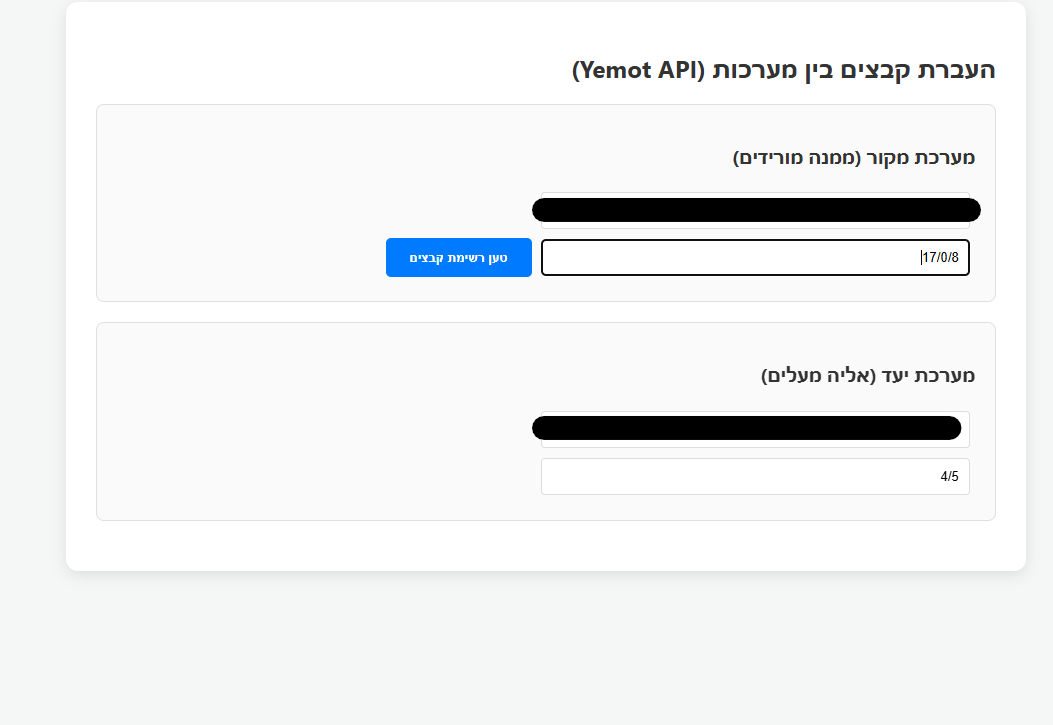
-
@מה אפשר באתר של LIY
https://ym.liy.ovh/manager/ -
כבר ניסיתי המון פעמים ולא הצליח.
(ניסיתי באתר החדש שלו https://ysm.liy.ovh/) -
-
@מה בכוונה הבאתי לך את האתר הישן שלו...
שם זה עובד מצויין... -
@זאביק כתב בהעברת קבצים ממערכת למערכת:
@מה בכוונה הבאתי לך את האתר הישן שלו...
שם זה עובד מצויין..אכן עובד מצוין ומהיר.
אבל אין אצלו אפשרות להעתיק תת שלוחות,
אפשר להעתיק רק את הקבצים מהשלוחה ללא השלוחות שתחתיו. -
@אA כתב בהעברת קבצים ממערכת למערכת:
עריכה: כרגע יתכן לא עובד, אני אשב ע"ז בהמשך לסדר את זה
מחכים בכליון עיניים.
אגב זה יעביר גם שלוחות בתוך שלוחות או רק קבצים ?
-
@מה
מה אתה רוצה שזה יעשה בדיוק? -
@מה
בדקתי והקוד הזה עובד.
בהצלחה!
אם תרצה תוספות תעדכן.
<!DOCTYPE html>
<html lang="he" dir="rtl">
<head>
<meta charset="UTF-8">
<title>מעביר קבצים - ימות המשיח</title>
<style>
body { font-family: 'Segoe UI', Tahoma, Geneva, Verdana, sans-serif; margin: 20px; background-color: #f4f7f6; color: #333; text-align: right; }
.container { max-width: 900px; margin: auto; background: white; padding: 20px; border-radius: 10px; box-shadow: 0 2px 10px rgba(0,0,0,0.1); }
.section { border: 1px solid #e0e0e0; padding: 15px; margin-bottom: 15px; border-radius: 8px; background: #fafafa; }
h2 { color: #2c3e50; border-bottom: 2px solid #3498db; padding-bottom: 10px; margin-top: 0; }
.input-group { margin-bottom: 10px; display: flex; gap: 10px; align-items: center; flex-wrap: wrap; }
input[type="text"] { padding: 8px; border: 1px solid #ddd; border-radius: 4px; flex: 1; min-width: 200px; }
button { padding: 10px 20px; background-color: #3498db; color: white; border: none; border-radius: 4px; cursor: pointer; font-weight: bold; }
button:hover { background-color: #2980b9; }
button:disabled { background-color: #bdc3c7; cursor: not-allowed; }table { width: 100%; border-collapse: collapse; margin-top: 15px; } th, td { border: 1px solid #ddd; padding: 10px; text-align: center; } th { background-color: #ecf0f1; } .progress-container { width: 100%; background-color: #eee; border-radius: 13px; margin: 15px 0; display: none; overflow: hidden; height: 25px; } .progress-bar { width: 0%; height: 100%; background-color: #2ecc71; text-align: center; line-height: 25px; color: white; transition: width 0.3s; } .status-text { font-weight: bold; color: #e67e22; text-align: center; margin-top: 5px; } .file-list-section { margin-top: 20px; border-top: 2px solid #eee; padding-top: 20px; } </style></head>
<body><div class="container">
<h2>מערכת העברת קבצים אוטומטית</h2><div class="section"> <strong>מערכת מקור</strong> <div class="input-group"> <input type="text" id="srcToken" placeholder="טוקן מקור"> <input type="text" id="srcPath" placeholder="שלוחה מקור (למשל 1)"> <button id="loadBtn" onclick="loadFiles()">טען קבצים</button> </div> </div> <div class="section"> <strong>מערכת יעד</strong> <div class="input-group"> <input type="text" id="destToken" placeholder="טוקן יעד"> <input type="text" id="destPath" placeholder="שלוחת יעד (למשל 2)"> <button id="transferBtn" onclick="startTransfer()" disabled>התחל העברה</button> </div> <div class="progress-container" id="progCont"> <div class="progress-bar" id="progBar">0%</div> </div> <div id="transferStatus" class="status-text"></div> </div> <div id="fileArea" class="file-list-section" style="display:none;"> <h3>קבצים בשלוחת המקור</h3> <table> <thead> <tr> <th><input type="checkbox" id="selectAll" onclick="toggleSelectAll(this)"></th> <th>שם הקובץ</th> <th>גודל</th> </tr> </thead> <tbody id="fileTableBody"></tbody> </table> </div></div>
<script>
function toggleSelectAll(source) {
const checkboxes = document.querySelectorAll('.file-check');
checkboxes.forEach(cb => cb.checked = source.checked);
}async function loadFiles() { const token = document.getElementById('srcToken').value; const path = document.getElementById('srcPath').value; const loadBtn = document.getElementById('loadBtn'); const tbody = document.getElementById('fileTableBody'); if(!token || !path) return alert("נא למלא טוקן ונתיב מקור"); loadBtn.innerText = "טוען..."; loadBtn.disabled = true; try { const response = await fetch(`https://www.call2all.co.il/ym/api/GetIVR2Dir?token=${token}&path=${path}`); const data = await response.json(); if (data.responseStatus !== "OK") throw new Error(data.message); tbody.innerHTML = ''; if (data.files && data.files.length > 0) { data.files.forEach(file => { tbody.innerHTML += `<tr> <td><input type="checkbox" class="file-check" data-name="${file.name}"></td> <td>${file.name}</td> <td>${(file.size / 1024).toFixed(1)} KB</td> </tr>`; }); document.getElementById('fileArea').style.display = 'block'; document.getElementById('transferBtn').disabled = false; } else { alert("לא נמצאו קבצים בשלוחה זו."); } } catch (e) { alert("שגיאה: " + e.message); } finally { loadBtn.innerText = "טען קבצים"; loadBtn.disabled = false; } } async function startTransfer() { const srcToken = document.getElementById('srcToken').value; const srcPath = document.getElementById('srcPath').value; const destToken = document.getElementById('destToken').value; const destPath = document.getElementById('destPath').value; const selected = Array.from(document.querySelectorAll('.file-check:checked')); if (selected.length === 0) return alert('נא לבחור קבצים להעברה'); const status = document.getElementById('transferStatus'); const progBar = document.getElementById('progBar'); document.getElementById('progCont').style.display = 'block'; document.getElementById('transferBtn').disabled = true; for (let i = 0; i < selected.length; i++) { const fileName = selected[i].getAttribute('data-name'); status.innerText = `מעביר: ${fileName} (${i + 1}/${selected.length})`; try { // הורדה const downloadUrl = `https://www.call2all.co.il/ym/api/DownloadFile?token=${srcToken}&path=ivr2:${srcPath}/${fileName}`; const downloadRes = await fetch(downloadUrl); if (!downloadRes.ok) throw new Error('הורדה נכשלה'); const fileBlob = await downloadRes.blob(); // העלאה const formData = new FormData(); formData.append('token', destToken); formData.append('path', `ivr2:${destPath}/${fileName}`); formData.append('qqfile', fileBlob, fileName); const uploadRes = await fetch(`https://www.call2all.co.il/ym/api/UploadFile`, { method: 'POST', body: formData }); await uploadRes.json(); } catch (err) { console.error("תקלה:", err); status.innerText = `שגיאה בקובץ ${fileName}, ממשיך...`; } const percent = Math.round(((i + 1) / selected.length) * 100); progBar.style.width = percent + '%'; progBar.innerText = percent + '%'; } status.innerText = 'ההעברה הושלמה בהצלחה!'; document.getElementById('transferBtn').disabled = false; }</script>
</body>
</html>