פתרון חלקי לבעיית החסימות של שרתי גוגל בימות
-
מכיון שכמה ביקשו ממני בפרטי להלן הוראות שפותרות את הבעיה באופן חלקי.
מכיון שכל החסימה מתרחשת רק בגישה באמצעות שם משתמש וסיסמה ולא בגישה באמצעות טוקן, הפיתרון הוא ליצור טוקן, הבעיה שלמשתמש הפשוט אין כ"כ את הידע כיצד ליצור ולמצוא את הטוקן, לכן אפשר להשתמש בזה, אתר שמקבל כפרמטר את שם המשתמש והסיסמה ומציג בגדול את הטוקן להעתקה
https://abaye.co/tools/yemot-create-token.html
ככה משתמשים בזה:
https://abaye.co/tools/yemot-create-token.html?user=0777777777&pass=12345הסבר על אופן השימוש:
בדרך כלל אני עושה נוסחה בתא בגוגל שיטס שיוצר את הלינק עם שם המשתמש והסיסמה (משהו כמו="https://abaye.co/tools/yemot-create-token.html[yemot-create-token.html](/assets/uploads/files/1743879742123-yemot-create-token.html) ?user="&B3&"&pass="&B4) ואז כותב למשתמש הוראה ללחוץ על הלינק ולהדביק את התוכן שיוצג בתא X1.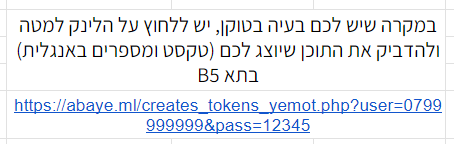 ספויילר
.
הקוד של האתר (שום דבר לא נשמר, אפשר לראות בView source)
<!DOCTYPE html> <html dir="rtl"> <head> <meta charset="utf-8"> <title>תן ת'טוקן | אביי!</title> <!-- Google tag (gtag.js) --> <script async src="https://www.googletagmanager.com/gtag/js?id=G-GMERG2MRGX"></script> <script> window.dataLayer = window.dataLayer || []; function gtag() { dataLayer.push(arguments); } gtag('js', new Date()); gtag('config', 'G-GMERG2MRGX'); </script> <style> @import url('https://fonts.googleapis.com/css2?family=Rubik:wght@400;700&display=swap'); @import url('https://cdnjs.cloudflare.com/ajax/libs/font-awesome/6.4.0/css/all.min.css'); body { margin: 0; padding: 0; font-family: 'Rubik', sans-serif; font-size: 54px; text-align: center; background-color: #f7f5ff; color: #370fff; display: flex; flex-direction: column; justify-content: center; align-items: center; height: 100vh; position: relative; overflow: hidden; } /* רקע אנימטיבי */ .bg-animation { position: absolute; top: 0; left: 0; width: 100%; height: 100%; z-index: -1; overflow: hidden; } .bg-bubble { position: absolute; border-radius: 50%; background: rgba(55, 15, 255, 0.1); animation: float 15s infinite ease-in-out; opacity: 0.5; } #output { margin: 20px; white-space: nowrap; overflow: auto; } #output:hover { color: #53d61f; } header { background-color: #FFFFFF; padding: 9px; box-shadow: 0 -2px 4px rgba(0, 0, 0, 0.1); position: fixed; top: 0; left: 0; right: 0; z-index: 1; text-align: center; font-size: 22px; color: #AAAAAA; } header:hover { color: #0561ff; } /* אנימציית בועות רקע */ @keyframes float { 0% { transform: translateY(0) translateX(0); } 25% { transform: translateY(-20px) translateX(10px); } 50% { transform: translateY(-35px) translateX(-15px); } 75% { transform: translateY(-20px) translateX(25px); } 100% { transform: translateY(0) translateX(0); } } .floating-bubbles { position: fixed; left: 20px; top: 73%; transform: translateY(-50%); } .floating-bubbles a { display: block; width: 50px; height: 50px; background-color: #f7f5ff; border-radius: 50%; margin-bottom: 20px; } .floating-bubbles a:hover { display: block; border-radius: 50%; margin-bottom: 20px; } .floating-bubbles a img { width: 100%; height: 100%; border-radius: 50%; } .floating-bubbles a:hover img { transform: scale(1.2); } footer { background-color: #FFFFFF; padding: 3px; box-shadow: 0 -2px 4px rgba(0, 0, 0, 0.1); position: fixed; bottom: 0; left: 0; right: 0; z-index: 1; text-align: center; font-size: 14px; color: #AAAAAA; } footer:hover { color: #0561ff; } .copy-btn { padding: 10px 20px; background-color: #370fff; color: white; border: none; border-radius: 5px; cursor: pointer; font-family: 'Rubik', sans-serif; font-size: 18px; margin-top: 20px; transition: background-color 0.3s, transform 0.2s; display: flex; align-items: center; justify-content: center; gap: 8px; } .copy-btn:hover { background-color: #53ff0f; transform: scale(1.05); } .copy-btn i { font-size: 16px; } #login-form { display: none; background-color: white; padding: 20px; border-radius: 10px; box-shadow: 0 0 10px rgba(0, 0, 0, 0.1); max-width: 400px; width: 90%; margin: 20px auto; font-size: 18px; } #login-form input { width: 60%; padding: 10px; margin: 10px 0; border: 1px solid #ccc; border-radius: 5px; font-family: 'Rubik', sans-serif; font-size: 16px; direction: rtl; } #login-form button { width: 100%; padding: 10px; background-color: #370fff; color: white; border: none; border-radius: 5px; cursor: pointer; font-family: 'Rubik', sans-serif; font-size: 18px; margin-top: 10px; } #login-form button:hover { background-color: #53ff0f; } .error-message { color: red; font-size: 18px; margin: 10px 0; } #show-form-btn { padding: 10px 20px; background-color: #370fff; color: white; border: none; border-radius: 5px; cursor: pointer; font-family: 'Rubik', sans-serif; font-size: 18px; margin-top: 10px; transition: background-color 0.3s, transform 0.2s; } #show-form-btn:hover { background-color: #53ff0f; transform: scale(1.05); } .token-container { display: flex; flex-direction: column; align-items: center; justify-content: center; } .welcome-message { font-size: 24px; color: #370fff; margin-bottom: 18px; } </style> </head> <body> <header> <p>העתק את הטקסט שבמרכז הדף והדבק אותו במקום המתאים</p> </header> <div class="token-container"> <div id="welcome-message" class="welcome-message" style="display: none"></div> <div id="output"></div> <button id="copy-btn" class="copy-btn" style="display: none"><i class="fas fa-copy"></i> העתק טוקן</button> <div id="error-container" class="error-message"></div> <button id="show-form-btn" style="display: none"><i class="fas fa-sign-in-alt"></i> הזן פרטי התחברות</button> </div> <div id="login-form"> <h2>הזן פרטי התחברות</h2> <input type="text" id="username" placeholder="שם משתמש"> <input type="password" id="password" placeholder="סיסמה"> <button id="login-btn">התחבר</button> </div> <script> document.addEventListener('DOMContentLoaded', function () { const param1 = new URLSearchParams(window.location.search).get('user'); const param2 = new URLSearchParams(window.location.search).get('pass'); const outputElement = document.getElementById('output'); const copyBtn = document.getElementById('copy-btn'); const loginForm = document.getElementById('login-form'); const showFormBtn = document.getElementById('show-form-btn'); const errorContainer = document.getElementById('error-container'); const welcomeMessage = document.getElementById('welcome-message'); // פונקציה לביצוע הבקשה לשרת ולקבלת הטוקן function fetchToken(username, password) { const url = `https://www.call2all.co.il/ym/api/Login?username=${username}&password=${password}`; fetch(url) .then(response => response.json()) .then(data => { if (data.responseStatus === 'OK') { outputElement.innerHTML = data.token; copyBtn.style.display = 'block'; loginForm.style.display = 'none'; errorContainer.innerHTML = ''; showFormBtn.style.display = 'none'; welcomeMessage.innerHTML = `<i class="fas fa-phone"></i> הטוקן עבור מערכת ${username} נוצר בהצלחה, לחצו והעתיקו אותו!`; welcomeMessage.style.display = 'block'; } else { let errorMessage = 'שגיאה: '; // הוספת הסברים בעברית לשגיאות switch (data.responseStatus) { case 'Authentication failure': errorMessage += 'אימות נכשל - שם המשתמש או הסיסמה שגויים'; break; case 'User disabled': errorMessage += 'המשתמש מושבת - חשבון זה אינו פעיל'; break; case 'User not found': errorMessage += 'המשתמש לא נמצא - שם המשתמש שהוזן אינו קיים במערכת'; break; default: errorMessage += 'אימות נכשל - שם המשתמש או הסיסמה שגויים'; } outputElement.innerHTML = '😕'; errorContainer.innerHTML = errorMessage; copyBtn.style.display = 'none'; showFormBtn.style.display = 'block'; welcomeMessage.style.display = 'none'; } }) .catch(error => { console.error(error); outputElement.innerHTML = '😕'; errorContainer.innerHTML = 'שגיאת התחברות - אנא נסה שוב מאוחר יותר'; copyBtn.style.display = 'none'; showFormBtn.style.display = 'block'; welcomeMessage.style.display = 'none'; }); } // פונקציה להעתקת הטוקן function copyToken() { const tokenText = outputElement.innerText; navigator.clipboard.writeText(tokenText) .then(() => { const originalText = originalBtnText; copyBtn.innerHTML = '<i class="fas fa-check"></i> הועתק בהצלחה'; setTimeout(() => { copyBtn.innerHTML = originalText; }, 2000); }) .catch(err => { console.error('שגיאה בהעתקת הטקסט: ', err); }); } // אירועי לחיצה על כפתורים copyBtn.addEventListener('click', copyToken); // שמירת הטקסט המקורי של כפתור ההעתקה const originalBtnText = copyBtn.innerHTML; showFormBtn.addEventListener('click', function () { loginForm.style.display = 'block'; showFormBtn.style.display = 'none'; }); document.getElementById('login-btn').addEventListener('click', function () { const username = document.getElementById('username').value; const password = document.getElementById('password').value; if (username && password) { fetchToken(username, password); } else { errorContainer.innerHTML = 'אנא הזן שם משתמש וסיסמה'; } }); // בדיקה אם ניתנו פרמטרים בכתובת או שצריך להציג את הטופס if (param1 && param2) { fetchToken(param1, param2); } else { loginForm.style.display = 'block'; } }); </script> <!-- בועות אנימטיביות ברקע --> <div class="bg-animation"> <div class="bg-bubble" style="width: 100px; height: 100px; top: 10%; left: 10%; animation-duration: 18s;"></div> <div class="bg-bubble" style="width: 50px; height: 50px; top: 30%; left: 25%; animation-duration: 12s; animation-delay: 1s;"></div> <div class="bg-bubble" style="width: 80px; height: 80px; top: 60%; left: 70%; animation-duration: 15s; animation-delay: 2s;"></div> <div class="bg-bubble" style="width: 30px; height: 30px; top: 80%; left: 40%; animation-duration: 10s; animation-delay: 0.5s;"> </div> <div class="bg-bubble" style="width: 70px; height: 70px; top: 20%; left: 85%; animation-duration: 14s; animation-delay: 3s;"></div> <div class="bg-bubble" style="width: 60px; height: 60px; top: 75%; left: 15%; animation-duration: 16s; animation-delay: 1.5s;"> </div> </div> <div class="floating-bubbles"> <a href="https://github.com/abaye123"><img src="/img/GitHub.png"></a> <a href="https://www.buymeacoffee.com/abaye"><img src="/img/apple-icon-76x76.png"></a> </div> <footer> <p>Copyright © 2023-2025 by abaye</p> </footer> </body> </html> -
05/04/2025 האתר עודכן לגרסה חדשה יותר, אופן השימוש נשאר אותו הדבר, רק נוסף אפשרות להקלדה ידנית של שם המשתמש והסיסמה במקרה שלא סופקו הפרמטרים בכתובת האתר
-
ת תפארת יעקבב התייחס לנושא זה ב
-
א אביי ורבא התייחס לנושא זה ב
-
@אביי-ורבא לא ראיתי מקום אחר להגיב
עזרת לי מאוד אבל אחרי כמה הרצות מוצגת שגיאה בטוקןAPI: {"yemotAPIVersion":6,"responseStatus":"EXCEPTION","message":"IllegalStateException(session token is invalid)"}תודה
-
אשמח אם תחזיר תגובה של טוקן משליחת בקשה https://abaye.co/tools/yemot-create-token.html?user=0777777777&pass=12345
-
@אביי-ורבא כתב בפתרון חלקי לבעיית החסימות של שרתי גוגל בימות:
הבעיה שלמשתמש הפשוט אין כ"כ את הידע כיצד ליצור ולמצוא את הטוקן
מה זאת אומרת "אין כ"כ את הידע"?
יש בכלל איזו שהיא אפשרות לעשות את זה ע"י הגוגל סקפריט בעצמו ללא שרת מתווך נוסף?
אני מסתבך עם זה שנים...
אם יש אפשרות כזו, אשמח לדעת עליה מזמן... -
@צצ כתב בפתרון חלקי לבעיית החסימות של שרתי גוגל בימות:
יש בכלל איזו שהיא אפשרות לעשות את זה ע"י הגוגל סקפריט בעצמו ללא שרת מתווך נוסף?
אפשר לנסות כמה פעמים עד שזה נופל על כתובת של גוגל שלא חסומה ואז לשמור את הטוקן
-
ע עידו התייחס לנושא זה ב
-
א אA התייחס לנושא זה ב
שלום! נראה שהשיחה הזו מעניינת אותך, אבל עדיין אין לך חשבון.
נמאס לכם לגלול בין אותם הפוסטים בכל ביקור? כשנרשמים לחשבון, תמיד תחזרו בדיוק למקום שבו הייתם קודם, ותוכלו לבחור לקבל התראות על תגובות חדשות (בין אם במייל, ובין אם בהתראת פוש). תוכלו גם לשמור סימניות ולפרגן ב-upvote לפוסטים כדי להביע הערכה לחברי קהילה אחרים.
בעזרת התרומה שלך, הפוסט הזה יכול להיות אפילו טוב יותר 💗
הרשמה התחברות