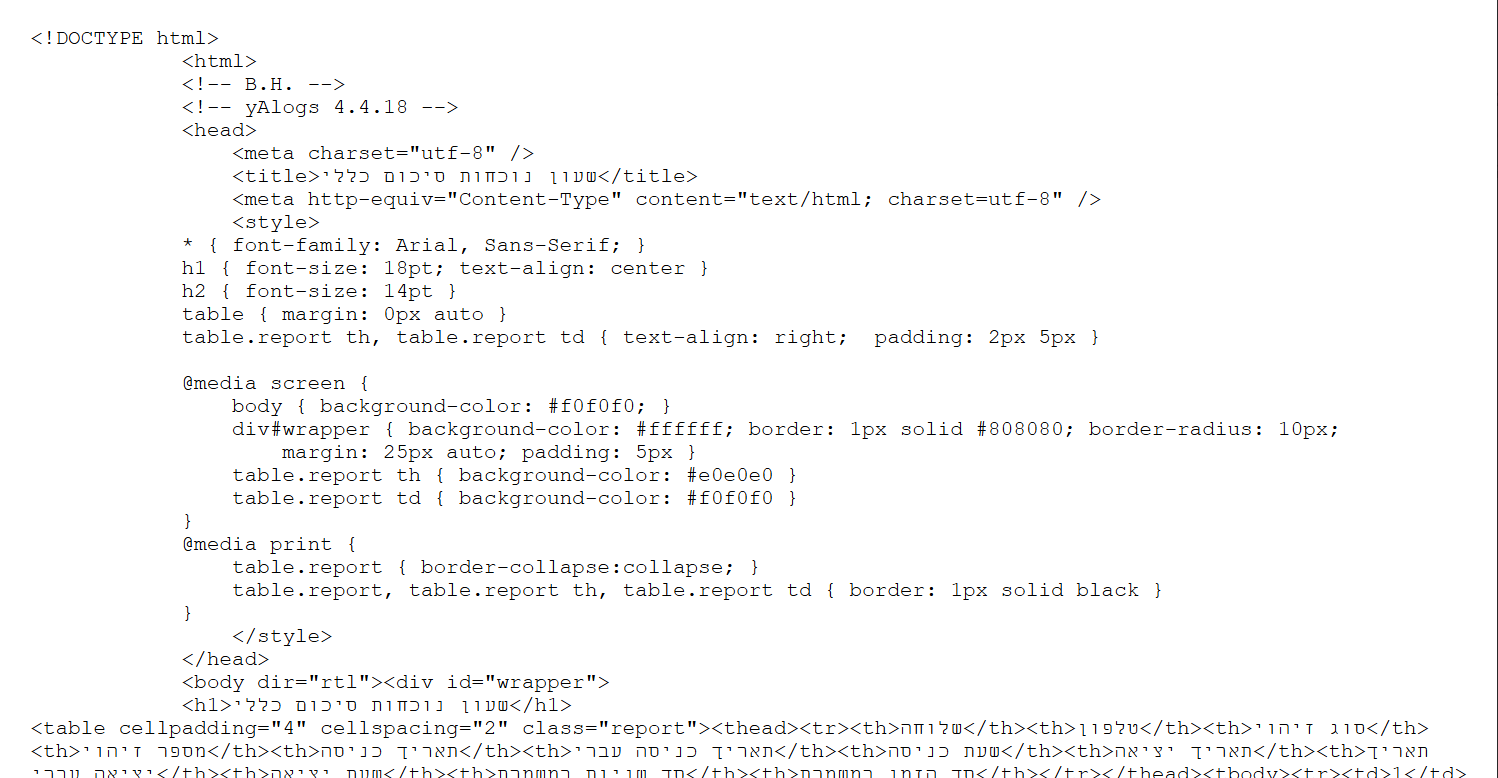
משהו יודע למה הדוחות נוכחות מגיעים כך?
-
לא צלחתי לעלות כקובץ-תודה רבה
-
למה לא מגיע בצורה קריאה
-
@ש-פ תנסה להסביר יותר, מהיכן זה מגיע? נשלח אליך למייל? הורדת מאתר הניהול?
זה הקוד הגולמי של הדף [HTML] -
@בלויא למייל
-
@ש-פ זה הגבלה של גוגל, צריך להוריד ואז לפתוח
נסיתי לבנות לזה תוסף ולא הצלחתי -
-
אין פתרון ???
-
@ש-פ תן את הקוד
-
-
@ש-פ מה קוד
-
@נועם-אלימלך קוד של מה??
-
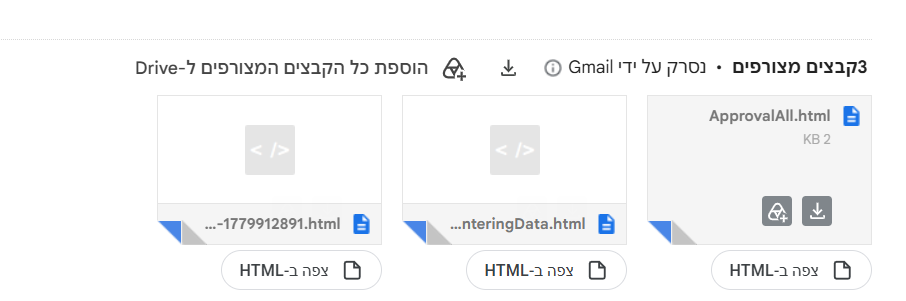
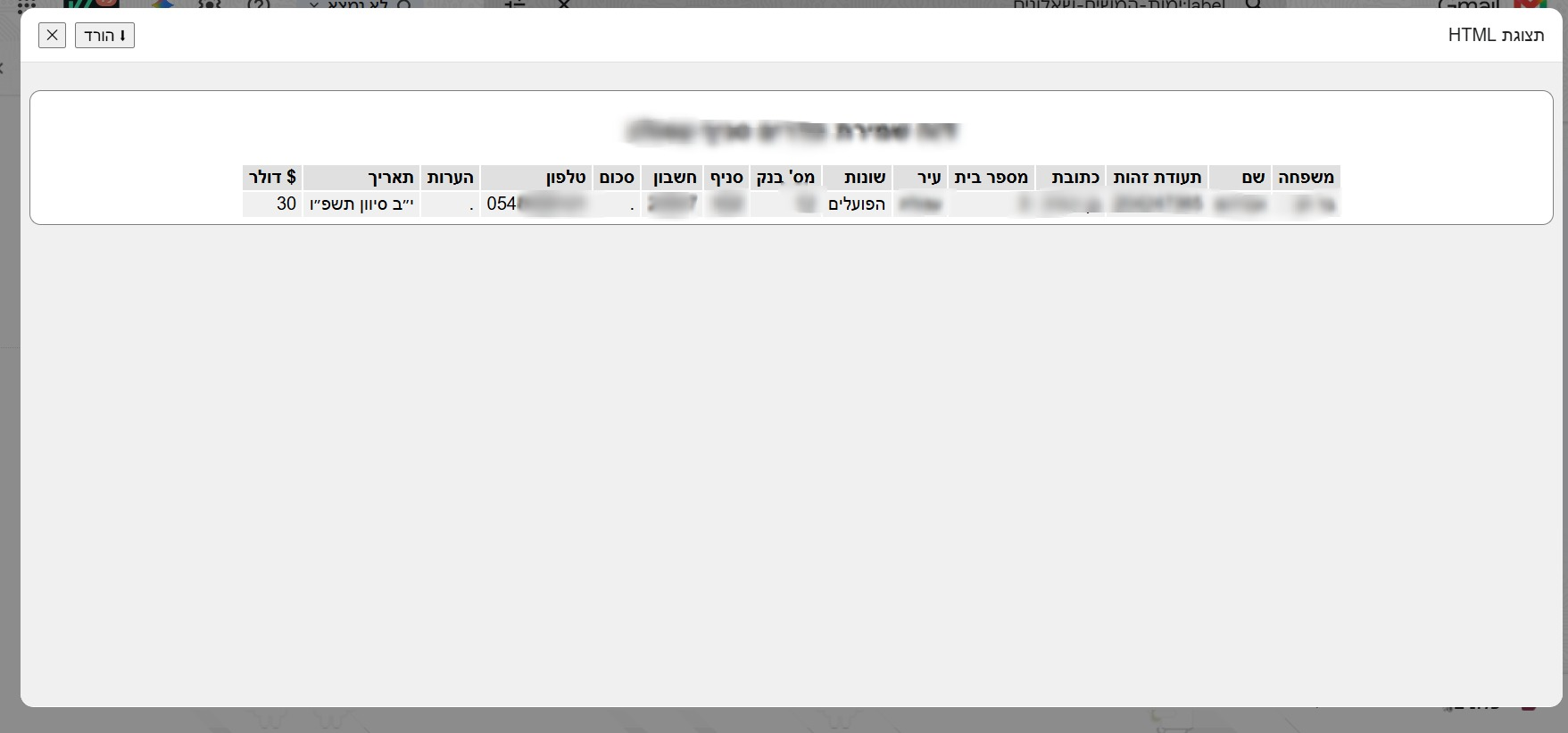
@ש-פ מצורף קוד להזרקה בטמפרמאנקי
בו ניתן גם לצפות ישירות מהמייל בקבצים וגם אפשרות להורדה כקובץ אקסל עם סיומת CSV// ==UserScript== // @name Gmail HTML צפיה + הורדה (HTML / CSV) // @namespace https://tampermonkey.net/ // @version 2.8 // @description View HTML attachments inside Gmail + proper download system (FULL HEIGHT & NAME FIX) // @match https://mail.google.com/* // @grant none // ==/UserScript== (function() { 'use strict'; let currentHtmlContent = ""; let currentFileName = "attachment"; // טעינת ספריית FileSaver באופן דינמי לעקיפת הגבלות הדפדפן function loadFileSaver(callback) { if (window.saveAs) { callback(); return; } const script = document.createElement('script'); script.src = 'https://cdnjs.cloudflare.com/ajax/libs/FileSaver.js/2.0.5/FileSaver.min.js'; script.fill = 'none'; script.onload = callback; document.head.appendChild(script); } // ========================= // כפתור תצוגה // ========================= function createButton() { const btn = document.createElement('button'); btn.innerHTML = ` <svg width="18" height="18" viewBox="0 0 24 24" fill="none" style="margin-left:6px"> <path d="M14 3H6a2 2 0 0 0-2 2v14a2 2 0 0 0 2 2h12a2 2 0 0 0 2-2V9z" stroke="currentColor" stroke-width="2"/> <path d="M14 3v6h6" stroke="currentColor" stroke-width="2"/> </svg> <span>צפה ב-HTML</span> `; btn.style.cssText = ` margin-left:8px; height:32px; padding:0 14px; border:1px solid #dadce0; border-radius:16px; background:#ffffff; color:#3c4043; font-size:13px; font-weight:500; font-family:Roboto, Arial, sans-serif; cursor:pointer; display:inline-flex; align-items:center; gap:4px; `; btn.onmouseenter = () => btn.style.background = '#f1f3f4'; btn.onmouseleave = () => btn.style.background = '#ffffff'; return btn; } // ========================= // מנגנון הורדה מבוסס ספרייה חיצונית // ========================= function forceDownload(content, filename, isCsv = false) { // ניקוי ואימות שם הקובץ שלא יהיה ריק או מזהה מוזר מדי let cleanName = filename.replace(/[\/\\?%*:|"<>\s]+/g, "_"); if (cleanName.length > 50 && !cleanName.includes('.')) { cleanName = "html_attachment"; } const finalName = cleanName + (isCsv ? ".csv" : ".html"); loadFileSaver(() => { if (isCsv) { const blob = new Blob(["\uFEFF" + content], { type: "text/csv;charset=utf-8" }); window.saveAs(blob, finalName); } else { const blob = new Blob([content], { type: "text/html;charset=utf-8" }); window.saveAs(blob, finalName); } }); } // ========================= // חלון תצוגה // ========================= function showHtmlInModal(blobUrl) { let overlay = document.getElementById('html-viewer-overlay'); if (!overlay) { overlay = document.createElement('div'); overlay.id = 'html-viewer-overlay'; overlay.innerHTML = ` <div id="html-viewer-modal"> <div id="html-viewer-header"> <span>תצוגת HTML</span> <div style="display:flex;gap:8px;"> <button id="html-viewer-download">⬇ הורד</button> <button id="html-viewer-close">✕</button> </div> </div> <div id="html-viewer-body" style="flex:1; width:100%; height:100%; overflow:hidden;"> <iframe id="html-viewer-frame"></iframe> </div> </div> `; overlay.style.cssText = ` position:fixed; inset:0; background:rgba(0,0,0,.45); z-index:2147483647; display:flex; align-items:center; justify-content:center; `; const modal = overlay.querySelector('#html-viewer-modal'); modal.style.cssText = ` width:90%; height:90%; background:#fff; border-radius:12px; overflow:hidden; display:flex; flex-direction:column; `; const header = overlay.querySelector('#html-viewer-header'); header.style.cssText = ` height:48px; padding:0 16px; display:flex; align-items:center; justify-content:space-between; border-bottom:1px solid #e0e0e0; font-family:Arial; font-weight:500; `; // פונקציית סגירה מאוחדת const closeModal = () => { overlay.remove(); document.removeEventListener('keydown', handleEscKey); }; overlay.querySelector('#html-viewer-close').onclick = closeModal; overlay.onclick = e => { if (e.target === overlay) closeModal(); }; // מאזין למקש ESC במקלדת const handleEscKey = (e) => { if (e.key === "Escape" || e.keyCode === 27) { const downloadBox = document.getElementById('html-download-choice-box'); if (downloadBox) { downloadBox.remove(); } else { closeModal(); } } }; document.addEventListener('keydown', handleEscKey); document.body.appendChild(overlay); } // 🔥 הגדרת גובה מלא קשיח של 100% ל-iframe כדי שלא ייחתך לעולם const iframe = overlay.querySelector('#html-viewer-frame'); iframe.style.cssText = ` width:100%; height:100%; min-height: calc(100vh - 150px); border:none; display:block; `; iframe.src = blobUrl; const downloadBtn = overlay.querySelector('#html-viewer-download'); // ========================= // תפריט בחירת הורדה (HTML / CSV) // ========================= downloadBtn.onclick = () => { if (document.getElementById('html-download-choice-box')) return; const box = document.createElement("div"); box.id = 'html-download-choice-box'; box.style.cssText = ` position:fixed; inset:0; background:rgba(0,0,0,0.45); z-index:2147483648; display:flex; align-items:center; justify-content:center; font-family:Arial; `; box.innerHTML = ` <div style="background:#fff;padding:18px;border-radius:12px;min-width:260px;text-align:center;"> <div style="margin-bottom:12px;font-weight:bold;">בחר סוג הורדה</div> <button id="h" style="margin:5px;padding:8px 12px;cursor:pointer;">HTML</button> <button id="c" style="margin:5px;padding:8px 12px;cursor:pointer;">CSV</button> <div style="margin-top:10px;"> <button id="x" style="cursor:pointer;">ביטול</button> </div> </div> `; document.body.appendChild(box); const closeBox = () => box.remove(); box.querySelector("#x").onclick = closeBox; box.querySelector("#h").onclick = () => { forceDownload(currentHtmlContent, currentFileName, false); closeBox(); }; box.querySelector("#c").onclick = () => { const doc = new DOMParser().parseFromString(currentHtmlContent, "text/html"); const csv = [...doc.querySelectorAll("table tr")] .map(tr => [...tr.querySelectorAll("td,th")] .map(td => `"${td.innerText.trim()}"`) .join(",") ) .join("\n"); forceDownload(csv, currentFileName, true); closeBox(); }; }; } // ========================= // הוספת כפתורים בג'ימייל // ========================= function addButtons() { document.querySelectorAll('[download_url]').forEach(el => { if (el.dataset.htmlViewerAdded) return; const downloadUrl = el.getAttribute('download_url'); if (!downloadUrl) return; const parts = downloadUrl.split(':'); let fileName = parts[1] || ''; if (!fileName.toLowerCase().match(/\.(html|htm)$/)) return; el.dataset.htmlViewerAdded = "1"; const btn = createButton(); btn.onclick = async (e) => { e.preventDefault(); e.stopPropagation(); const url = parts.slice(2).join(':'); const resp = await fetch(url, { credentials: 'include' }); const html = await resp.text(); currentHtmlContent = html; // חילוץ שם קובץ נקי יותר אם הוא מגיע מגורם פנימי בג'ימייל let extractedName = fileName.replace(/\.(html|htm)$/i, ""); if (extractedName.length > 40 && !extractedName.includes(' ')) { // ניסיון לחפש כותרת אלטרנטיבית בתוך האלמנט של ג'ימייל const titleEl = el.closest('.a6S')?.querySelector('.a1V, .aSx span'); if (titleEl && titleEl.innerText) { extractedName = titleEl.innerText.replace(/\.(html|htm)$/i, ""); } } currentFileName = extractedName; const blob = new Blob([html], { type: "text/html" }); const blobUrl = URL.createObjectURL(blob); showHtmlInModal(blobUrl); }; el.appendChild(btn); }); } const observer = new MutationObserver(addButtons); observer.observe(document.body, { childList: true, subtree: true }); addButtons(); })();מצורף גם קובץ
צפיה בקבצי HTML+הורדה בסיומת CSV.js
מצורף תמונות בספויילר
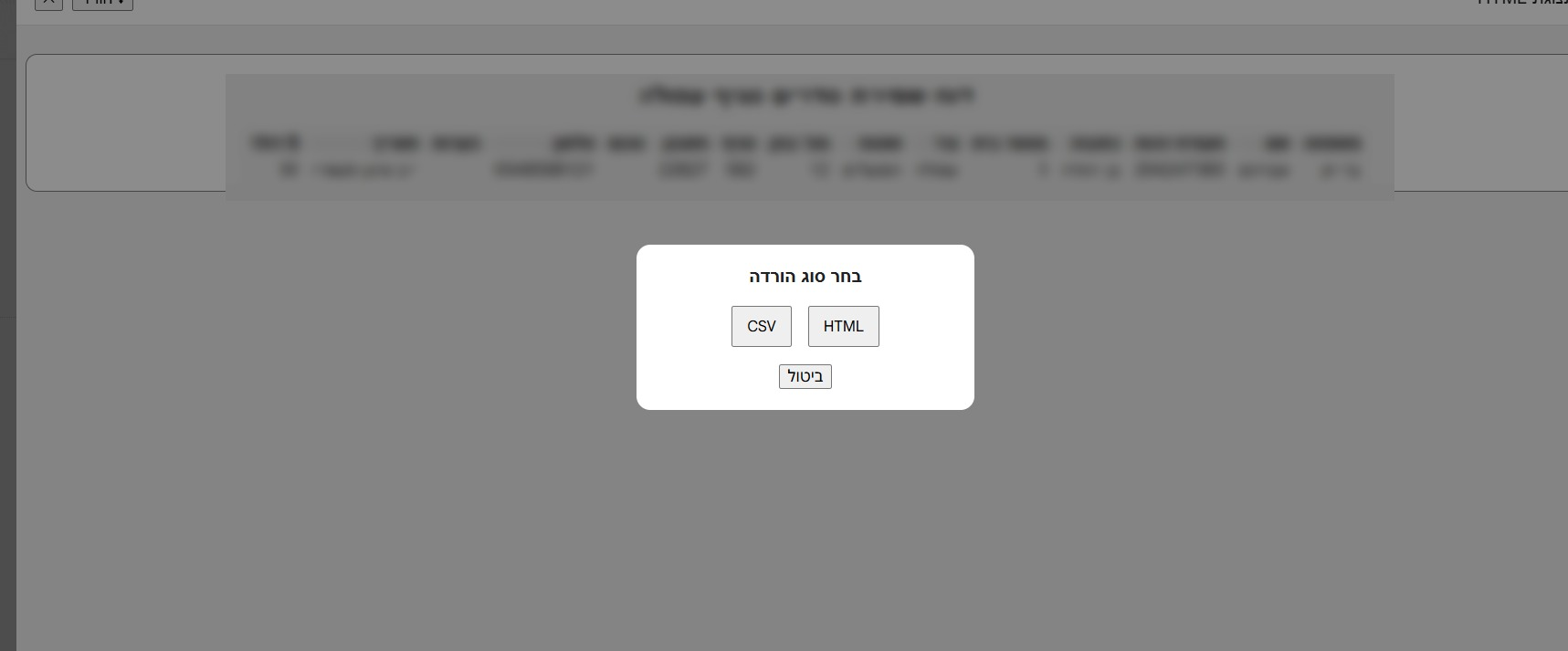
ספויילר
-
@פישל איך זה אמור לעבוד?
לא רואה שום שינוי? -
@מתעניין עשית ריענון לג'ימייל?
אצלי עובד מצוין! -
@פישל לא הבנתי איפה להגדיר את זה
-
-
@פישל כתב במשהו יודע למה הדוחות נוכחות מגיעים כך?:
ואז תוריד את הקובץ המצורף ותייבא אותו לתוסף או פשוט תלחץ עליו והוא אוטומטי יעלה לתוסף
הקישור להורדה לא עובד.
-
@ש-פ אכן גוגל חוסמים הורדות של קבצים אלו
אבל פשוט תעתיק לתוסף ישירות. -
@פישל כתב במשהו יודע למה הדוחות נוכחות מגיעים כך?:
אבל פשוט תעתיק לתוסף ישירות.
אני גם לא הצלחתי לא הבנתי


-

שלום! נראה שהשיחה הזו מעניינת אותך, אבל עדיין אין לך חשבון.
נמאס לכם לגלול בין אותם הפוסטים בכל ביקור? כשנרשמים לחשבון, תמיד תחזרו בדיוק למקום שבו הייתם קודם, ותוכלו לבחור לקבל התראות על תגובות חדשות (בין אם במייל, ובין אם בהתראת פוש). תוכלו גם לשמור סימניות ולפרגן ב-upvote לפוסטים כדי להביע הערכה לחברי קהילה אחרים.
בעזרת התרומה שלך, הפוסט הזה יכול להיות אפילו טוב יותר 💗
הרשמה התחברות