חיוג מהיר ומסודר למספרים באתרי אינטרנט עם הזיהוי של המערכת שלכם (תוסף לדפדפן)
-
בעקבות המדריך המעולה של @cubase כאן, פיתחתי בעזרת ה-AI כלי עזר משלים ונוח במיוחד: סקריפט חכם שהופך כל מספר טלפון שמופיע בדפדפן ללחצן חיוג מהיר!
ברגע שלוחצים על מספר טלפון בכל אתר אינטרנט, המערכת מחייגת אליכם באופן מיידי, ומעבירה אתכם ישירות לשיחה עם המספר שלחצם עליו מתוך הזיהוי של המערכת שלכם.
איך זה עובד בדיוק?
חדש:
התקנה אוטומטית
ניתן להתקין בלחיצת כפתור כאןהתקנה ידנית
התקנת התוסף: מתקינים את תוסף Tampermonkey מחנות התוספים של הדפדפן (כרום / אדג' וכו').
הוספת הסקריפט: יוצרים סקריפט חדש בתוסף, מוחקים את הקוד ברירת המחדל שמופיע שם ומדביקים את הקוד המלא המצורף למטה (בתוך הספוילר). שמרו את הקוד (Ctrl + S).
הגדרות ראשוניות: בפעם הראשונה שתפתחו דף אינטרנט רגיל שיש בו מספרי טלפון, יקפוץ לכם אוטומטית חלון הגדרות מעוצב במרכז המסך. תתבקשו להזין בו:
טוקן המערכת, @cubase זו שלוחה sistem/A">נתיב שלוחה לעדכון,
מספר זיהוי יוצא,װ שם רשימת הצינתוקים.מתחילים לחייג: זהו! מעכשיו כל מספר בדפדפן יודגש כקישור לחיץ. לחיצה עליו תעדכן מיד את היעד בניתוביה ותפעיל צינתוק אל הטלפון שלכם.
טיפ קטן: רוצים לשנות את ההגדרות בעתיד? לחצו על סמל התוסף בדף פעיל ויופיע לכם כפתור עריכה

קוד הסקריפט (להעתקה):// ==UserScript== // @name חיוג מהיר ומערכת צינתוקים - ימות המשיח (PRO Security) // @namespace http://tampermonkey.net/ // @version 2.5.0 // @description איתור מספרי טלפון, הצפנת טוקן, סנכרון זיהוי יוצא, כפתורי בחר/נקה הכל וחסימת חיוג עצמי בחלונות התוסף // @match *://*/* // @exclude *://docs.google.com/* // @exclude *://github.com/* // @grant GM_setValue // @grant GM_getValue // @grant GM_registerMenuCommand // @grant GM_xmlhttpRequest // @connect call2all.co.il // @updateURL https://github.com/Extension-404/Speed-dial/raw/refs/heads/main/Speed-dial.user.js // @downloadURL https://github.com/Extension-404/Speed-dial/raw/refs/heads/main/Speed-dial.user.js // @run-at document-idle // ==/UserScript== (function() { 'use strict'; // ========================================== // 1. הגדרות וניהול גרסאות // ========================================== const CURRENT_VERSION = "2.5"; const CONFIG_KEYS = { TOKEN: 'ym_token', PATH: 'ym_path', CALLER_ID: 'ym_caller_id', PROMPT_CALLER_ID: 'ym_prompt_caller_id', // מתג שאל אותי לפני חיוג ALL_APPROVED_IDS: 'ym_all_approved_ids', // כל רשימת המספרים מהשרת ACTIVE_CALLER_IDS: 'ym_active_ids', // המספרים שנבחרו להופיע בפופ-אפ החיוג LIST_NAME: 'ym_list_name', VERSION: 'ym_script_version' }; function getSettings() { return { token: GM_getValue(CONFIG_KEYS.TOKEN, ''), path: GM_getValue(CONFIG_KEYS.PATH, 'ivr2:/'), callerId: GM_getValue(CONFIG_KEYS.CALLER_ID, ''), promptCallerId: GM_getValue(CONFIG_KEYS.PROMPT_CALLER_ID, false), allApprovedIds: JSON.parse(GM_getValue(CONFIG_KEYS.ALL_APPROVED_IDS, '[]')), activeCallerIds: JSON.parse(GM_getValue(CONFIG_KEYS.ACTIVE_CALLER_IDS, '[]')), listName: GM_getValue(CONFIG_KEYS.LIST_NAME, '') }; } // ========================================== // 2. משיכת מספרי זיהוי יוצא משרתי ימות המשיח // ========================================== function fetchApprovedCallerIdsFromApi(token, callback) { if (!token) { alert("❌ יש להזין טוקן תחילה בכדי למשוך נתונים!"); return; } const url = `https://www.call2all.co.il/ym/api/GetApprovedCallerIDs?token=${encodeURIComponent(token)}`; GM_xmlhttpRequest({ method: "GET", url: url, onload: function(response) { try { const data = JSON.parse(response.responseText); let ids = []; if (data.call) { ids = [...(data.call.callerIds || []), ...(data.call.secondaryDids || [])]; } else if (Array.isArray(data.callerIds)) { ids = data.callerIds; } ids = [...new Set(ids)].map(id => id.replace(/^(\+)?972/, '0')); if (ids.length > 0) { GM_setValue(CONFIG_KEYS.ALL_APPROVED_IDS, JSON.stringify(ids)); callback(true, ids); } else { callback(false, "לא נמצאו מספרים מאושרים בחשבון זה."); } } catch(e) { callback(false, "שגיאה בפענוח נתוני השרת."); } }, onerror: () => callback(false, "שגיאת תקשורת מול שרתי ימות המשיח.") }); } // ========================================== // 3. ממשק משתמש (UI) - חלון הגדרות מעוצב ומתוחכם // ========================================== function openSettingsModal() { const existingModal = document.getElementById('ym-settings-modal'); if (existingModal) existingModal.remove(); const current = getSettings(); let callerIdOptions = `<option value="">-- ברירת מחדל של המערכת --</option>`; current.allApprovedIds.forEach(id => { const selected = (id === current.callerId) ? 'selected' : ''; callerIdOptions += `<option value="${id}" ${selected}>${id}</option>`; }); if (current.callerId && !current.allApprovedIds.includes(current.callerId)) { callerIdOptions += `<option value="${current.callerId}" selected>${current.callerId} (ידני)</option>`; } const modalHtml = ` <div id="ym-settings-modal" style="position: fixed; top: 0; left: 0; width: 100%; height: 100%; background: rgba(0,0,0,0.6); z-index: 999999; display: flex; align-items: center; justify-content: center; font-family: Arial, sans-serif; direction: rtl;"> <div style="background: #fff; padding: 25px; border-radius: 12px; width: 480px; max-width: 95%; max-height: 90vh; overflow-y: auto; box-shadow: 0 5px 25px rgba(0,0,0,0.3); text-align: right; position: relative;"> <h3 style="margin-top: 0; color: #333; border-bottom: 2px solid #0066cc; padding-bottom: 10px;">⚙️ הגדרות מערכת צינתוקים (PRO)</h3> <label style="display: block; margin-top: 15px; font-weight: bold; font-size: 13px; color: #555;">טוקן המערכת (מוסתר):</label> <div style="position: relative; width: 100%; margin-top: 5px;"> <input type="password" id="ym-input-token" value="${current.token}" placeholder="077xxxxxxx:123456" style="width: 100%; padding: 8px; padding-left: 35px; border: 1px solid #ccc; border-radius: 4px; box-sizing: border-box; direction: ltr; text-align: left; font-family: monospace;"> <span id="ym-toggle-token" style="position: absolute; left: 10px; top: 50%; transform: translateY(-50%); cursor: pointer; font-size: 16px;" title="הצג/הסתר">👁️</span> </div> <label style="display: block; margin-top: 15px; font-weight: bold; font-size: 13px; color: #555;">נתיב שלוחה לעדכון (ניתוביה):</label> <input type="text" id="ym-input-path" value="${current.path}" placeholder="ivr2:/ או /" style="width: 100%; padding: 8px; margin-top: 5px; border: 1px solid #ccc; border-radius: 4px; box-sizing: border-box; direction: ltr; text-align: left;"> <label style="display: block; margin-top: 15px; font-weight: bold; font-size: 13px; color: #555;">מספר זיהוי יוצא קבוע (Caller ID):</label> <div style="display: flex; gap: 5px; margin-top: 5px;"> <select id="ym-select-callerid" style="flex-grow: 1; padding: 8px; border: 1px solid #ccc; border-radius: 4px; background: #fff; font-size: 14px;"> ${callerIdOptions} </select> <button id="ym-btn-fetch-ids" style="background: #17a2b8; color: #fff; border: none; padding: 0 12px; border-radius: 4px; cursor: pointer; font-weight: bold; font-size: 12px; white-space: nowrap;" title="משוך מספרי זיהוי יוצא מאושרים מהשרת">🔄 מול ימות</button> </div> <div style="margin-top: 15px; background: #f8f9fa; padding: 12px; border-radius: 8px; border: 1px solid #e9ecef;"> <label style="display: flex; align-items: center; cursor: pointer; font-weight: bold; font-size: 13px; color: #0056b3; margin: 0;"> <input type="checkbox" id="ym-check-prompt" ${current.promptCallerId ? 'checked' : ''} style="margin-left: 8px; width: 16px; height: 16px; cursor: pointer;"> 🔔 שאל אותי באיזה זיהוי יוצא להשתמש לפני כל חיוג </label> <!-- אזור סימון המספרים המועדפים --> <div id="ym-pool-container" style="display: ${current.promptCallerId ? 'block' : 'none'}; margin-top: 12px; padding-top: 10px; border-top: 1px dashed #ccc;"> <div style="display: flex; justify-content: space-between; align-items: center; margin-bottom: 8px;"> <span style="font-size: 12px; color: #555; font-weight: bold;">📋 בחר אילו מספרים יופיעו בחלון:</span> <div style="display: flex; gap: 4px;"> <button type="button" id="ym-btn-select-all" style="background: #e2e3e5; border: 1px solid #ccc; padding: 3px 8px; border-radius: 4px; font-size: 11px; cursor: pointer; font-weight: bold;">☑️ בחר הכל</button> <button type="button" id="ym-btn-clear-all" style="background: #e2e3e5; border: 1px solid #ccc; padding: 3px 8px; border-radius: 4px; font-size: 11px; cursor: pointer; font-weight: bold;">⬜ נקה הכל</button> </div> </div> <div id="ym-checkbox-list" style="max-height: 150px; overflow-y: auto; background: #fff; border: 1px solid #ddd; padding: 8px; border-radius: 6px; display: grid; grid-template-columns: 1fr 1fr; gap: 6px;"> </div> </div> </div> <label style="display: block; margin-top: 15px; font-weight: bold; font-size: 13px; color: #555;">שם רשימת הצינתוקים (חובה):</label> <input type="text" id="ym-input-listname" value="${current.listName}" placeholder="לדוגמה: vip או test" style="width: 100%; padding: 8px; margin-top: 5px; border: 1px solid #ccc; border-radius: 4px; box-sizing: border-box;"> <div style="margin-top: 25px; display: flex; justify-content: space-between;"> <button id="ym-btn-save" style="background: #28a745; color: #fff; border: none; padding: 10px 20px; border-radius: 5px; cursor: pointer; font-weight: bold; flex-grow: 1; margin-left: 10px;">💾 שמור הגדרות</button> <button id="ym-btn-close" style="background: #dc3545; color: #fff; border: none; padding: 10px 15px; border-radius: 5px; cursor: pointer; font-weight: bold;">ביטול</button> </div> <div id="ym-save-status" style="margin-top: 10px; text-align: center; font-weight: bold; font-size: 14px; min-height: 20px;"></div> </div> </div> `; document.body.insertAdjacentHTML('beforeend', modalHtml); // פונקציה לרינדור רשימת הצ'קבוקסים (ברירת מחדל: לא מסומן כלום אלא אם יש ברשימה הפעילה) function renderCheckboxList(allIds, activeIds) { const container = document.getElementById('ym-checkbox-list'); if (allIds.length === 0) { container.style.gridTemplateColumns = "1fr"; container.innerHTML = `<div style="color: #dc3545; font-size: 12px;">לא נמצאו מספרים במאגר. לחץ על "🔄 מול ימות" למשיכה.</div>`; return; } container.style.gridTemplateColumns = "1fr 1fr"; container.innerHTML = allIds.map(id => { const isChecked = activeIds.includes(id) ? 'checked' : ''; return ` <label style="display: flex; align-items: center; font-size: 13px; color: #333; background: #f1f3f5; padding: 5px 6px; border-radius: 4px; cursor: pointer; user-select: none;"> <input type="checkbox" class="ym-pool-item" value="${id}" ${isChecked} style="margin-left: 6px; cursor: pointer;"> <span style="direction: ltr;">${id}</span> </label> `; }).join(''); } renderCheckboxList(current.allApprovedIds, current.activeCallerIds); // כפתורי בחר הכל / נקה הכל document.getElementById('ym-btn-select-all').addEventListener('click', () => { document.querySelectorAll('.ym-pool-item').forEach(cb => cb.checked = true); }); document.getElementById('ym-btn-clear-all').addEventListener('click', () => { document.querySelectorAll('.ym-pool-item').forEach(cb => cb.checked = false); }); document.getElementById('ym-check-prompt').addEventListener('change', function() { document.getElementById('ym-pool-container').style.display = this.checked ? 'block' : 'none'; }); document.getElementById('ym-toggle-token').addEventListener('click', function() { const input = document.getElementById('ym-input-token'); input.type = (input.type === 'password') ? 'text' : 'password'; this.innerText = (input.type === 'password') ? '👁️' : '🔒'; }); document.getElementById('ym-btn-close').addEventListener('click', () => { const modal = document.getElementById('ym-settings-modal'); if (modal) modal.remove(); }); // סנכרון רשימת המספרים מול השרת (ברירת מחדל: אף מספר לא מסומן ברשימה החדשה) document.getElementById('ym-btn-fetch-ids').addEventListener('click', function() { const token = document.getElementById('ym-input-token').value.trim(); const statusEl = document.getElementById('ym-save-status'); this.innerText = "⏳"; this.disabled = true; fetchApprovedCallerIdsFromApi(token, (success, result) => { this.innerText = "🔄 מול ימות"; this.disabled = false; if (success) { const selectEl = document.getElementById('ym-select-callerid'); const currentVal = selectEl.value; selectEl.innerHTML = `<option value="">-- ברירת מחדל של המערכת --</option>` + result.map(id => `<option value="${id}" ${id === currentVal ? 'selected' : ''}>${id}</option>`).join(''); // מרנדרים את הרשימה כשהכל כברירת מחדל ללא סימון (מערך ריק []) renderCheckboxList(result, []); statusEl.style.color = 'green'; statusEl.innerText = '✅ המספרים סונכרונו! בחר כעת את המספרים הרצויים ב-V.'; } else { statusEl.style.color = 'red'; statusEl.innerText = '❌ ' + result; } }); }); document.getElementById('ym-btn-save').addEventListener('click', () => { const token = document.getElementById('ym-input-token').value.trim(); const path = document.getElementById('ym-input-path').value.trim(); const callerId = document.getElementById('ym-select-callerid').value; const promptCallerId = document.getElementById('ym-check-prompt').checked; const listName = document.getElementById('ym-input-listname').value.trim(); const selectedActiveIds = []; document.querySelectorAll('.ym-pool-item:checked').forEach(cb => { selectedActiveIds.push(cb.value); }); if (!token || !listName || !path) { const statusEl = document.getElementById('ym-save-status'); statusEl.style.color = 'red'; statusEl.innerText = '❌ יש למלא טוקן, נתיב ושם רשימה!'; return; } GM_setValue(CONFIG_KEYS.TOKEN, token); GM_setValue(CONFIG_KEYS.PATH, path); GM_setValue(CONFIG_KEYS.CALLER_ID, callerId); GM_setValue(CONFIG_KEYS.PROMPT_CALLER_ID, promptCallerId); GM_setValue(CONFIG_KEYS.ACTIVE_CALLER_IDS, JSON.stringify(selectedActiveIds)); GM_setValue(CONFIG_KEYS.LIST_NAME, listName); GM_setValue(CONFIG_KEYS.VERSION, CURRENT_VERSION); const statusEl = document.getElementById('ym-save-status'); statusEl.style.color = 'green'; statusEl.innerText = '✅ ההגדרות נשמרו בהצלחה!'; setTimeout(() => { const modal = document.getElementById('ym-settings-modal'); if (modal) modal.remove(); }, 1200); }); } GM_registerMenuCommand("⚙️ הגדרות חיוג מהיר (ימות המשיח)", openSettingsModal); // ========================================== // 4. חלון בחירה מהיר לזיהוי יוצא (פופ-אפ חכם) // ========================================== function openQuickDialModal(phoneNumber, targetElement, onSelect) { const config = getSettings(); const existingModal = document.getElementById('ym-quick-dial-modal'); if (existingModal) existingModal.remove(); const idsToDisplay = (config.activeCallerIds.length > 0) ? config.activeCallerIds : config.allApprovedIds; let buttonsHtml = ''; if (idsToDisplay.length === 0) { buttonsHtml = `<div style="color: #dc3545; font-size: 13px; margin-bottom: 10px;">לא נבחרו מספרים למאגר. כנס להגדרות וסמן מספרים ב-V.</div>`; } else { buttonsHtml = idsToDisplay.map(id => `<button class="ym-quick-btn" data-id="${id}" style="background: #f8f9fa; border: 1px solid #ced4da; padding: 10px; border-radius: 6px; cursor: pointer; font-weight: bold; font-size: 15px; color: #0056b3; transition: all 0.2s;">📞 ${id}</button>` ).join(''); } const modalHtml = ` <div id="ym-quick-dial-modal" style="position: fixed; top: 0; left: 0; width: 100%; height: 100%; background: rgba(0,0,0,0.5); z-index: 9999999; display: flex; align-items: center; justify-content: center; font-family: Arial, sans-serif; direction: rtl;"> <div style="background: #fff; padding: 20px; border-radius: 12px; width: 340px; max-width: 90%; box-shadow: 0 5px 25px rgba(0,0,0,0.3); text-align: center; border-top: 4px solid #0066cc;"> <h4 style="margin: 0 0 5px 0; color: #333; font-size: 16px;">חיוג מהיר אל: <span style="color: #0066cc; direction: ltr; display: inline-block;">${phoneNumber}</span></h4> <p style="margin: 0 0 15px 0; font-size: 13px; color: #666;">בחר באמצעות איזה זיהוי יוצא להוציא את השיחה:</p> <div style="display: flex; flex-direction: column; gap: 8px; max-height: 260px; overflow-y: auto; margin-bottom: 15px; padding: 2px;"> <button class="ym-quick-btn" data-id="" style="background: #e2e3e5; border: 1px solid #d3d6d8; padding: 8px; border-radius: 6px; cursor: pointer; font-size: 13px; color: #383d41;">🌐 ברירת מחדל של המערכת</button> ${buttonsHtml} </div> <button id="ym-quick-cancel" style="background: #dc3545; color: #fff; border: none; padding: 8px 20px; border-radius: 5px; cursor: pointer; font-weight: bold; font-size: 13px; width: 100%;">ביטול חיוג</button> </div> </div> `; document.body.insertAdjacentHTML('beforeend', modalHtml); document.querySelectorAll('.ym-quick-btn').forEach(btn => { btn.addEventListener('mouseover', function() { this.style.background = '#e6f2ff'; this.style.borderColor = '#80bdff'; }); btn.addEventListener('mouseout', function() { this.style.background = (this.getAttribute('data-id') === '') ? '#e2e3e5' : '#f8f9fa'; this.style.borderColor = '#ced4da'; }); btn.addEventListener('click', function() { const selectedId = this.getAttribute('data-id'); document.getElementById('ym-quick-dial-modal').remove(); onSelect(selectedId); }); }); document.getElementById('ym-quick-cancel').addEventListener('click', () => { document.getElementById('ym-quick-dial-modal').remove(); resetElement(targetElement, phoneNumber); }); } // ========================================== // 5. ביצוע קריאות ה-API מול ימות המשיח // ========================================== function triggerDial(phoneNumber, targetElement) { const config = getSettings(); if (!config.token || !config.path || !config.listName) { alert("❌ חסרים פרטי הגדרות. אנא הגדר את המערכת בחלון שיפתח כעת."); openSettingsModal(); return; } const cleanPhone = phoneNumber.replace(/\D/g, ''); const originalText = targetElement.innerText; targetElement.innerText = "⏳ מכין חיוג..."; targetElement.style.pointerEvents = "none"; if (config.promptCallerId) { openQuickDialModal(phoneNumber, targetElement, (selectedCallerId) => { executeCall(cleanPhone, selectedCallerId, targetElement, originalText); }); } else { executeCall(cleanPhone, config.callerId, targetElement, originalText); } } function executeCall(cleanPhone, callerIdToUse, targetElement, originalText) { const config = getSettings(); targetElement.innerText = "⏳ מחייג..."; const updateUrl = `https://www.call2all.co.il/ym/api/UpdateExtension?token=${encodeURIComponent(config.token)}&path=${encodeURIComponent(config.path)}&nitoviya_dial_to=${encodeURIComponent(cleanPhone)}`; GM_xmlhttpRequest({ method: "GET", url: updateUrl, onload: function(response) { if (response.status === 200) { const callerIdParam = callerIdToUse ? `&callerId=${encodeURIComponent(callerIdToUse)}` : '&callerId='; const tzintukUrl = `https://www.call2all.co.il/ym/api/RunTzintuk?token=${encodeURIComponent(config.token)}${callerIdParam}&TzintukTimeOut=9&sayInfoOnAnswer=true&phones=tzl:${encodeURIComponent(config.listName)}`; GM_xmlhttpRequest({ method: "GET", url: tzintukUrl, onload: function(tzResponse) { if (tzResponse.status === 200) { targetElement.innerText = "✅ שיחה יצאה!"; targetElement.style.color = "green"; } else { targetElement.innerText = "❌ כשל בצינתוק"; console.error("RunTzintuk Error:", tzResponse.responseText); } resetElement(targetElement, originalText); }, onerror: () => { targetElement.innerText = "❌ שגיאת רשת"; resetElement(targetElement, originalText); } }); } else { targetElement.innerText = "❌ כשל בעדכון יעדים"; console.error("UpdateExtension Error:", response.responseText); resetElement(targetElement, originalText); } }, onerror: () => { targetElement.innerText = "❌ שגיאת רשת"; resetElement(targetElement, originalText); } }); } function resetElement(element, text) { setTimeout(() => { element.innerText = text; element.style.pointerEvents = "auto"; element.style.color = ""; }, 3000); } // ========================================== // 6. סריקת DOM ויעילות (TreeWalker + Observer) // ========================================== const PHONE_REGEX = /(?:(?:(\+?972|\b0)(?:[-.\s]?\d){8,9})|\b(1[78]00|1599)(?:[-.\s]?\d){6}\b|\*\d{3,4}\b)/g; const IGNORE_TAGS = new Set(['SCRIPT', 'STYLE', 'NOSCRIPT', 'TEXTAREA', 'INPUT', 'SELECT', 'A', 'BUTTON']); function scanAndReplace(rootNode) { const walker = document.createTreeWalker( rootNode, NodeFilter.SHOW_TEXT, { acceptNode: function(node) { if (!node.parentNode || IGNORE_TAGS.has(node.parentNode.nodeName)) return NodeFilter.FILTER_REJECT; if (node.parentNode.hasAttribute('data-ym-dialer')) return NodeFilter.FILTER_REJECT; // מניעת סריקה וחיוג בתוך חלונות ההגדרות והפופ-אפ של התוסף עצמו if (node.parentNode.closest && node.parentNode.closest('#ym-settings-modal, #ym-quick-dial-modal')) return NodeFilter.FILTER_REJECT; return PHONE_REGEX.test(node.nodeValue) ? NodeFilter.FILTER_ACCEPT : NodeFilter.FILTER_SKIP; } } ); const nodesToProcess = []; let currentNode; while (currentNode = walker.nextNode()) nodesToProcess.push(currentNode); nodesToProcess.forEach(node => { const text = node.nodeValue; const fragment = document.createDocumentFragment(); let lastIndex = 0; let match; PHONE_REGEX.lastIndex = 0; while ((match = PHONE_REGEX.exec(text)) !== null) { if (match.index > lastIndex) { fragment.appendChild(document.createTextNode(text.slice(lastIndex, match.index))); } const phoneNumber = match[0]; const dialBadge = document.createElement('span'); dialBadge.innerText = phoneNumber; dialBadge.title = "לחץ לחיוג מהיר באמצעות ימות המשיח"; dialBadge.setAttribute('data-ym-dialer', 'true'); dialBadge.style.cssText = "color: #0066cc; text-decoration: underline; cursor: pointer; font-weight: bold; background-color: #e6f2ff; padding: 0 3px; border-radius: 3px; margin: 0 1px;"; dialBadge.addEventListener('click', (e) => { e.preventDefault(); e.stopPropagation(); triggerDial(phoneNumber, dialBadge); }); fragment.appendChild(dialBadge); lastIndex = PHONE_REGEX.lastIndex; } if (lastIndex < text.length) { fragment.appendChild(document.createTextNode(text.slice(lastIndex))); } if (node.parentNode) node.parentNode.replaceChild(fragment, node); }); } scanAndReplace(document.body); let debounceTimer = null; const observer = new MutationObserver((mutations) => { if (debounceTimer) clearTimeout(debounceTimer); debounceTimer = setTimeout(() => { mutations.forEach(mutation => { mutation.addedNodes.forEach(node => { if (node.nodeType === Node.ELEMENT_NODE && !IGNORE_TAGS.has(node.nodeName)) { if (node.id === 'ym-settings-modal' || node.id === 'ym-quick-dial-modal') return; scanAndReplace(node); } else if (node.nodeType === Node.TEXT_NODE && node.parentNode && !IGNORE_TAGS.has(node.parentNode.nodeName)) { if (PHONE_REGEX.test(node.nodeValue)) scanAndReplace(node.parentNode); } }); }); }, 400); }); observer.observe(document.body, { childList: true, subtree: true }); })();אין צורך לומר אבל בכל זאת הטוקן המידע האישי שלכם נמצא רק אצלכם אין לי שום גישה לזה
נ.ב. ניתן להוסיף שיפורים מי שזה שימושי לו שייתן לבינה את הקוד נגיד שבלחיצה על המספר ישאל אותך מאיזה זיהוי להוציא את השיחה
לשנות את המספר אליו תגיע השיחה וכו'
עריכה: הקוד שודרג יש כפתור לטעון את כל מספרי המשנה המאושרים במערכת ניתן לבחור האם הזיהוי יוצא קבוע או לשאול לפינ כל חיוג ניתן לבחור איזה מספרים הוא יציע
מי שמחליף זיהוי יוצא שים לב לסדר את הפילטר בשלוחה ראשית ככה שיפנה לשלוחה המתאימה -
@cubase האם נראה לך שיש דרך בלי ליצור עוד שלוחות להשתמש בזה גם מהדפדפן וגם מהטלפון
-
@שלוחה-404 להגדיר שכשאתה מחייג תעבור בשלוחת הוספת ערך ל-
nitoviya_dial_toורק אח"כ לשלוחת הצינתוק ואז אתה מחייג, מקיש את המספר הרצוי ומקבל שיחה חוזרת שמחייגת ליעד המבוקש -
@שלוחה-404 יפה מאוד!
אולי כדאי שתעשה התקנה בלחיצה עם המדריך הזה -
@מייבין-במקצת בוצע
-
@שלוחה-404 תוכל לצרף תמונו איך זה נראה אח"כ
-
@איל-משולש
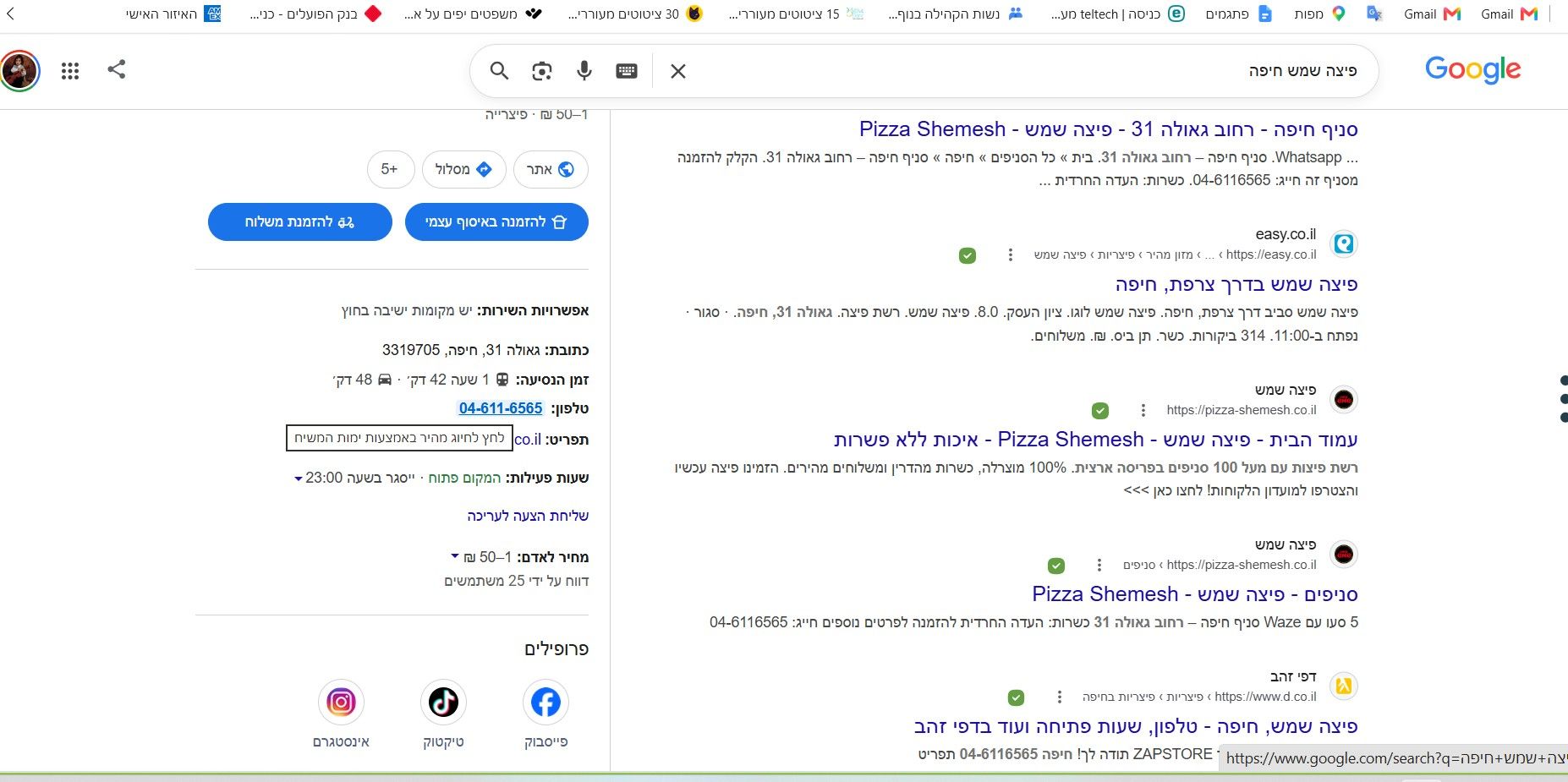
אני לוחץ על המספר המערכת מחייגת אלי והיא כבר ממתינה בתור למענה לשיחה -
@שלוחה-404 חשבתי שזה עובד רק על האתר של ימות - מטורף ממש אין עלייך
-
@איל-משולש אתה יכול להגביל אותו לאתרים בעיקרון כרגע זה עובד על כל דף שיש בו מספר טלפון תקין
-
@שלוחה-404 שאפו ענק, זה דבר מטורף, אבל השיחה יוצאת עם זיהוי המערכת, לא?
-
@איל-משולש אתה יכול לבחור איזה זיהוי
את אתה רוצה את המספר שלך תוסיף אותו כזיהוי ספיישל ותגדיר אותו לזיהוי יוצא
לא לשכוח אם כן לשנות את ההגדרות של הפילטר בשלוחה ראשית -
@שלוחה-404 נראלי זה לא יעזור, כי המערכת חייגה לעצמה ואז כשאני נכנס לניתובייה אין לי דרך לשנות זיהוי (רק עם יחידות)
-
ש שלוחה-404 התייחס לנושא זה
-
@שלוחה-404 יש את התוסף הרשמי
https://f2.freeivr.co.il/topic/11203/תוסף-click-to-call-לדפדפן
שלזה הוא מיועד.. -
@איל-משולש אתה משנה את הזיהוי יוצא ממילא זה אומר שהמערכת התקשרה לעצמה אם הזיהוי שלך וזה הזיהוי יוצא שיופיע לאן שתחייג
-
@avrham התוסף עולה כסף. זה בחינם!
-
@שלוחה-404 תעשה איזה פיתוח שניתן לבחור את סוג הזיהוי כל פעם
-
@איל-משולש אתה תצטרך להגדיר פילטר במערכת לפי כל מספר מהזיהוי יוצא שיש לך
אני עכשיו מפרק את התוסף של ימות ללמוד איך לשדרג -
@איל-משולש הקוד שודרג
ניתן ללחוץ על כפתור שמסנכרן את כל המספרים של הזיהוי יוצא
אפשר או זיהוי קבוע או לבחור לפני כל חיוג ולבחור איזה מספרים הוא יציע לך
שלום! נראה שהשיחה הזו מעניינת אותך, אבל עדיין אין לך חשבון.
נמאס לכם לגלול בין אותם הפוסטים בכל ביקור? כשנרשמים לחשבון, תמיד תחזרו בדיוק למקום שבו הייתם קודם, ותוכלו לבחור לקבל התראות על תגובות חדשות (בין אם במייל, ובין אם בהתראת פוש). תוכלו גם לשמור סימניות ולפרגן ב-upvote לפוסטים כדי להביע הערכה לחברי קהילה אחרים.
בעזרת התרומה שלך, הפוסט הזה יכול להיות אפילו טוב יותר 💗
הרשמה התחברות